Zoho 3CX - Popup/Zoho Records

Status
Not open for further replies.

Surfy

Customer
Basic Certified
Joined
Jul 4, 2019
Messages
9
Reaction score
0
Hello,

I am having an issue with getting the customers record to show up when receive an inbound call.

I believe that the 3CX Web Application is the trying to open zoho to the contact, however when I get a call; a new tab opens to https://www.zoho.com/au/crm/ with no details or records.

Any ideas? I've got call journaling working along and no issues looking up extension. Log's show it finding the correct customer account in Zoho; logs ( 3cxSystemService.log ) don't indicate an errors or issues
 
Try deleting CRM contacts from the 3CX Console > Advanced > Contacts, maybe you have old contacts with a wrong URL already there, and these are being poped up...
 
thanks for the response, I don't see any URL's in the contact's section that link to Zoho crm. All of these contacts are correct from what I can see, I've only got one test contact i'm using.

Is this something i'll need to lodge a ticket to have investigated further? or could there be an issue coming from Zoho's side?
 
thanks for the response, I don't see any URL's in the contact's section that link to Zoho crm. All of these contacts are correct from what I can see, I've only got one test contact i'm using.
The Contact URL is not visible, but it's stored inside the contact. If the Web Client is poping up a wrong URL, you have 2 options:
1) This URL is stored from old tests. In this case you can delete the CRM contacts from the 3CX console, and they will be re-synchronized the next time they call, or you call them.
2) The template is returning wrong URLs. If you're using a standard template, then this is a misconfigured integration.

Is this something i'll need to lodge a ticket to have investigated further? or could there be an issue coming from Zoho's side?
In order to troubleshoot this, enable verbose logs, ensure that you don't have CRM contacts in the 3CX Console > Advanced > Contacts, make a test call from a number you know is in the CRM, and then check the logs. There you will see all the interactions between 3CX and Zoho.
 
Is there anyway to check the returned URLs?

Looking at my logs I can't see any reason for it to have issues, It is finding the correct contact, linking it to the correct extension.


2020/06/03 09:37:55.547|13553|0039|Verb| Header 'Authorization' = 'Zoho-oauthtoken 1000.db1be04f19a5ab14b0550339527e2361.947f1ea6c1872bdf798deac300a1c015'
2020/06/03 09:37:55.547|13553|0039|Verb|Performing GET request 'https://www.zohoapis.com/crm/v2/Contacts/search?criteria=((Phone:equals:XXXXXXXX) or (Mobile:equals:XXXXXXXX) or (Home_Phone:equals:XXXXXXXX) or (Other_Phone:equals:XXXXXXXX) or (Fax:equals:XXXXXXXX))&fields=Account_Name,id,First_Name,Last_Name,Phone,Mobile,Home_Phone,Asst_Phone,Other_Phone,Email,Fax'.
2020/06/03 09:37:55.956|13553|0039|Verb|The response is: '{"data":[{"First_Name":"Lachlan","Home_Phone":null,"Email":"[email protected]","Last_Name":"Test","Phone":"0XXXXXXXX","Other_Phone":"0XXXXXXXX","Account_Name":{"name":"Test Account","id":"654406000020413029"},"id":"654406000020534001","Fax":null,"Mobile":null}],"info":{"per_page":200,"count":1,"page":1,"more_records":false}}'
2020/06/03 09:37:55.956|13553|0039|Verb|Unknown path element: Asst_Phone. Null value is returned.
2020/06/03 09:37:55.957|13553|0039|Verb|Filtered variables for matching:
2020/06/03 09:37:55.957|13553|0039|Verb| 'Id' = '654406000020534001'
2020/06/03 09:37:55.957|13553|0039|Verb| 'Email' = '[email protected]'
2020/06/03 09:37:55.957|13553|0039|Verb| 'OtherPhone' = '0XXXXXXXX'
2020/06/03 09:37:55.957|13553|0039|Verb| 'HomePhone' = ''
2020/06/03 09:37:55.957|13553|0039|Verb| 'MobilePhone' = ''
2020/06/03 09:37:55.957|13553|0039|Verb| 'LastName' = 'Test'
2020/06/03 09:37:55.957|13553|0039|Verb| 'Phone' = '0XXXXXXXX'
2020/06/03 09:37:55.957|13553|0039|Verb| 'AssistantPhone' = ''
2020/06/03 09:37:55.957|13553|0039|Verb| 'Fax' = ''
2020/06/03 09:37:55.957|13553|0039|Verb| 'FirstName' = 'Lachlan'
2020/06/03 09:37:55.957|13553|0039|Verb| 'AccountName' = 'Test Account'
2020/06/03 09:37:55.957|13553|0039|Verb|Processing scenario 'Default'.
2020/06/03 09:37:55.957|13553|0039|Verb|Creating new HttpClient for Scenario authentication.
2020/06/03 09:37:55.957|13553|0039|Verb| Header 'Authorization' = 'Zoho-oauthtoken 1000.db1be04f19a5ab14b0550339527e2361.947f1ea6c1872bdf798deac300a1c015'
2020/06/03 09:37:55.957|13553|0039|Verb|Skipping request...
2020/06/03 09:37:55.957|13553|0039|Verb|No matchings found.
2020/06/03 09:37:55.957|13553|0039|Info|CRM: No changes detected for contact Wphonebook.28: Wtenant.1: default - - Lachlan GilmourTest
2020/06/03 09:37:55.957|13553|0039|Verb|Removed from processing. Number=0XXXXXXXX
2020/06/03 09:37:55.957|13553|0039|Info|CRM: processing of 0XXXXXXXX has been finished
 
According to the template, the contact URL for Zoho Contacts is built as follows:
[Domain]/crm/EntityInfo.do?module=Contacts&id=[Id]

Where [Domain] is the value you configured in the 3CX console as Zoho CRM URL:. What value do you have there? You should probably have:
https://crm.zoho.com

And then the final URL would be:
https://crm.zoho.com/crm/EntityInfo.do?module=Contacts&id=654406000020534001

Is that the URL being poped up by the Web Client?
 
No matter the contact, it is taking us directly to https://crm.zoho.com everytime.
I've also noticed the web client doesn't open the contact ( not sure if it should or not - some docs I read indicate it should).
 
No matter the contact, it is taking us directly to https://crm.zoho.com everytime.
I've also noticed the web client doesn't open the contact ( not sure if it should or not - some docs I read indicate it should).
The Web Client should open the contact in a new browser tab. If you say that the Web Client is not opening the contact, where do you see the page https://crm.zoho.com?

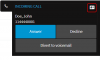
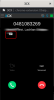
When you receive an inbound call from a contact that exists in the CRM, you should see the following button in the calling card:
1591280905247.png

Do you see this button? Can you click it and see what URL is being launched in that case?
 
I was referring to not seeing the web client open the contact in 3cx; I do see a new tab open to the crm.zoho page.

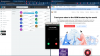
The popup I get looks different from the one you're seeing; but I do have the same button, clicking it launches to the same url ( crm.zoho)
 

Attachments

  • Screenshot from 2020-06-05 08-12-22.png
    Screenshot from 2020-06-05 08-12-22.png
    260.1 KB · Views: 21
You're using the Chrome Extension instead of the Web Client, which is fine, both launch the contact URL in a new browser tab. Are you logged in to Zoho? In the screenshot you sent, it seems you're not logged in. If you're not logged in, you will be redirected to the Zoho login page, and maybe that's what you're seeing....
 
I've got the web client open as well; and yes I am logged into Zoho.
 

Attachments

  • Screenshot from 2020-06-08 08-23-35.png
    Screenshot from 2020-06-08 08-23-35.png
    689.5 KB · Views: 19
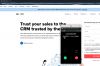
In this second call there is no contact matched, as you can see in the screenshot you sent:
1591630837748.png

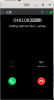
When there is a match, you see the contact card button, as in the previous screenshot you sent:
1591630880851.png

Also, please note that the contact popup is only launched for inbound calls. For outbound calls you will see the contact card icon, and you need to click on it to manually launch the contact record.

Said this, please do the following:
1) Go to the 3CX Console > Advanced > Contacts > Delete CRM contacts. This way you start from scratch, without any CRM contact in 3CX contacts. This doesn't affect your contacts in Zoho.
2) Enable verbose logs as explained here: https://www.3cx.com/docs/collecting-logs-for-3cx-support/
3) Make an inbound test call from a number you know is in Zoho.
4) Generate the Support Information bundle, and send it to me in a Private Message.

This way I can see if the contact lookup is working, and the Contact URL being returned.

Thanks.
 
Status
Not open for further replies.

Members Online Now

Forum statistics

Threads
111,843
Messages
589,326
Members
164,679
Latest member
SamadMYK