Zoho call journaling has stopped working but contact lookup works

jv18564

Customer
Advanced Certified
Joined
Oct 17, 2024
Messages
17
Reaction score
9
3CX Pro V20 on latest Update 6
Since last week calls from 3CX aren’t appearing in Zoho, we have tried deleting and redownloading the Zoho CRM template in 3CX (version 36) and re added via the integration menu in 3cx, making sure the correct zoho.com.au URL is used.

Authorizing is successful and the contact lookup works but new calls inbound and outbound aren’t appearing in Zoho.
 
You should enable verbose logs, make a test call, and check the 3cxSystemService.log file that you will find in the Support Information Package ZIP file. Any error while reporting the call should be visible there.
 
  • Like
Reactions: Alejandro_3CX
You should enable verbose logs, make a test call, and check the 3cxSystemService.log file that you will find in the Support Information Package ZIP file. Any error while reporting the call should be visible there.
Hi, have made a test call using an extesion with the same email as Zoho.

Edit: I have noticed this in the 3CXSystemService.log fle

2025/07/05 12:41:53.553|0036|Debg| [Integration.Crm.Engine.ResultVariableScenarioProcessor] CRM: Continue with empty matching.
2025/07/05 12:41:53.553|0036|Debg| [Integration.Crm.Engine.ResultVariableScenarioProcessor] CRM: Processing scenario 'CreateCallActivity'.
2025/07/05 12:41:53.553|0036|Debg| [Integration.Crm.Engine.ScenarioAuthHttpClientProvider] CRM: All tokens are up to date
2025/07/05 12:41:53.553|0036|Debg| [Integration.Crm.Engine.ResultVariableScenarioProcessor] CRM: Performing POST request to 'https://www.zohoapis.com.au' with message '********'.
2025/07/05 12:41:53.554|0036|Info| [_3CX.HttpClient] Sending 'POST/1.1' to 'https://www.zohoapis.com.au/crm/v2.1/Calls'
2025/07/05 12:41:53.624|0036|Info| [_3CX.HttpClient] Received '400 BadRequest' after 70.6ms
2025/07/05 12:41:53.626|0036|Erro| [Integration.Crm.Engine.CrmProcessor] CRM: Exception during call reporting
System.Exception: Server returned a non successful status code - HTTPStatusCode=BadRequest - Reason= - Content={"data":[{"code":"INVALID_DATA","details":{"api_name":"Call_Duration","json_path":"$.data[0].Call_Duration"},"message":"Please provide a valid call start time and duration","status":"error"}]}
 
Last edited:
Hello,

Can you confirm that the template used is as provided by 3CX, not modifications done to it?
 
Hello,

Can you confirm that the template used is as provided by 3CX, not modifications done to it?
Correct, no modifications.
We even deleted the CRM template and re downloaded from the 3CX updates page (version 36)
 
We have contacted Zoho support, they said 3CX is not one of their supported PBX's are aren't offering much help.
 
It seems 3CX is sending an invalid value in the Call_Duration field during the API call. Maybe the logs show the value being sent?
 
When I search Call_Duration in the 3CXSystemService.Log file there are over 1000 matches, for each one it's the same

2025/07/03 08:23:29.744|0026|Erro| [Integration.Crm.Engine.CrmProcessor] CRM: Exception during call reporting
System.Exception: Server returned a non successful status code - HTTPStatusCode=BadRequest - Reason= - Content={"data":[{"code":"INVALID_DATA","details":{"api_name":"Call_Duration","json_path":"$.data[0].Call_Duration"},"message":"Please provide a valid call start time and duration","status":"error"}]}

I restarted the required service before collecting the logs as mentioned in this article https://www.3cx.com/docs/collecting-logs-for-3cx-support/
 
The expression used for the Call_Duration in the template looks correct:
[toint32([[DurationTimespan].get_TotalMinutes()]).ToString("00")]:[[DurationTimespan].ToString("ss")]

I'm just wondering if the DurationTimespan is set for missed or unanswered outbound calls. Can you check if this only happens for those calls or for answered calls as well?
 
Once a fan, always a fan of our buddy Ernesto (@edossantos_sipcaller). If I am not mistaken, he was the original developer of many of these integrations and it is great to still have him as a resource helping out in the forums. Thanks Ernesto for your help from all of us.
 
Once a fan, always a fan of our buddy Ernesto (@edossantos_sipcaller). If I am not mistaken, he was the original developer of many of these integrations and it is great to still have him as a resource helping out in the forums. Thanks Ernesto for your help from all of us.
Yes and we really appreciate his support! :):)
 
The expression used for the Call_Duration in the template looks correct:
[toint32([[DurationTimespan].get_TotalMinutes()]).ToString("00")]:[[DurationTimespan].ToString("ss")]

I'm just wondering if the DurationTimespan is set for missed or unanswered outbound calls. Can you check if this only happens for those calls or for answered calls as well?
Hi, I sent the 3cxSystemService.log to Zoho Support and this is what they told me

Greetings from Zoho One Support.

Upon checking the logs with the developers, we have confirmed that the specific call log pushed from 3CX had tried to create a call on "GMT: Saturday, 5 July 2025 02:40:37.096" and the Call_Start_Time in payload is "2025-07-05T02:41:37Z", here the call start time is greater than the Current time which is fine, however for scheduled calls we can't set the duration in future. If the start time is lesser than the current time, then if we set the duration it will work. Hence the error occurred. Hope it clarifies!

Feel free to get back to us for further support.
 
Hi, I sent the 3cxSystemService.log to Zoho Support and this is what they told me

Greetings from Zoho One Support.

Upon checking the logs with the developers, we have confirmed that the specific call log pushed from 3CX had tried to create a call on "GMT: Saturday, 5 July 2025 02:40:37.096" and the Call_Start_Time in payload is "2025-07-05T02:41:37Z", here the call start time is greater than the Current time which is fine, however for scheduled calls we can't set the duration in future. If the start time is lesser than the current time, then if we set the duration it will work. Hence the error occurred. Hope it clarifies!

Feel free to get back to us for further support.
Ah, maybe the 3CX server has a wrong time? Can you set it to sync time automatically?
 
Ah, maybe the 3CX server has a wrong time? Can you set it to sync time automatically?

Yes that's a good suggestion
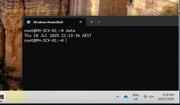
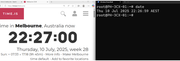
I can confirm 3CX Time Zone was already set correctly to Melbourne time, so I decided to check the actual time on the server (it's running on a dedicated MSI Cubi 5 on 3CX Linux ISO), the time is within 1 minute accuracy to the PC I used.


To eliminate any doubt on the time I decided to set the time manually to the exact second comparing with an online tool using this guide https://wiki.debian.org/DateTime

then rebooted the 3CX Server and the time is still accurate to that website


I checked the customer's call logs for this week and they seem to be making shorter calls recently, most are less than a few minutes. So I have requested they test this tomorrow by making a longer call with a Zoho contact, then we'll see if it works.

Thank you everybody for your suggestions so far.
 
That 1 minute difference is most probably causing it, so what you did must be the solution. Keep us posted!
 
That 1 minute difference is most probably causing it, so what you did must be the solution. Keep us posted!
Thanks, and I'm happy to check/adjust anything as per your suggestion and 3CX support to help resolve the issue.

Interesting thing is the hardware is new, barely 10 months old and time was set from BIOS prior to deployment, I would have thought that if a time-drift was significant enough it would cause more obvious issues like SSL Certificate error in the browser or connecting to 3CX activation, but no issues there.

We like bare metal and haven't had an issue in the past with Intel NUC which unfortunately is no longer on the market.

We will see if the time adjustment has helped. I still have an open case with Zoho support and they have a call scheduled with the customer to check things on the Zoho end.
 
10 months is enough time to cause that time-drift. This is a Windows server, correct? You should enable the "Set time automatically" on the Date & Time settings, so it regularly syncs against "time.windows.com" and you don't have this issue again.
 
  • Like
Reactions: Evolute IT
10 months is enough time to cause that time-drift. This is a Windows server, correct? You should enable the "Set time automatically" on the Date & Time settings, so it regularly syncs against "time.windows.com" and you don't have this issue again.
Hi, we only use the 3CX Debian ISO nowadays, and rarely if ever connect via SSH after deployment.

In this case I opened a time checker website to compare with and followed the commands from Debian's documentation https://wiki.debian.org/DateTime

Specifically these commands:

to set the time:
date --set 22:26:55

to write time to system clock:
hwclock --systohc

reboot

After reboot checked the time again and confirmed it's still accurate to the website I calibrated it with.

The same Debian documentation suggests installing an NTP client, I don't know whether there is already one included in the 3CX V20 ISO, but I decided not to install anything as my understanding is 3CX Update checks for unwanted apps/packages.
 
You should be good with this. Maybe you can set a reminder once every 3 months to login and do this time sync again, just in case.
 
You should be good with this. Maybe you can set a reminder once every 3 months to login and do this time sync again, just in case.
Hi, the customer is saying call logs from 3CX is now appearing in Zoho again so I think this might be resolved.

This would actually be the very first time I have had to correct time on a 3CX server.
Does anybody know whether the 3CX Debian ISO has any NTP configuration included? I would like to know in case a similar issue appears in the future.

The support we recieved here on the 3CX Forum was fantastic, although I can't say the same for Zoho support as they were very dismissive toward the issue.

If I have understood this correctly, it was Zoho rejecting the data sent by 3CX and returning the error message in the logs.