Zoho CRM Integration

Status
Not open for further replies.

Jason Aldous

Bronze Partner
Advanced Certified
Joined
May 24, 2018
Messages
9
Reaction score
2
I have signed up for the cloud 3CX solution and paid for a Pro license to get the CRM integration. We use Zoho. I found these instructions
https://www.3cx.com/docs/pbx-crm-integration-zoho/ which all look good.

However the instructions show Zohov2 in the list of CRM options. I do not get that on my 3CX instance. I get Zoho. In the instructions you enter Client ID and Client Secret and click Authorise, I get asked for AuthToken and Domain and no Authorise button.

I suspect my 3CX instance needs a new plug in or something as clearly the Zoho integration has been updated to V2 but I cannot access this? I am up to date on latest 3CX firmware.

Can anyone shed any light on this?
 
Hello @Jason Aldous,

The documentation is for the Zoho v2 template, which will be included in the upcoming Update 5 of 3CX v15.5. Please wait a few days until it is released, because the current template uses an API that will be deprecated by Zoho soon, so it will not work for too long...

Kind regards.
 
If you still need to try the previous template, you can use the documentation attached.
 

Attachments

Hello @Jason Aldous,

The documentation is for the Zoho v2 template, which will be included in the upcoming Update 5 of 3CX v15.5. Please wait a few days until it is released, because the current template uses an API that will be deprecated by Zoho soon, so it will not work for too long...

Kind regards.

Thanks very much for the quick reply. Great support. I will sit tight and wait for the new template.
 
Hello,

Should the new template be available in the Beta version? I tried updating to the Beta but I can't get the right template, it's still the old one.

Thanks
 
I keep checking it but no sign of an update yet?
 
Yes, the beta includes an update, but it has the name "Zohov2", so you need to change it from the drop down list.
 
I updated to the new version released today and it still shows as "zoho" and not Zohov2 as shown in the screenshot of those instructions.
 
In the latest Update 5, the default integration with Zoho (with name "Zoho" and not Zohov2), includes the changes to use the API v2, so just by upgrading you should get this new version of the template.
 
Thank you. When I click "test" I get the contact results returned with their name, URL to the entry in the CRM and other contact details, but on the popup within the web client it does not have the contact card appear. How do I get this entry to show for the 3CX web clients?
 
It should be shown automatically if there is a match. If this is not happening, please enable verbose logs for 3CX, and then make a call and check the 3cxSystemService.log, which contains all the interactions with the CRM.

Also, please ensure that you don't have the contact previously added by other means. Otherwise the contact lookup will be skipped in the CRM, and the contact link will not be available...
 
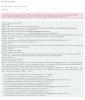
Hello, I get the following message when I click test. The system only seems to be searching for 6 digits even though I enter a 10 digit phone number.

Server returned a non successful status code - HTTPStatusCode=BadRequest - Reason=Bad Request - Content={"code":"INVALID_QUERY","details":{"reason":"the field is not available for search","api_name":"Home_Phone"},"message":"invalid query formed","status":"error"}
 

Attachments

  • 2018-06-28 15_51_53-Window.jpg
    2018-06-28 15_51_53-Window.jpg
    594 KB · Views: 36
It's only using the last 6 digits, because you configured it that way. You can change that configuration from the 3CX Console > Contacts > Settings.

Regarding the error you get, the problem is that the field "Home_Phone" is hidden for entity Contacts. You need to make it visible in Zoho, and the issue should be fixed.
 
  • Like
Reactions: Nicolas Pouliot
It's only using the last 6 digits, because you configured it that way. You can change that configuration from the 3CX Console > Contacts > Settings.

Regarding the error you get, the problem is that the field "Home_Phone" is hidden for entity Contacts. You need to make it visible in Zoho, and the issue should be fixed.

Thank you very much! That part works now.

Now what does this option do exactly: "Enable call journaling [ALPHA]"? If it's suppose to log the calls automatically, it doesn't seem to work for me.
 
Last edited:
Thank you very much! That part works now.

Now what does this option do exactly: "Enable call journaling [ALPHA]"? If it's suppose to log the calls automatically, it doesn't seem to work for me.

Actually I see the calls in my activities, but they are not linked to the proper contact.
 
Yes, that feature should log the calls in the contact's activity. Can you give me more details on what you see wrong here, so we can check it?
 
  • Like
Reactions: Nicolas Pouliot
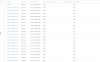
Here is a screenshot of what I see in Zoho. So all the calls are logged, but they are not linked to the proper contact. The contact name field remains empty, and the number I'm using for my test is entered in my CRM and I'm able to pull out the contact form via the web client.

The only problem is really that it doesn't link the call to any contacts at all, it also always links the activity to one specific user.
 

Attachments

  • 2018-06-29 10_15_11-Window.jpg
    2018-06-29 10_15_11-Window.jpg
    360.7 KB · Views: 47
Last edited:
Thanks for the feedback. This feature in in alpha stage, so it is normal that you find this kind of issues. We'll take a look into this and improve the template.
 
I am getting the same issue. Calls are logged automatically but not related to the contact that was called.
 
Any update on this Alpha feature? When can we expect it to leave alpha?
 
Status
Not open for further replies.