Zoho integration not working after upgrading to V16

Status
Not open for further replies.

Polaron Solar

Forum User
Joined
Jul 8, 2019
Messages
5
Reaction score
0
Hello,

Our Company was using Zoho integration with 3CX. When we use 3CX make a phone call all the income/outcome call will be recorded in Zoho > Activities. However, after we upgrade 3CX to V16, we found all the call activities are not recorded anymore.
We follow the latest integration guide and reset the integration, but the activities still not been recorded.
https://www.3cx.com/docs/pbx-crm-integration-zoho/


Thanks.
Polaron IT
 
In v16 there is an important change regarding call journaling that can be causing this if you don't configure the integration properly. You need to specify a field to define the agent extension, as defined here:
https://www.3cx.com/docs/pbx-crm-integration-zoho/#h.qp9eqhnqzdv4

Then this field ID needs to be set in the 3CX configuration:
https://www.3cx.com/docs/pbx-crm-integration-zoho/#h.fufki07ehefe

If you don't do this, 3CX can't map the agent extension to the Zoho user, and then the call journaling entry will not be created.
 
Thank you for your replay.
Actually, I have followed all the settings. But the call log still doesn't work.
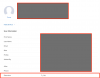
Here is my User Page in Zoho CRM.

11258

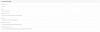
Here is my Setting in 3CX.
11261

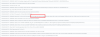
And here is the activity log in the 3CX
11262

Please help!
 
Please enable verbose logs from the 3CX Console > Dashboard > Activity Log > Settings. Then make a test call and check the 3cxSystemService.log, that's where all the interactions between 3CX and Zoho are written.
 
Please check the log

2019/07/08 16:27:12.888|5440|0011|Info|VMMonitor: alive (iter=4063)
2019/07/08 16:28:51.607|5440|0014|Info|CRM ProcessActiveConnections(). Attached entries to connection: 73
2019/07/08 16:28:51.607|5440|0014|Info|CRM: Synchronize(...) called
2019/07/08 16:28:51.607|5440|0005|Info|CRM: maxConcurrency=16
2019/07/08 16:28:51.607|5440|0005|Info|CRM: making request to CRM. Number=5196357609
2019/07/08 16:28:52.352|5440|0049|Info|CRM: No changes detected for contact Wphonebook.73: Wtenant.1: default - 5196357609 - Rui Geng
2019/07/08 16:28:52.352|5440|0049|Info|CRM: processing of 5196357609 has been finished
2019/07/08 16:29:31.460|5440|0032|Info|CHR: #1: Seg[1/#1] 43149d186609(5196357609)=>0e62fb4a636c(Ext.900) (16:28:51.606..16:28:51.870) Ringing Connected
2019/07/08 16:29:31.460|5440|0032|Info|CHR: #2: Seg[1/#2] 43149d186609(5196357609)=>7c6ba351287d(Ext.900) (16:28:51.870..16:28:57.014) Talking ReplacedDst by f311ab39d826(Ext.711)
2019/07/08 16:29:31.461|5440|0032|Info|CHR: #3: Seg[1/#3] 43149d186609(5196357609)=>971e5705b44f(Ext.711) (16:28:57.014..16:29:02.516) Ringing Connected
2019/07/08 16:29:31.461|5440|0032|Info|CHR: #4: Seg[1/#4] 43149d186609(5196357609)=>f311ab39d826(Ext.711) (16:29:02.516..16:29:31.327) Talking TerminatedByDst
2019/07/08 16:29:31.470|5440|0032|Info|Transcribe is disabled
2019/07/08 16:29:31.470|5440|0005|Info|CRM: about to report 1 calls at maxConcurrency 1
2019/07/08 16:29:31.750|5440|0032|Erro|Exception during call reporting: Server returned a non successful status code - HTTPStatusCode=Unauthorized - Reason= - Content={"code":"OAUTH_SCOPE_MISMATCH","details":{},"message":"invalid oauth scope to access this URL","status":"error"}

2019/07/08 16:31:11.913|5440|0013|Info|Log verbosity is set to Low
2019/07/08 16:32:24.112|5440|0023|Erro|CHR: Stop recording received without Start for Party 9406e17c7424{762}
2019/07/08 16:42:57.514|5440|0031|Erro|Exception during call reporting: Server returned a non successful status code - HTTPStatusCode=Unauthorized - Reason= - Content={"code":"OAUTH_SCOPE_MISMATCH","details":{},"message":"invalid oauth scope to access this URL","status":"error"}

2019/07/08 16:44:13.781|5440|0028|Erro|Exception during call reporting: Server returned a non successful status code - HTTPStatusCode=Unauthorized - Reason= - Content={"code":"OAUTH_SCOPE_MISMATCH","details":{},"message":"invalid oauth scope to access this URL","status":"error"}
 
The error:
invalid oauth scope to access this URL

Means that when you authorized 3CX to access Zoho, the requested permissions which were granted were less than the required. You will need to authorize again from the 3CX console, in order to grant additional permissions.
 
When I click on AUTHORIZE, it popped up a page like this, how can I fix? and when I closed this window, 3CX started to authorize and finished without any errors.
But still no activities add into Zoho CRM.
11263
 
The authorization can't successfully finalize after that error. The authorization procedure stops there. Maybe the integration still works because you're using the previously obtained refresh token.

In order to fix that error, when you create the Client ID in Zoho as described here:
https://www.3cx.com/docs/pbx-crm-integration-zoho/#h.zaftvul27g84

...the Authorized redirect URIs field needs to be set to something like:
https://3CX_FQDN:5001/api/oauth2crm

where:
https://3CX_FQDN:5001

is the URL you use to access your 3CX management console.
 
Status
Not open for further replies.