
Tailor your subscription with self-managed edition changes, SC downgrades and hosting removal.
Following up on our recent licensing flexibility announcements, the latest updates to the 3CX Portal introduce even more ways to tailor your subscription to your exact operational needs. We've added the ability to downgrade your SC (Simultaneous Calls) and fully manage your 3CX Hosting subscription directly at renewal.
These actions are currently exclusive to the 3CX Portal and unavailable via the Ordering API.
Downgrading SC & Editions
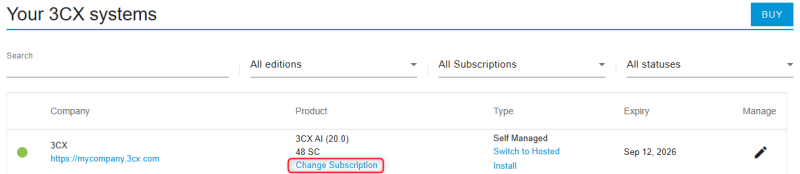
Just as you can downgrade your edition, the 3CX Portal now gives you the ability to downgrade your SC when renewing your subscription. This ensures you are aligning your license precisely with your current needs:
- Seamlessly downgrade your SC and your edition at the same time.
- Benefit from maximum flexibility to mix actions, such as upgrading your SC while downgrading your Edition, and vice versa.
Note for 3CX Hosted Customers: If you want to downgrade your Simultaneous Calls (SC), you can only move to an SC tier that shares the same allocated hosting resources as your current setup. You can check which SC tiers share the same resources on our Hosted Info page.
Removing & Deleting Hosting
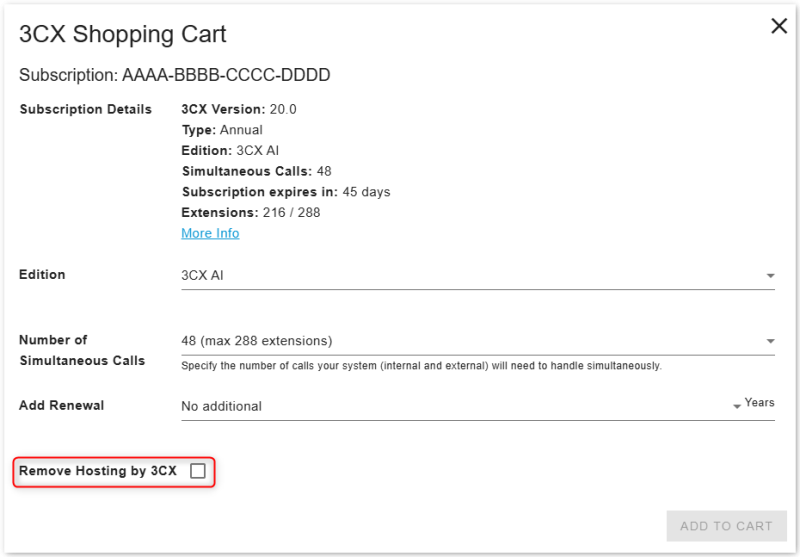
If your infrastructure requirements change, you can now remove hosting when renewing your subscription. Here's what you need to know:
- Choosing to remove hosting: The subscription will no longer be eligible for Hosted by 3CX deployment.
- Hosting instance is currently running: Removing hosting will permanently delete the hosting instance and all its data.
- Preventing data loss: We strongly recommend a full backup of your system is taken and saved locally before performing this action.
Downgrades & the Maximum Extension Policy
As a reminder of our Maximum Extension Policy, any customer wanting to downgrade their license or remove hosting must adhere to the maximum number of extensions permitted for that lower tier. You must ensure your system's extension count is in line with the target license size before attempting to downgrade.
Downgrade Eligibility & Timing
A downgrade must be combined with a renewal of at least one year. Your license must have enough room for this renewal without exceeding the five-year validity limit.
The downgrade happens immediately, not when your current license expires. You will keep the time remaining on your license, but you will lose the features or hosting included in your current plan. No refund or credit will be given. We therefore recommend waiting until your license is close to expiry before downgrading.
Join the Discussion
Join the conversation in our dedicated Partner or Customer Forums. Follow us on X and LinkedIn to stay-up-to date on latest news and feature releases.