





 Although rare, we’ve seen cases of call fraud where several misconfigurations led to the unnecessary exposure and compromise of 3CX. In this blog post we’re going to highlight some common mistakes we’ve noticed that lead to call fraud and what you can do to avoid them.
What is a Call Fraud?
Simply put, call fraud occurs when untrusted parties place calls through your PBX, at your expense. Usually this happens overnight or when offices are closed, and calls are placed in bulk to various international destinations. And then you get a large bill at the end of the month which you need to pay....
Since the early ages of PBXs, free international calling has been the target of phone phreaks - or more commonly known as scammers. You might think that it’s something of the past with communication costs having drastically decreased, however in the modern age of VoIP telephony organized crime seeking to make big profits in an industrial manner is now a global threat.
Usually a hacker compromises IP PBX servers in order to establish calls to premium international numbers. His motivation is an indirect financial gain, as he will dial thousands of premium service numbers under his control in an automated manner, in order to get paid commissions per call or per time spent on the line. This is also known as International Revenue Sharing Fraud (IRSF). Another common way to profit more directly is the simple resale of stolen credentials on the darknet for whoever wants a cheap route to dial out.
The 3CX Phone System has many inbuilt security features and default settings which prevent such abuses, however, administrators sometimes disable safeties without understanding the risks implied and unfortunately leading to the inevitable.
We will detail below the TOP 5 common mistakes to avoid.
Number 1: Weak Credentials
The first mistake is using weak credentials for your extensions.
When creating an extension in your phone system, default random credentials are generated at all levels including strong SIP Authentication ID and password for SIP, for your hard phone web interface, random voicemail PIN, etc. You should stick to those random values to ensure protection against password-guessing attacks, also called brute-force.
For user login, 2FA is on by default and strict password requirements are enforced. You can also leverage your company's SSO, with Microsoft and Google supported.
It has been impossible since V15.5 to edit and save an extension with credentials that are too short. However, you may have inherited such a setting from previous versions or backups.
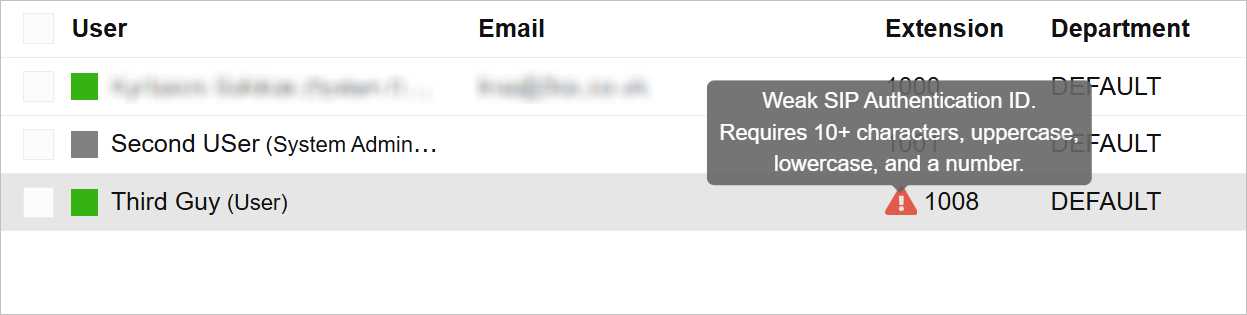
If an Admin has weak credentials, they are alerted witha warning flag next to extension names. If you hover over the extension you will get more information on the issue:
It’s also important to avoid setting temporary credentials for testing. We’ve seen that although there may be an intention to change them later when going into production, the reality is that people tend to forget these things.
Number 2: Allowing Remote Access
The second most common mistake is to have the option “Block remote non-tunnel connections (Insecure!)” unticked under your extensions Options when not needed.
This option prevents remote SIP registration on your extension and is ticked by default when creating an extension. You can still use a remote 3CX client or the 3CX Web Client under this condition without being affected, as the client uses the tunnel protocol to connect to the PBX. In effect, the option should be unticked only when using a remote STUN hard phone.

Number 3: Too Many Countries Allowed
When first installing your PBX only your selected installation country is allowed for outbound calls. This list can be later found in Advanced / Allowed Country Codes.
It should be restricted to the countries commonly called by the users.
A bad practice is of course to allow all countries. Again you might be thinking that it will be adjusted later. In reality this does not get updated at a later point.
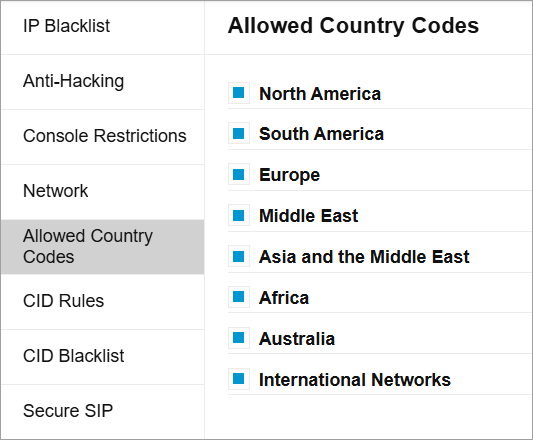
Note for US customers: the North American Numbering Plan (NANP) allows users to dial 25 regions or countries from North America and the Caribbean, without an international dial code. The international dial code would be 011, or + in case of US. The anti-hacking feature will let such numbers go through as local numbers (as per ITU standards). You should therefore have strict outbound rules, with a list of NANP prefixes to block and route 1: Block calls, and ensure this rule is in first position.
Number 4: Lazy Outbound Rules
Another bad practice is to have “lazy” outbound rules, letting any number dialed from anyone in the system go through. A typical rule is one with no criteria other than the DEFAULT extension group.
You should have rules set as strictly as possible, like in firewalls, defining specific prefixes or number lengths, and which extensions or which extension groups will be allowed to dial out.
Number 5: Misconfigured E164 Settings
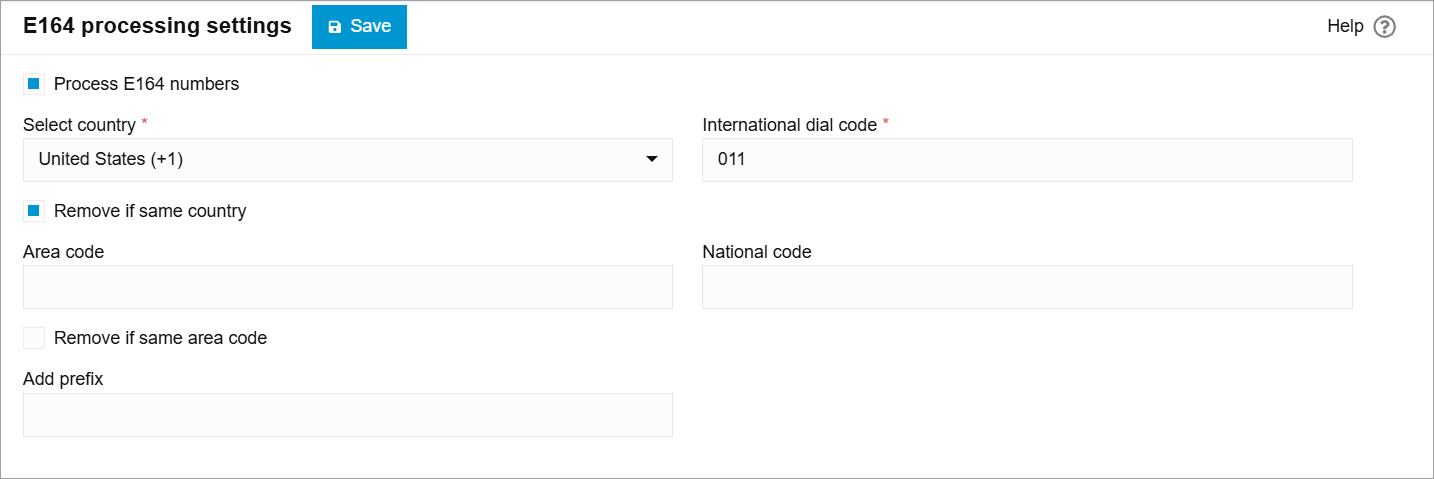
Under Settings / E164 Processing are standard settings ensuring the replacement of the “+” by your local international dial code. The reference is the country defined at the installation time. For example in most countries you will get “00” as the international dial code, for the US you will get “011”. Those are values as per ITU standards.
This setting is important as it is also used to determine the list of country codes blocked as per the “Allowed country codes” tab discussed above.
For instance, with “00” and Albania blocked, the feature will look for numbers dialed in the form of 00355xxx or +355xxx.
If you misconfigured the international dial code, this can result in a wrong “+” replacement but also in the safety being inoperant.
Note that in most call fraud schemes that we’ve observed, a cumulation of the previous 5 mistakes resulted in the compromise. One alone would usually not be enough for an attacker to be successful.
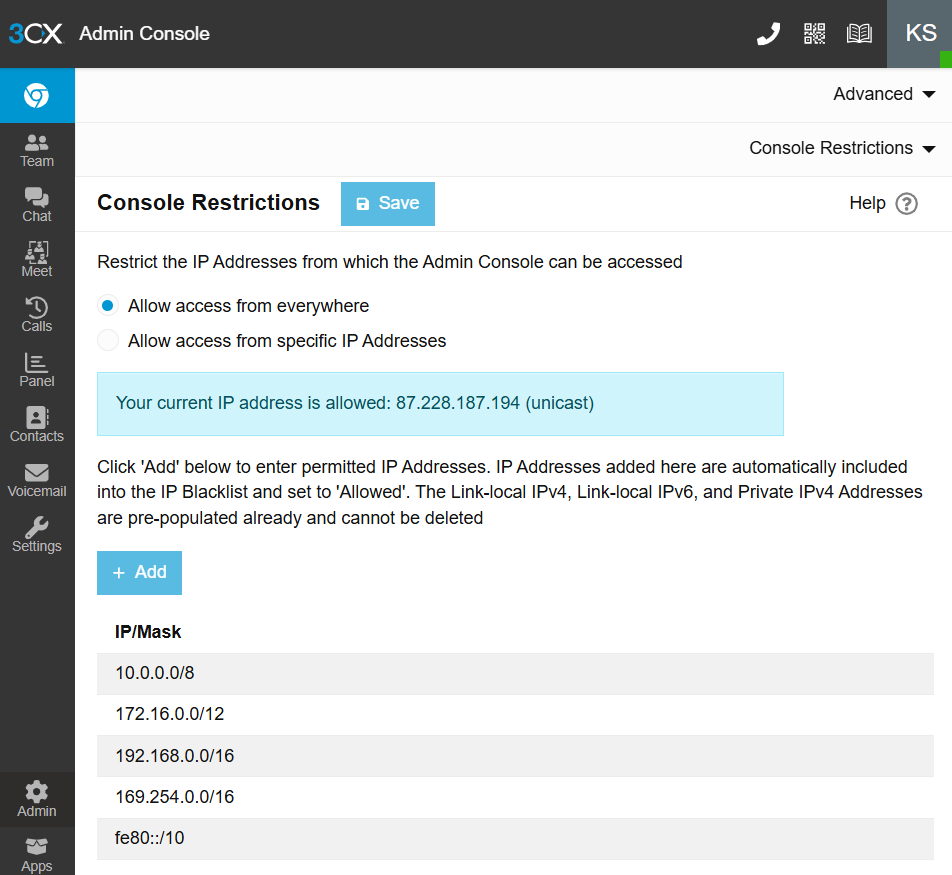
As far back as V16 we introduced two major security features improving the security posture of 3CX even more. The first one allows you to restrict management console access based on the IP and is in Advanced / Console Restrictions. By default all IPs are allowed, if enabled it will let through only local IP subnets and specified public IPs. This option does not interfere with other web services such as provisioning, Web Client, etc.
The second major improvement is the Automatic Global 3CX IP Blacklist, available in Advanced / Anti-Hacking. When this is enabled, your PBX will report any blacklist event including the attacker IP, to our centralized server. After evaluation, recurring attackers will be added and spread across all 3CX systems which have this feature enabled so that any malicious traffic will be dropped. To date this global blacklist has over 29,000 common IPs and ranges which have been reported as scammingor defrauding. We encourage you to keep this feature enabled.

In case of an incident, don’t panic. It is important that you gather logs before taking any further actions so that forensic information is archived. To do that, go to the Dashboard and generate support information, which will generate a .zip file and send you the link by email.
What should I do if I receive a security alert from my EDR/Antivirus software?
Please report the issue to your antivirus vendor and share their Antivirus Vendor Report with us once it is available by submitting this contact form and choosing option Security & Data Protection.
If you have a 3CX Partner, report any security reports/alerts to them immediately.
We look forward to receiving your comments on this topic!


 Copyright © 2026