





A plain-language guide to choosing between separate PBXs, centralized call control, local phones, and shared site connectivity.
Multi-site 3CX deployments usually begin with a choice about where call control should live. A bridge links separate PBXs so sites can call each other. An SBC connects local phones to a PBX at another site or in the cloud. Both can support a multi-site design, but they solve different connectivity and administration needs.
Before opening the Admin Console, decide whether each site needs its own PBX or whether the sites should share one central call-control system. A branch may need its own extensions, trunks, office hours, queues, and local administration. Another site may only need its desk phones to reach a PBX hosted at headquarters or in the cloud.
These are different operating models. Choosing the connection method after the PBX model is clear makes the numbering, routing, and network decisions much easier to explain.
Separate Site Connectivity From PBX Placement
Site connectivity asks how calls and phone traffic move between locations. PBX placement asks where extensions, trunks, queues, office hours, and call routing are managed. A bridge connects two 3CX systems. An SBC connects phones at one site to a remote 3CX system.
That distinction matters because a bridge does not turn separate systems into one PBX, and an SBC does not create a local PBX with its own trunks or call-control policies. Start with the operating model, then select the connectivity component that supports it.
Architecture Choice: Bridges vs. SBCs
Keep Multiple PBXs as Separate Systems (Bridges)
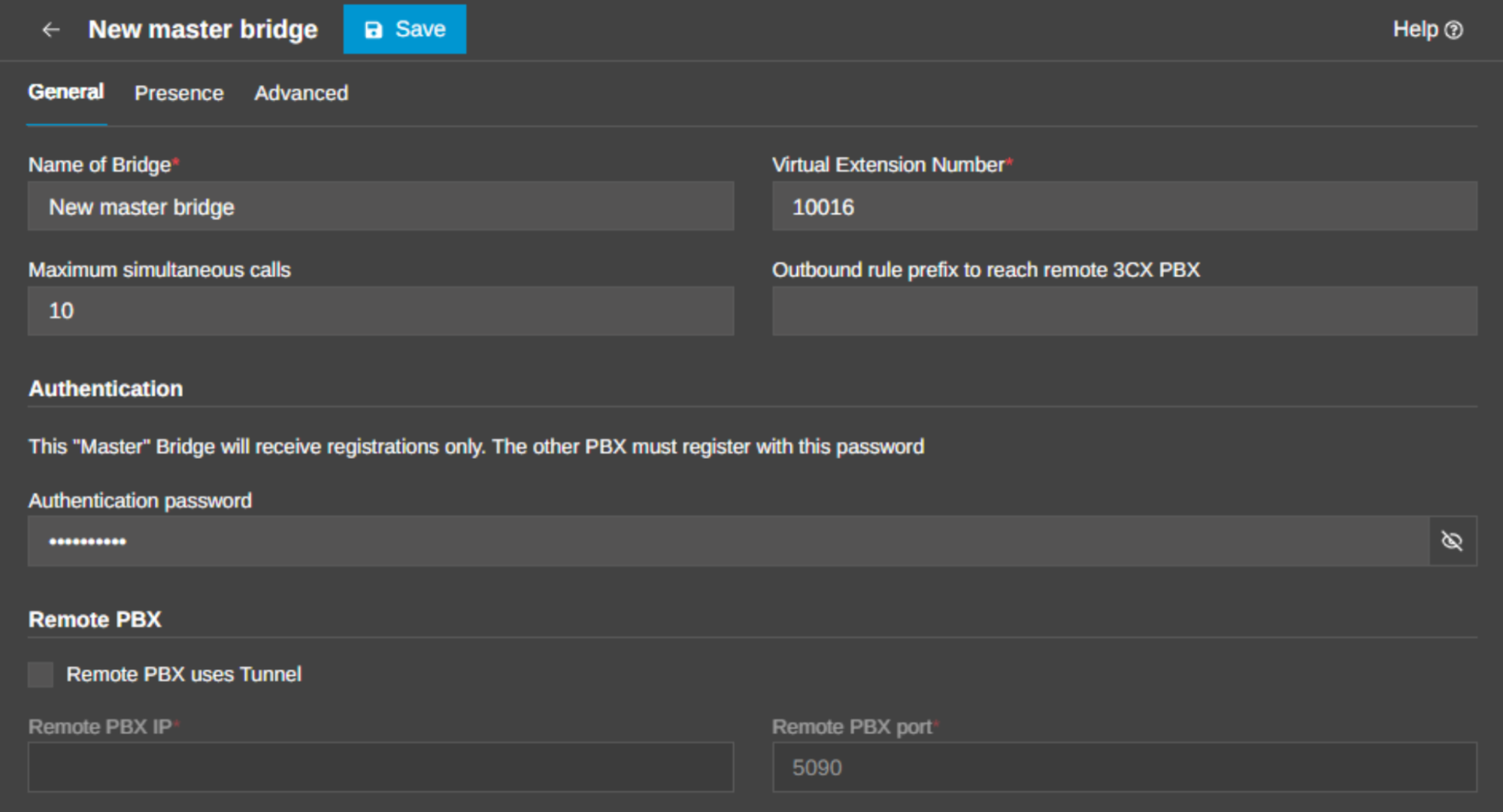
Choose a bridge when each site should remain a separate 3CX system but users still need to call across the organization. The current 3CX bridge guidance explains that two remote systems can use the existing internet connection for inter-site calls, with a prefix or numbering plan that identifies the destination office.
A bridge is a good fit when each PBX has its own administrators, trunks, office hours, queues, or local call-routing policies. It keeps the boundary between systems explicit while giving users a predictable way to reach colleagues at another site.
Go to Admin Console > Voice & Chat > +Add Bridge. The bridge configuration uses a Master and Slave relationship, a shared authentication value, an outbound prefix, and a secure FQDN for the remote system. If a tunnel connection is used, SIP and RTP traffic can be carried through the configured tunnel path. Plan the numbering and outbound rules before users start dialing.
Plan Numbering, Routing, and Presence
A prefix-based plan is easy to explain: a user dials a branch prefix followed by the remote extension. A site-based numbering plan can feel more natural when each office owns a distinct extension range. Either approach works only when the outbound rules, digit stripping, and country-code restrictions agree with the plan.
Presence is a separate decision. If users should see the status of colleagues on the other PBX, enable the bridge options that publish and receive presence information. Do not assume that inter-site dialing alone creates a shared directory or a single call-control plane.
Connect Local Phones to a Remote PBX (SBCs)
Choose an SBC when the PBX should stay in the cloud or at another site, while a group of IP phones needs a reliable local connection. The 3CX SBC guide describes the SBC as a local service that combines SIP signaling and RTP media from one location and delivers it to the remote 3CX instance.
This is often the simplest design for a branch that does not need its own PBX. The branch keeps its local phones and LAN, while call control, extensions, trunks, and administration remain centralized. For smaller sites, a supported router phone or the 3CX apps may be more appropriate than a dedicated SBC.
An SBC host needs a static LAN IP and must be available whenever the local phones need service. Treat it as part of the phone path, alongside the LAN, firewall, DNS, and power that support it.
In the Admin Console, go to Voice & Chat and choose +Add SBC. Provision the SBC, then assign local phones to it. Keep the design focused: the SBC is solving remote-phone connectivity and firewall traversal. It is not creating a second PBX or replicating PBX configuration.
Implementation & Pre-Deployment Checklist
Use a bridge when each site needs its own PBX identity and local control, with planned inter-site dialing between the systems. Use an SBC when the organization wants one PBX to manage extensions, trunks, queues, and policies while phones remain at another location.
If the sites need different office hours, local queues, or separate administrators, separate PBXs may be the clearer boundary. If the main goal is consistent administration and a shared extension system, a centralized PBX with SBC-connected phones is usually easier to operate.
Plan DNS, Trunks, Phones, and Testing
Name resolution is part of the design, not a post-deployment detail. 3CX guidance requires secure FQDNs for bridged systems and recommends split DNS for on-premise deployments. Use the same documented names in phone provisioning, app access, certificates, bridge connections, and administration.
Review the 3CX firewall guidance for each site and run the Firewall Checker after the network path is configured. Avoid SIP ALG, define the correct ACLs, and record which ports and flows are required for trunks, remote phones, SBCs, and administration.
Finally, test from the user's perspective. Verify desk phones, Web Client access, mobile and desktop apps, push notifications, queues, transfers, IVRs, emergency-call procedures, recordings, integrations, and presence across the sites.
Use This Decision Checklist
Before choosing an architecture, confirm:
- Bridge: separate PBXs need controlled inter-site dialing, numbering, and possibly shared presence.
- SBC: local IP phones need to reach a remote or cloud PBX without deploying another PBX at the site.
- Numbering: each site has a documented extension range, prefix, or dialing rule that users can understand.
- Network: every site has the required FQDN, DNS behavior, firewall rules, and a documented phone path.
- Ownership: the team knows who manages each PBX, bridge, SBC, trunk route, and numbering change.
- Testing: the team has verified inter-site calls, inbound and outbound calling, presence, app access, and representative phone features.
Common Architecture Mistakes
Typical mistakes include using a bridge when a site really needs centralized extensions, using an SBC when a site needs its own PBX and trunks, letting each site invent incompatible numbering rules, relying on an IP instead of the documented FQDN, skipping split DNS, and assuming that inter-site calls automatically create a shared directory or presence. Rule of thumb: evaluate where responsibility for the call lies.
Keep the architecture clear enough to operate. Every PBX, bridge, SBC, DNS record, trunk route, and numbering rule should have an owner and a documented test. If nobody can explain how a user at one site reaches the right extension or trunk at another site, the design is not finished.
Join the Discussion
Join the 3CX discussion in our dedicated Partner or Customer Forums. Follow us on X and LinkedIn to stay-up-to date on latest news and feature releases.









 Copyright © 2026