





The 3CX Chrome Extension dialer is a simple and hassle-free way for the admin to roll out a 3CX phone app to Chrome browsers. If you are a Google GSuite user, you can even auto-install it for your users, enabling your employees to get started faster.
📄 Note: If you have the 3CX Click to Call extension for Chrome installed, you need to disable or uninstall it before installing the 3CX Google Chrome Extension.
Using an account with GSuite admin rights, open the Chrome App Management and perform these steps:

- You can roll out the app for the entire organization by selecting the root domain, or for a specific organization unit (OU) only.
- After selecting the desired scope (1), whole organization or OU, press the yellow plus icon and select “Add the Chrome app by extension or ID”.
- Enter this ID: baipgmmeifmofkcilhccccoipmjccehn
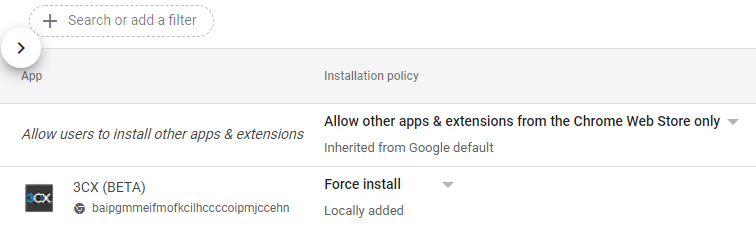
- Once added, change the “Installation policy” to “Force install” to ensure all users will receive the app. This will take some time.
After deploying your Chrome extension policy, you can check user devices to make sure the policy was applied correctly. Open the URL chrome://policy and click on “Reload policies” to force-update your Chrome policy for the devices.


 Copyright © 2026