





Take control of your queues, recover missed customers and call from the right number, all from your phone.
Your call center no longer needs you sitting at a desk to run it. 3CX Android V5.8 is now ready for production, and it puts the queue tools supervisors and agents rely on every day right in their pocket.
Following the Beta release, this production build also fixes an issue where the login and logout buttons on the queue management screen could stop responding if you lost your internet connection, until you moved to a different screen. Now they keep working, so you can count on the app in a warehouse, on a train or anywhere your signal comes and goes.
All features below require V20 Update 10, and outbound number selection must be enabled by your Admin. Here’s what V5.8 looks like in practice.
Fix a Backed-Up Queue in Seconds
When your queue is under pressure, you can respond immediately, wherever you are. The Queue info section shows every available queue and which agents are logged in or out. If you have queue management permissions, you can log individual agents in or out, or the whole team at once.
Picture it: you’re out at a client meeting when the lunch rush hits and callers start stacking up in the sales queue. Instead of calling the office and hoping someone’s around to sort it out, you open the app, log two extra agents in and watch the queue clear. Once it calms down, you log them back out.
Queue management is no longer tied to a desk. It goes wherever you go.
Win Back Every Caller Who Hung Up
A caller who hangs up isn’t a lost customer if your team follows up fast. Agents and supervisors of a queue can now see its abandoned calls in the Recents tab under the Abandoned filter, with the caller, the queue they were in and the time they called. Your team can update the handling status as they follow up, so the whole queue team can see who’s been called back and who’s still waiting.
Imagine a potential customer gives up after a few minutes in the support queue. Within minutes, an agent sees the call under Abandoned, rings them back and marks it handled, so no one else on the team calls the same person twice.
Every abandoned call becomes a second chance, not a lost opportunity.
Always Call From the Right Number
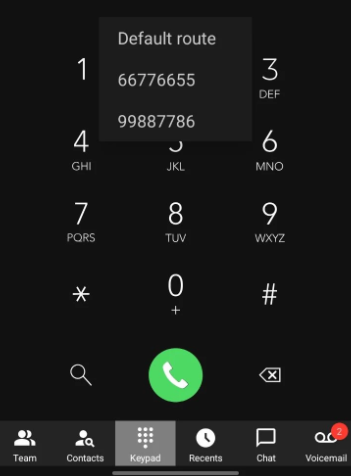
The number you call from shapes whether a customer picks up. Users with multiple numbers assigned can now choose which one to use before placing an outbound call. When enabled by the Admin, the Call using option lets users either follow the default outbound rules or pick any of their assigned numbers.
Say a rep covers your Texas and Miami branches. When returning a Manchester customer’s call, they choose the Manchester number, so the customer sees a familiar local number and answers. Or a support agent calls out on the helpdesk line, so callbacks land back in the support queue rather than on their personal extension.
The right number on the screen means more answered calls and fewer misdirected callbacks.
Get the Update
Your queues, your callbacks and your caller ID are now all in your hands. Download V5.8 from the Google Play Store today. All features require V20 Update 10, and outbound number selection must be enabled by your Admin.
For setup help, see our configuration guide, or check the changelog for the full list of changes in this build.
Tell Us What You Think
Head over to the Android Forum to share your feedback, and follow us on X and LinkedIn to stay up to date on the latest releases.









 Copyright © 2026