T54W Not Provisioning

AndrewSotiris

Silver Partner
Basic Certified
Joined
Sep 26, 2025
Messages
12
Reaction score
0
I was called by a client today reporting that they had a network upset and lost all phone connections. Remoting into the network, I found that the local network had recovered to the point that wired Internet access was restored and all phones received IP addresses, however the phone service was not restored. Shifting my focus to the T54W router phone, I found that it had an incorrect provisioning server address pointing to our V18 server. I supplied it with the correct provisioning link and triggered an auto-provision. The phone autop-ed, but still lacked service. I then confirmed that the public IP was not on our 3CX block list and rebooted the phone to find the account registration status reading "Disabled". Perplexed, I updated the firmware of the phone, factory reset it, removed and readded it to 3CX, factory reset it again, and then pre-filled the provisioning link. Despite all of this, the phone will not provision. Requesting assistance, preferably in the form of a meeting.
 
Are you using a custom FQDN and certificate?
Is it trusted from the vendor?
 
Are you using a custom FQDN and certificate?
Is it trusted from the vendor?
Custom FQDN is brgoma.sotiris3cx.com.
Another T54W on another network for the same client is now having the same issue. It was connected, I factory reset it to use a new SBC instead of acting as a router phone, and it wont provision.
 
Custom FQDN is brgoma.sotiris3cx.com.
Another T54W on another network for the same client is now having the same issue. It was connected, I factory reset it to use a new SBC instead of acting as a router phone, and it wont provision.
Can confirm this is a custom cert.
I'm not sure what you mean by "Is it trusted from the vendor?". We've provisioned phones at these locations before. These are not new offices.
 
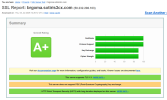
Check the cert using ssllabs or similar to ensure the full chain is present.
 
LetsEncrypt (if you are using them) made a change to their root CA last week, if the phones don't have a full chain/don't know this new CA they will have issues doing secure provisioning. It is possible to request a certificate that is using the older CA still and use that.
 
You can safely ignore the above in this case, I see your CA is supported by Yealink.

Focus on the account being disabled. Yealinks routers could do this in two known scenarios:

a) You have old FW, and your firewall blocks UDP connections. The old FW would sometimes not be able to activate the account unless UDP is allowed (not port forwarded, just allowed). Ensure you upgrade to the phone to 96.87.0.22 from here.

b) You have an MTU issue. Yealink has confirmed that some customers faced this exact problem when their LAN MTU size did not agree with the phone's default. The customer adjusted the MTU size to 1452 bytes in that specific case, and was able to get it to work.
 
You can safely ignore the above in this case, I see your CA is supported by Yealink.

Focus on the account being disabled. Yealinks routers could do this in two known scenarios:

a) You have old FW, and your firewall blocks UDP connections. The old FW would sometimes not be able to activate the account unless UDP is allowed (not port forwarded, just allowed). Ensure you upgrade to the phone to 96.87.0.22 from here.

b) You have an MTU issue. Yealink has confirmed that some customers faced this exact problem when their LAN MTU size did not agree with the phone's default. The customer adjusted the MTU size to 1452 bytes in that specific case, and was able to get it to work.
Hello,

Looks like the cert came back good. In one case, I was able to get the phone to 96.87.0.22 and that had no affect. I'll ask about MTU size.
 

Attachments

  • 1780575828542.png
    1780575828542.png
    63.1 KB · Views: 4

Members Online Now

Forum statistics

Threads
111,832
Messages
589,285
Members
164,662
Latest member
DejanMDS