Customer call quality issues

Alle CTEC

Silver Partner
Advanced Certified
Joined
Sep 11, 2023
Messages
356
Reaction score
44
Hello everyone, I have a customer with 3CX in a multi-site cloud. There are 5 locations with a "UNIDATA" certified trunk. Given that all locations have the same firewall model, I'm having an audio quality issue at only one location. Both internal and external calls sometimes have a short audio cutout, and the voice can be heard in the distance. I tried activating call monitoring for the department's users, but I didn't find any useful details. The users are all using the 3CX Windows application with a Yealink headset.
 
Can you replicate?
Does it happen on internal calls?
Echo test *777
Is it picked up on recordings?
Another browser?
Mobile app?
Firewalls on same firmware? same model?
Internet speeds?
Rebooted router?
 
  • Like
Reactions: Alejandro_3CX
Hello everyone, I have a customer with 3CX in a multi-site cloud. There are 5 locations with a "UNIDATA" certified trunk. Given that all locations have the same firewall model, I'm having an audio quality issue at only one location. Both internal and external calls sometimes have a short audio cutout, and the voice can be heard in the distance. I tried activating call monitoring for the department's users, but I didn't find any useful details. The users are all using the 3CX Windows application with a Yealink headset.
In addition to what @Alphabetic mentioned, could you please activate the call quality monitor as described in the following blog?

Enable the call quality monitor for the extensions that are facing the issue, and then get a call report for further analysis
 
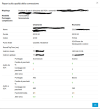
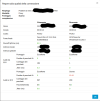
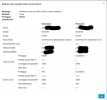
I have attached the report of a 3CX Windows application user with Yealink Headset, the problem only affects PC application users even among internal calls.

Thank you
 

Attachments

  • Test01.png
    Test01.png
    67.9 KB · Views: 25
  • Test02.png
    Test02.png
    61 KB · Views: 25
  • Test03.png
    Test03.png
    59.4 KB · Views: 25
Based on your screenshots, this is a network issue at that location. The Windows client is having trouble reaching 3CX.
 
Based on your screenshots, this is a network issue at that location. The Windows client is having trouble reaching 3CX.
Hi, I personally installed a new switch on which I transferred the clients. Furthermore, the PC antivirus/firewall has a rule that allows everything to the IP PBX. The gateway firewall also allows everything to the 3CX IP without Packet Inspection. I attached an extension, but the problem occurs on the department's extension pool. It doesn't occur on landlines using a Debian Virtual SBC.

Thank you
 
Hi, I personally installed a new switch on which I transferred the clients. Furthermore, the PC antivirus/firewall has a rule that allows everything to the IP PBX. The gateway firewall also allows everything to the 3CX IP without Packet Inspection. I attached an extension, but the problem occurs on the department's extension pool. It doesn't occur on landlines using a Debian Virtual SBC.

Thank you
If hardware phones or mobile phones on the same network don't have the problem, then something on the clients is causing it—antivirus software, for example.
 
If hardware phones or mobile phones on the same network don't have the problem, then something on the clients is causing it—antivirus software, for example.
The customer has 5 locations all with the same firewall model and the exact same AVG Cloud client, the same portal, only on one I have the problem.
 
Do all devices at that location have the problem—including mobile phones or hardware phones? If so, you—or whoever is responsible for the network—need to dig a bit deeper into the issue.
 
Hello @Alle CTEC ,

You could try the following:
Download a free Windows tool from Colasoft to ping multiple destinations.
Ping to some device internal, like printer also ping the lan ip of the router, and ping the next hop of your router wan, and ping something like google and also ping the 3CX server.
Pure example ping: 192.168.1.102,192.168.1.254,80.80.80.80,8.8.8.8,123.123.123.123
Let it run for an hour and check where the delay is high. Is it on lan or wan side?

Paulo
 
  • Like
Reactions: bitn2
You mentioned this:

"Both internal and external calls sometimes have a short audio cutout"

Does this mean that this can happen when 2 internal extensions, both in the same remote network which is under investigation, make a call to each other?

However, you also mentioned this:

"the voice can be heard in the distance"

...this suggests that network traffic is being exchanged correctly, with a VERY low volume - if there was no network traffic, then you not hear anything at all.

So, if the "short audio cutout" it NOT a "cutout" but a "short period of severely reduced volume", then:

1. it is NOT a network issue
2. it is going to be about the device microphones, their dynamic settings, noise cancellation, echo cancellation, and any other related features.

To avoid confusion/complication for the purposes of this exchange:

1. please limit the scope of devices to 3CX Phones and supported SIP devices
2. please also exclude G729 calls from this equation

Thoughts / Comments?
 
  • Like
Reactions: bitn2
You mentioned this:

"Both internal and external calls sometimes have a short audio cutout"

Does this mean that this can happen when 2 internal extensions, both in the same remote network which is under investigation, make a call to each other?

However, you also mentioned this:

"the voice can be heard in the distance"

...this suggests that network traffic is being exchanged correctly, with a VERY low volume - if there was no network traffic, then you not hear anything at all.

So, if the "short audio cutout" it NOT a "cutout" but a "short period of severely reduced volume", then:

1. it is NOT a network issue
2. it is going to be about the device microphones, their dynamic settings, noise cancellation, echo cancellation, and any other related features.

To avoid confusion/complication for the purposes of this exchange:

1. please limit the scope of devices to 3CX Phones and supported SIP devices
2. please also exclude G729 calls from this equation

Thoughts / Comments?
Hi, look, it's a more complex problem. Okay, so at my office I have phones under the VoIP VLAN, Yealink DECTs using Debian SBCs, and a Fanvil X5U-V2 configured as a router phone. These work perfectly, the problem only appears on mobile applications and Windows Store apps that are on the data network. Be careful, even moving the PCs and smartphones from the data VLAN to the voice VLAN, the problem persists. I also tried replacing the Yealink W63h headsets with standard USB headsets.
 
Hello Alle CTEC,

Basically all the devices using the Debian SBC located on the VoIP Lan wotk fine. Also the Fanvil X5U-V2 as router phone (working with internal SBC), works fine in the VoIP Lan.
It Seems to be only regarding the PC Clients and Smartphone APP users.
And you have made sure it is not just the VLAN, as moving from PC Vlan to VoIP VLAN does not help the situation.

Just in general the DATA from the PC, Printers and other network devices genarate data that will cause higher Jitter than only VoIP networks, that is just a given. So this is just strange that it did not fix anything when you did try to move to the VoIP VLAN.
This could also just mean this is not any Jitter problem at all.

The way that the connection is made from the Windows device and from an SBC device is not exactly the same. This could mean that the SBC does not have the problem on Port 5090 (TCP/UCP), but can have on other ports thru the firewall?
Also you did mention that you are not 100% sure it could also be the headset devices.

The only way to be sure the headset could be the root of the prblem, is to record all the calls and play back to listen if it contains the same audio drop as on the headset. If it does, that should not be the headset problem. I would this is not the problem as it is the same for PC and smartphone users.

Basically it could be or would be a firewall problem in the UDP ports (that is what I would guess and investigate deeper).
If the audio drop is alway at some timepoint (timer related), you could try to change the keep alive time to something smaller, and check again (Admin - Advanced - Parameters: KEEPALIVE_TIME_UDP set it to 15 seconds).
Also focus on the Firewall UDP ports 10500 - 10999 for the communicaion to and from the PC and smartphones. (not 100% sure about these port numbers, please correct me if wrong!).

Let us know if any improvement has been found.

Paulo
 
Hi, look, it's a more complex problem. Okay, so at my office I have phones under the VoIP VLAN, Yealink DECTs using Debian SBCs, and a Fanvil X5U-V2 configured as a router phone. These work perfectly, the problem only appears on mobile applications and Windows Store apps that are on the data network. Be careful, even moving the PCs and smartphones from the data VLAN to the voice VLAN, the problem persists. I also tried replacing the Yealink W63h headsets with standard USB headsets.
Thank you for the additional information. The fact that:
  • IP phones (including those behind the Debian SBC and the Fanvil router phone) work correctly,
  • the issue affects only the Windows Desktop App and mobile applications,
  • moving the affected devices from the data VLAN to the VoIP VLAN makes no difference, and
  • replacing the headsets does not change the behaviour,
strongly suggests that neither the headset nor the VLAN is the root cause.

Based on the connection quality reports, the Windows clients are experiencing packet loss on the media stream received from the PBX. At this point, I would focus on capturing a Wireshark trace on an affected PC during an affected call and comparing it with a working IP phone capture. I would also review any endpoint security software, Windows Firewall, VPN clients, or network policies that may be affecting UDP/RTP traffic on the Windows devices.

Since the issue is isolated to a single site and only affects application clients, it is unlikely to be a PBX issue and is more likely related to the network path or the Windows endpoints themselves.
 
Update with the strongest evidence yet.

Following up on my previous post (parallel client + firewall LAN/WAN capture showing identical gaps). I then got a packet capture directly from 3CX support/infrastructure side (same call, same tunnel session, port 5090, extension 1000 calling extension 2309) and compared it against my own client + firewall captures using absolute timestamps (not relative), to line up the exact same real-world moments across all three capture points.

Result: the same gap events show up within ~10ms of each other across:
- the client PC (Wireshark)
- my Endian firewall, both LAN and WAN side (tcpdump)
- the capture taken on the 3CX server/infrastructure side

Example: a gap ending at epoch 1784293112.845 on my LAN capture, 1784293112.845 on my WAN capture, and 1784293112.835 on the 3CX-side capture. Same thing repeats throughout the call, in both directions.

What stands out most: for the 3CX->client direction (audio going TO the site), the gap is already present in the capture taken on the 3CX side, i.e. before the packet even leaves 3CX's own infrastructure to cross the internet. That points to the irregularity originating within the tunnel/media relay component itself, not on the internet path, and not anywhere in my network (which I'd already ruled out with the LAN/WAN comparison).

This leaves one open question I can't answer myself: if this is happening within 3CX's own infrastructure on the tunnel side, why does it consistently and repeatedly affect only this one site, when all 5 sites of this customer share the exact same tenant/PBX (xxx.xxx.xxx.xxx)? Is there some per-session or per-worker routing internally that could explain a degradation isolated to a subset of tunnel connections even though they all hit the same public PBX endpoint? I'm planning a comparative test from one of the other (unaffected) sites, same PBX, different firewall/ISP, to see if the same pattern shows up there too or not - will report back.

Also opened a formal support ticket with these findings (LAN/WAN/3CX-side timestamp correlation) so this can be looked at server-side.

@paulodagraca - re: your point about the Windows app vs SBC connection not being "exactly the same" even on the same port - would still be very useful to understand what's actually different there (routing/handling on the 3CX cloud side, not the port/protocol itself, since both appear to use the tunnel).
 
Hi, small question for testing 'hardware and network path'. In theory you can reboot one of the windows computers which has this 3cx client agent call-quality problem - use a Linux LiveUSB distro of your choice in "try me from USB" mode - don't touch the local install of windows - get yourself logged in to preferred web browser in this linux environment - normal network access on the endpoint device, we are just using a different ClientOS on the same hardware / same network context. Login to 3cx web-portal for your 3cx server. Try to do some test calls from the PWA or web-app version of 3cx. See if any issues persist or if call quality is good? In theory this would rule out network and hardware between your (Endpoint computer) and (3cx instance) if you can get 'good operation on a different OS' possibly (?)

Tim
 
Hello, yesterday all possible tests were carried out. One at a time, the workstations without antivirus were connected directly to the operators' routers. 3 different connectivity options were used. Different types of headsets were used. Live Linux 3CX Web was unsuccessful. I have currently installed telephones for the operators. The audio quality, which with PC or smartphone applications, appears to have gaps, sudden gaps, distant voices, and delayed audio. Using Fanvil X5U-V2 or Fanvil X3U router telephones and Yealink W90B DECT via SBC Debian, appears to be perfect.
 

Members Online Now

No members online now.

Forum statistics

Threads
111,831
Messages
589,277
Members
164,660
Latest member
RJenkinsROCK