1 click call on Windows 11

Status
Not open for further replies.

David Schumann

Silver Partner
Joined
Mar 27, 2019
Messages
50
Reaction score
7
Hello,
I cannot get a 1 click call working on Windows 11. Setting the registry key as described in this manual does not work.

Is there a new way of solving this?
 
This manual will allow you to stop the browser pop-up by adding the registry settings.
Are you using Chrome or Edge?
 
I am using chrome on Windows 11.
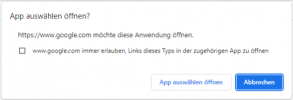
I set the 3CX App to open for tel Links. I set the registry key. Restarted the system and tried clicking a Phone number in chrome. I get the attached screenshot. If I set to remember my choice, then t remembers for the given site, but still asks me on new sites.
 

Attachments

  • Screenshot 2023-09-15 075114.png
    Screenshot 2023-09-15 075114.png
    28.6 KB · Views: 11
Are you using the Desktop App only on your PC?
 
I have tried using the web Client, the Chrome PWA and the Electron App.It is all tried on a newly installed Windows 11 PC
 
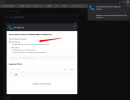
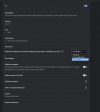
In the Click2Call on your browser settings have allowed for all sites?

2023-09-15_10h41_02.png1694763731943.png
 
There I get the same behavior. Chrome comes with the popup. Then I allow chrome to send the number to 3CX and the number appears in whichever 3CX App being used.

The Registry entry should eliminate the chrome Popup asking whether to open an external application for the tel link.
 
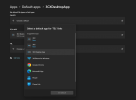
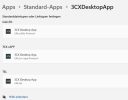
Can you please set the Desktop App as the default 'tel' protocol app on your machine?
1694765290522.png
 
That is set.
The Problem is with the chrome popup for every website. Getting the Phone number into 3CX works. For all apps.
I just want to get rid of the popup. This used to be done by the Registry entry, but I cannot get it to work anymore.

https://www.3cx.com/blog/releases/1-click-dial/
 

Attachments

  • Screenshot 2023-09-15 111609.png
    Screenshot 2023-09-15 111609.png
    37 KB · Views: 9
Status
Not open for further replies.

Forum statistics

Threads
111,974
Messages
590,081
Members
164,899
Latest member
mazet