3CX App for Android - Not showing contacts name on incoming call

Status
Not open for further replies.

Orbitel_Marcus

Silver Partner
Advanced Certified
Joined
Apr 23, 2021
Messages
9
Reaction score
1
Hi All,

Almost similar to this post from 2019: https://www.3cx.com/community/threa...tacts-name-on-incoming-call.69333/post-304379

Our client has a Google Pixel and has forwarded all his mobile calls to his 3CX DID. Callers (who's contacts are stored in the Android) are coming into 3CX and ringing the App but it doesn't show the Contact info, only the number. However, only after the call is taken does the Caller's name show up and when the call is ended the call history shows their Contact info.

Sadly, we cannot export the contacts and import into 3CX as it would be a band-aid fix since the client wishes to only add contacts to Android rather 3CX.
  • Phone Model: Samsung Galaxy S9+
  • Android Version: Android 10
  • App Version: 16.7.5.103
  • 3CX PBX Version: 16.0.9, Debian
  • Network Connection: WiFi
Anyone have any suggestions?

Update:
Recreated the issue on my Android.
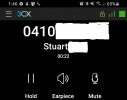
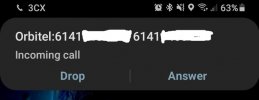
Call coming in from an Android Contact only shows the caller's number.
After taking the call, the app shows the caller's name.Screenshot_20210531-135615_Nova Launcher.jpgScreenshot_20210531-134624_3CX.jpg
 
Last edited:
Unfortunately this is to be expected unfortunately.

Let me explain.
Incoming calls are a 2-step process:
  1. Your 3CX PBX sends a PUSH message that makes your phone ring and you see what you have posted in your first screenshot.
  2. When you answer the call, the actual App launches and you hear the audio (2nd screenshot)
In step #1, the Caller ID information is sent solely from the PBX. If your PBX does not have any information about this number, it will not show up there.
Only in step #2 when the App launches can the Android phone contacts be parsed.

This is more or less what was explained in the thread you linked to as well.
Best suggestion would be, same your contacts on your PBX and if you don't want to put them in the Public Phonebook, put them in your Personal Phonebook of your extension, then they should show as well.
 
Last edited:
Unfortunately this is to be expected unfortunately.

Let me explain.
Incoming calls are a 2-step process:
  1. Your 3CX PBX sends a PUSH message that makes your phone ring and you see what you have posted in your first screenshot.
  2. When you answer the call, the actual App launches and you hear the audio (2nd screenshot)
In step #1, the Caller ID information is sent solely from the PBX. If your PBX does not have any information about this number, it will not show up there.
Only in step #2 when the App launches can the Android phone contacts be parsed.

This is more or less what was explained in the thread you linked to as well.
Best suggestion would be, same your contacts on your PBX and if you don't want to put them in the Public Phonebook, put them in your Personal Phonebook of your extension, then they should show as well.
Hi Nick,

Thanks for the reply. We've been doing some testing and reading through another post from 2020:
https://www.3cx.com/community/threa...ncoming-call-on-android-3cx-mobile-app.74278/

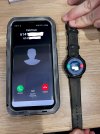
So 3CX should be able to 'control' the lock screen and show the Android contact information. We've run some tests and for some reason my Watch can display the contact info but not my phone when locked?
 

Attachments

  • 3CX.jpg
    3CX.jpg
    1 MB · Views: 16
It looks like the 3CX client doesn't have access to the device contacts:
- PBX notify the client with only the number.
- the client doesn't have access to the the device contacts so it shows the number only
- Telecom API takes control and activates the Watch passing it the number
- Watch HAS access to device contacts, so it matches the number with the contact and shows the name.
 
It looks like the 3CX client doesn't have access to the device contacts:
- PBX notify the client with only the number.
- the client doesn't have access to the the device contacts so it shows the number only
- Telecom API takes control and activates the Watch passing it the number
- Watch HAS access to device contacts, so it matches the number with the contact and shows the name.
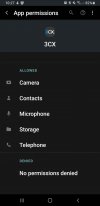
Thanks for the message, however, the 3CX does have full contact permissions. Again, taking the call will still show the contact info.
 

Attachments

  • Screenshot_20210602-102707_Permission controller.jpg
    Screenshot_20210602-102707_Permission controller.jpg
    94.2 KB · Views: 16
Status
Not open for further replies.

Members Online Now

Forum statistics

Threads
111,832
Messages
589,284
Members
164,662
Latest member
DejanMDS