3cx audio conference access denied

Status
Not open for further replies.

mohamed hamed

Premier Customer
Joined
Apr 16, 2019
Messages
60
Reaction score
2
i am trying to create a new conference by calling 777 and personal id but first time is working for extension but when tring to do it again from the same Extension it reply with access denied.

how could i solve this issue? i restarted 3cx but still the same issue
 
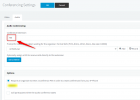
Have you enabled "Require PIN to create conference"?

Also, are you referring to the audio conferencing, or WebMeeting (videoconference) ?
 
  • Like
Reactions: mohamed hamed
Hi @mohamed hamed,

@Frederick Marcoux's questions are on point. Please answer them, but also can you provide the steps you follow to reproduce the problem?

For example:
  • I log in to the Webclient on extension 101.
  • I click Scheduled Conference... etc
 
  • Like
Reactions: Evolute IT
Hi @Hamed,

In the 3CX system, 777 is a Hotdesking Extension. the default internal Conference extension is "700". Please try with 700 and enter the Conference PIN followed by the # key. To know your conference PIN number, go to setting---> Conference and the following is for your reference.

1626085129669.png

Thanks,
RA.
 
Thank you all for your response , first i call 700 then type id (any number) then press # and confirming create a new conference and join the conference with another extension.
when trying the same steps with the same extension call 700 then type another id then press # the response is access denied .
I am talking about audio conference.
 
Hi @mohamed hamed,

I'd appreciate if you could walk us through the steps you follow exactly, as I'd previously mentioned.

Are you using an IP phone for this?

What version is your PBX running?
 
Status
Not open for further replies.

Forum statistics

Threads
111,982
Messages
590,122
Members
164,909
Latest member
Jacob.Ive