


- Joined
- Feb 16, 2021
- Messages
- 5
- Reaction score
- 2
Hi,
We've recently updated to V18 and we're looking to take advantage of the new SSO feature for the WebClient and Management Portal. We're encountering an issue during SSO testing where 2 out of 4 users cannot get SSO to work.
Notes:
* O365 integration/sync was setup by me about a year ago, no issues have been encountered and this is working correctly.
* I have followed 3CX's official YouTube guide to set SSO up at:
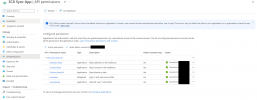
* I have updated the User.Read.All Azure permission
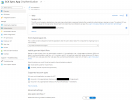
* I have checked the 'ID tokens (used for implicit and hybrid flows)' box in Azure
* For all users that I'm using to conduct tests, the permission to login to the Management Portal has been granted properly
* We're on the latest version of 3CX (18.0 (Build 461)
* All users we're testing with have 'Microsoft 365' listed under the Synced with column in 'Users'
Problem:
I've tested with 4 user accounts (my own user account, a second test account and 2 other real coworker accounts) and only my own + test account is able to get SSO working. The other 2 accounts will not sign in, after selecting the Microsoft SSO button under the login fields, they are automatically returned to the login page, and it loops from there if you select the SSO button again.
Troubleshooting:
* For my account, I had to wait 30 minutes before SSO would work after enabling all the correct permissions. Maybe this was a sync delay thing. Unsure.
* I then asked my coworkers to attempt to sign in, and they couldn't to either WebClient or Management Portal. Using different browsers and Incognito mode in Chrome. Incognito would correctly prompt for their O365 creds, but then drop them back at the 3CX login screen after they were supplied.
* I then tried using a new test account. I sync'ed an existing test user from O365 that wasn't previously added to 3CX so it would obtain a new extension, I then assigned Management Portal rights and tested Web Client / Management Portal SSO and this worked successfully.
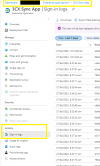
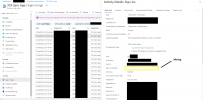
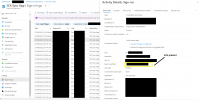
* I've gone into the Azure 3CX App logs to see what might be missing, and the only thing I can spot is that the 'Sign-in identifier' field is blank for the 2 users that are having issues, and for myself and the test account, this is populated with our email addresses. Is this the issue? Azure isn't passing on a required field, or is this just a red herring?
Any thoughts / suggestions would be appreciated!
Ben
We've recently updated to V18 and we're looking to take advantage of the new SSO feature for the WebClient and Management Portal. We're encountering an issue during SSO testing where 2 out of 4 users cannot get SSO to work.
Notes:
* O365 integration/sync was setup by me about a year ago, no issues have been encountered and this is working correctly.
* I have followed 3CX's official YouTube guide to set SSO up at:
* I have checked the 'ID tokens (used for implicit and hybrid flows)' box in Azure
* For all users that I'm using to conduct tests, the permission to login to the Management Portal has been granted properly
* We're on the latest version of 3CX (18.0 (Build 461)
* All users we're testing with have 'Microsoft 365' listed under the Synced with column in 'Users'
Problem:
I've tested with 4 user accounts (my own user account, a second test account and 2 other real coworker accounts) and only my own + test account is able to get SSO working. The other 2 accounts will not sign in, after selecting the Microsoft SSO button under the login fields, they are automatically returned to the login page, and it loops from there if you select the SSO button again.
Troubleshooting:
* For my account, I had to wait 30 minutes before SSO would work after enabling all the correct permissions. Maybe this was a sync delay thing. Unsure.
* I then asked my coworkers to attempt to sign in, and they couldn't to either WebClient or Management Portal. Using different browsers and Incognito mode in Chrome. Incognito would correctly prompt for their O365 creds, but then drop them back at the 3CX login screen after they were supplied.
* I then tried using a new test account. I sync'ed an existing test user from O365 that wasn't previously added to 3CX so it would obtain a new extension, I then assigned Management Portal rights and tested Web Client / Management Portal SSO and this worked successfully.
* I've gone into the Azure 3CX App logs to see what might be missing, and the only thing I can spot is that the 'Sign-in identifier' field is blank for the 2 users that are having issues, and for myself and the test account, this is populated with our email addresses. Is this the issue? Azure isn't passing on a required field, or is this just a red herring?
Any thoughts / suggestions would be appreciated!
Ben
Attachments
Last edited:


