3CX CFD

Sovuthy.net

Gold Partner
Advanced Certified
Joined
Mar 1, 2023
Messages
24
Reaction score
1
Dear 3cx Teams,

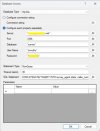
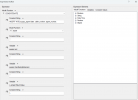
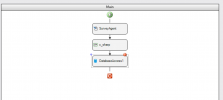
Regarding to my 3cx CFD, I have issue with Database Access componence is error like below could you help check ? and how we can fix that?
Thank you.
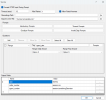
Screenshot 2025-07-23 181807.pngScreenshot 2025-07-23 181840.pngScreenshot 2025-07-23 181912.jpgScreenshot 2025-07-23 182052.png
 
You can't use the CONCATENATE expression anymore with the Database Access component. You must use parameters instead. This is to avoid SQL injection.
 
Hello Sovuthy.net,

Reading the responce of edossantos_sipcaller, it seems that CONCATENATE is not possible.
You could try to create the string first in an object or C, and than use the string in the database query?
Not tested this myself, but is just a tip, to see if you can build the query statement as needed.

Paulo
 
Basically, instead of:
CONCATENATE("select * from table where id = '",myVariable,"'")

You enter:
select * from table where id = @id

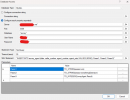
And then you provide the id as a parameter in the table below.

You need to do this for each variable part you have.
 
thank all for your guide, let me try to check that.
 
Has 3CX updated the samples that were for V18?
 
  • Like
Reactions: Sovuthy.net
You can't use the CONCATENATE expression anymore with the Database Access component. You must use parameters instead. This is to avoid SQL injection.
1753773950180.png

Hello edossantos_sipcall and 3cx team

Now I try to write script SQL statement with Parameter like above, the Database Access componence don't error, but insert data to my table, not work. could anyone have the worked, SQL script sample ?

Best Regard.
Sovuthy
 
Have you tried with @ in front of the parameters like in @edossantos_sipcaller 's example?
SQL:
select * from table where id = @id
 
Is there any updated documentation about this anywhere? I have a CFD app I'm trying to update that uses the database access component as well, and I can't seem to get past the same error as Sovuthy.

The SQL statement was originally: CONCATENATE("SELECT count(*) FROM \"JPAssetSites\" WHERE \"propID\"=",inputPropID.Buffer)

And it has been changed to: SELECT count(*) FROM @table WHERE propID = @propertyID

I added 2 parameters as well - table = "JPAssetSites", and propertyID = inputPropID.Buffer

The error I am seeing on build is: Error: SQL Statement must be a constant string value at Database Access component 'authPropID'. Please use parameters for variable parts to avoid SQL injection. (file Main.flow)

I appreciate any advice you may have.
 
Hello whill,

Please look at the example of Sovuthy.net, he does use:
TO_STRING (inputPropID.Buffer)

The error does state there is some error with 'authPropID' must be a constant string.
Could this help you?

Paulo
 
Is there any updated documentation about this anywhere? I have a CFD app I'm trying to update that uses the database access component as well, and I can't seem to get past the same error as Sovuthy.

The SQL statement was originally: CONCATENATE("SELECT count(*) FROM \"JPAssetSites\" WHERE \"propID\"=",inputPropID.Buffer)

And it has been changed to: SELECT count(*) FROM @table WHERE propID = @propertyID

I added 2 parameters as well - table = "JPAssetSites", and propertyID = inputPropID.Buffer

The error I am seeing on build is: Error: SQL Statement must be a constant string value at Database Access component 'authPropID'. Please use parameters for variable parts to avoid SQL injection. (file Main.flow)

I appreciate any advice you may have.
The table name is static, so you don't need to set it as a parameter. The statement should be:
"SELECT count(*) FROM \"JPAssetSites\" WHERE \"propID\"=@propertyID"

Then you need to define just 1 parameter:
propertyID

Set it to:
inputPropID.Buffer

The Buffer property is already a string, so you don't need to use the TO_STRING function.

You can't use the CONCATENATE function in the SQL statement, just what I suggested above.
 
The table name is static, so you don't need to set it as a parameter. The statement should be:
"SELECT count(*) FROM \"JPAssetSites\" WHERE \"propID\"=@propertyID"

Then you need to define just 1 parameter:
propertyID

Set it to:
inputPropID.Buffer

The Buffer property is already a string, so you don't need to use the TO_STRING function.

You can't use the CONCATENATE function in the SQL statement, just what I suggested above.
That fixed it, thank you. I removed the quotes and escape characters because I thought they were only needed by the concatenate function. Putting them back seems to be doing the job. Much appreciated!
 
Yes, you need to escape those to include quotes inside a C# string.
 
  • Like
Reactions: Evolute IT