3CX Desktop App not showing up when clicking on a phone number

Status
Not open for further replies.

davide.bonavita

Premier Customer
Joined
Apr 17, 2020
Messages
136
Reaction score
29
Hello fellow colleagues,
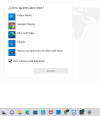
I'm having this weird behaviour for the last 3/4 installations. I install the 3CX Desktop app clicking on the button in the browser (I've tried both the Chrome and Edge flavours) and I install the click2call extension. After that when I click on a number the usual popup shows the list of the applications I want to use to handle the request, but 3CX is not listed (sorry for the Spanish language).
I've also checked in the windows configuration and the same list shows up when I want to assign an application for the ":tel" extension. I don't know if I'm just missing anything?
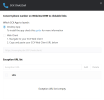
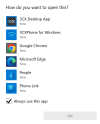
Untitled.png
 
Hello,

I tested the latest available version of the plug-in: 5.0.0.111

On my Windows 10 PC I have the latest stable Desktop App: 18.10.461

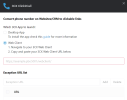
My plugin is configured to launch the app:
1667573012693.png

And sure enough, I see the options:

1667572905010.png


Maybe you should uninstall the app, and reinstall it fresh so it can register as a handler of tel links.
 
The App does NOT register the "tel" protocol (only callto). It works only if another App like Teams registered the protocol earlier.

We had to register the protocol with a GPO for all users manually:
https://www.3cx.com/community/threads/clicktocall-extension-deploy-config.117291/post-544634

You can test this by yourself:
Go to the registry an delete the "tel" protocol:
"HKEY_CLASSES_ROOT\tel" (delete this Key)

You can also delete the "callto" protocol in the registry:
"HKEY_CLASSES_ROOT\callto"

Now install the 3CX App and look again in the registry (or in the system settings).
Only "callto" is now available. "tel" is not registered during the install.
 
Hi @mOrbo

- Can you tell me how you installed the app? (manually or via GPO)
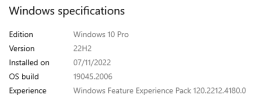
- Can you tell me exactly what version of Windows you are using on the PC you were testing?
Share a screenshot like below please:
1667815886761.png
 
I've managed to make it work installing the native desktop app (the msi file you download from the "Windows" button), but I still have the same issue on new computers when I just install the browser app from Chrome or Edge (the PWA)
 
I've managed to make it work installing the native desktop app (the msi file you download from the "Windows" button), but I still have the same issue on new computers when I just install the browser app from Chrome or Edge
Same as above, share screenshot of your Windows version
 
Same as above, share screenshot of your Windows version
Thank you John

Code:
Edición    Windows 11 Home
Versión    22H2
Instalado el    ‎20/‎10/‎2022
Versión del sistema operativo    22621.755
Número de serie    PF3X615A
Experiencia    Windows Feature Experience Pack 1000.22636.1000.0
 
Hi John,

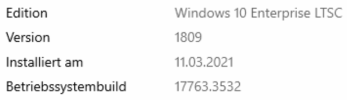
we are using a GPO for the Installation on a Windows 10 Enterprise LTSC 2019 Version, which is basically the 1809 Feature Pack with longterm Support.
 
Hi all,

I was able to get tel links working in Win 10 Pro, and Win 11 Home, without editing the registry.
The fact that it was missing from the registry did not appear to prevent me from using the "tel:" functionality.

  1. Install fresh Windows (22H2 in my case for both 10 and 11), and install Chrome
  2. Login to WebClient and install the desktop app manually from the provided links in the WC
  3. Provision the app, then click a tel: link on a web page (plugin not required - tel links are already clickable)
  4. Chrome asks me to pick an app to handle it and I click to continue
  5. 3CX appeared in the list of apps that Windows offers
  6. After choosing the 3CX app the number was passed on to the Desktop Client normally.
- I did not edit the registry, and the tel link under HKEY_CLASSES_ROOT\tel did not exist when Windows was installed.
- This did not prevent me from using everything as intended, it worked the first time around.

I am not sure if something else took place in your case that could have affected the outcome but I was not able to replicate the issue yet. Let me know if you have some suggestions and I can investigate further.
 
Hi John,

we are using a GPO for the Installation on a Windows 10 Enterprise LTSC 2019 Version, which is basically the 1809 Feature Pack with longterm Support.
Could I get a screenshot as requested above please, from an affected machine? Thanks!
 
  • Like
Reactions: JohnS_3CX
Can you please take a look if there is anything in your GPO that may prevent the end user (non-Administrator let's say) from making registry changes during software installation and software launching?

I'm wondering if our app / installer / Chrome browser / our your CMR app are prevented from calling up the tel protocol due to a group policy setting. I know it's not an easy one to pin point, but I'm not able to replicate the issue on machines where I have Admin control and no group policies applied.

You could potentially also build a clean test-machine and login as a full admin, and see if the problem goes away when you have full access rights.
 
I think no standard user is allowed to make changes in the "HKEY_CLASSES_ROOT" Path of the registry.
Users can only make changes to "HKEY_CURRENT_USER". This is Microsofts standard user right.

BUT, the App is deployed with a Computer-GPO, not a User-GPO. So the deployment is running with system rights.

Also is does register the "callto" protocol under "HKEY_CLASSES_ROOT" during the Installation properly. So the registering of protocols in the "HKEY_CLASSES_ROOT" Path is working. It just does not register the second protocol "tel".

We tested this on four different Systems. Always the same result. It's working with "tel" only if the protocol was registered from another App before the installation of the 3CX App.
 
Where exactly are your tel links? Are they clicked from within Chrome for example?
Because I noticed that the first time you click a tel link, Chrome (a tel requester) will create the tel protocol entry for you.
Then any app which reports its capabilities to Windows as supporting tel (like our app and others), can be selected as a handler to receive the telephone number you wish to dial.

I think the difference we have here is that in your cases, the requester (ie. Chrome) cannot generate the protocol entry (insufficient rights?) on the first attempt a user makes to click a tel link. If you generate the entry yourself (as an admin with the correct rights) then obviously the chain is complete and you can dial your numbers like you have already verified. So ultimately, I think it comes down to learning why in your case the browser is prevented from generating the entry and completing the chain.
 
Seems a reasonable explanation.

Yes, we do click such links directly within the browser. A browser is a highly dangerous application, which never should run with admin rights. We do secure such applications with a lot security setting, preventing them from being a potential malware gateway.

Chrome/Edge does definitely not have the right to create a reg-key in "HKEY_CLASSES_ROOT".

But the 3CX App is creating the "callto" protocol during the installation and is also binding itself as the handler app. So callto is working right away. Why doesn't the 3CX App register the "tel" protocol during the installation the same way? It seems that even the 3CX Browser-Plugin is using "tel". So the registration of the protocol is more important than "callto".
 
Hi @mOrbo

As a premier customer, please feel free to open it as an idea in the Ideas Section under Webclient (which includes the desktop app) and I will also pass on the feedback: https://www.3cx.com/community/forums/web-client.71/

For the near future though, anyone who has restrictions on their machines will have to manually create the tel entry on their PCs somehow (or similar to how you did).
 
  • Like
Reactions: Evolute IT
How can I associate tel links to the PWA App? It is not listed as an installed App in the Windows list of apps. And it don't reacts to tel links actually.
 
install the Click2Call Extension and set it up as webclient
1668779998347.png

Confirm your webclient works first, then when you are happy with it proceed to install the PWA app.

Clicking links will call up the PWA app from this point on.

If you have issues after this, start a new thread here please
https://www.3cx.com/community/forums/webrtc-webclient/
 
Hi, is this the only way? The extension makes strange things with the content of websites.. I don't like it really. And other apps that uses the tel protocol did not works, anyway.
 
Status
Not open for further replies.

Forum statistics

Threads
112,351
Messages
592,038
Members
165,515
Latest member
fngl