3CX Enterprise Failover v16

Status
Not open for further replies.

Scot Busby

Customer
Joined
Jun 8, 2017
Messages
87
Reaction score
19
I have setup the failover process as described in the documentation provided by 3CX. It has been running for about a week doing the restores regularly - with success. I had an opportunity to test the failover process yesterday by downing the main server. After the pre-set time, the passive server became active and all seemed well. I placed a test call...but nothing happened. In the failover management console, I can see the incoming call, however, none of the digital reception recordings were playing and nothing seems to happen, regardless of the options pressed.

I downloaded some of the recordings from the failover server, but they all sounded good. The SIP trunks were registered and I could see my incoming calls.

I am sure I'm just missing something small, but wondered if anyone else has experienced this?
 
I have setup the failover process as described in the documentation provided by 3CX. It has been running for about a week doing the restores regularly - with success. I had an opportunity to test the failover process yesterday by downing the main server. After the pre-set time, the passive server became active and all seemed well. I placed a test call...but nothing happened. In the failover management console, I can see the incoming call, however, none of the digital reception recordings were playing and nothing seems to happen, regardless of the options pressed.

I downloaded some of the recordings from the failover server, but they all sounded good. The SIP trunks were registered and I could see my incoming calls.

I am sure I'm just missing something small, but wondered if anyone else has experienced this?
When you say nothing happened, you mean phones never rang or you never heard the IVR pick up? We need a bit more info.
 
Run the firewall checker on the failover server. Could be an issue with the RTP ports.
 
My apologies- a little more detail. Our setup routes all calls to a digital receptionist depending on time of day. When in failover mode, rather than hear the night recording, I hear silence. The system picks up the call, as I can see in the call list, but now that @CentrexJ mentions it, it could be a port issue not allowing audio. I will check my firewall rules and see if I can resolve.
 
  • Like
Reactions: JohnS_3CX
Hi Scot,

Also take a look at the services on the standby server, they should all start after the failover event is triggered.
 
@JohnS_3CX - Thanks for the tip. The services seem to be starting without any issue.

One thing I wanted to obtain clarification on. During the setup, the WAN IP address was supposed to be different on the failover system than the primary. We do have a backup WAN connection from a different ISP, so I am able to use a different IP address, but the failover system indicates there is an IP address mismatch. I am wondering if I set this up correctly or not.
 
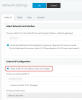
Likely this just means that the last known Static WAN IP has changed. It's a side effect of having a dynamic IP (which you effectively do, since you have 2 WAN IPs that can change) while your settings tell the system to expect that you have a static IP like this example:

12270
 
Likely this just means that the last known Static WAN IP has changed. It's a side effect of having a dynamic IP (which you effectively do, since you have 2 WAN IPs that can change) while your settings tell the system to expect that you have a static IP like this example:

View attachment 12270
Thanks again for this info. Yes, we do have essentially 2 static WAN IPs from two separate providers (for D/R purposes). The router will take care of failing over to the backup provider if the primary fails, so should the failover 3CX system be configured to use the primary WAN IP (same as the primary server) rather than the backup WAN IP?
 
Let me put it this way, if you plan on using more than one IP on either server, then you should set them to Dynamic Public IP in the management console.

This way in case you internet goes down and the router switches to the 2nd link, both your 3CX systems can update their WAN IP accordingly.

Note: Just make sure that in the failover Passive Server settings, you are monitoring the LAN IP of the Active server. You don't want the passive to think that the active went down in case your WAN1 drops and your router switches to WAN2. I'm assuming these two servers are on the same network and share the same WAN at any given moment (scenario A or B https://www.3cx.com/docs/failover/#h.9pyv4ra4v56x ).
 
Last edited:
We had a failure in our primary internet connection this morning, so when my router automatically switched to the backup internet connection, I ran into the same issue - calls would be connected, but there is no audio. This does not have to do with the primary or failover PBX (since the PBX was not down and was running on the primary system), but rather the internet connection going down. I was finally able to get it working by modifying the static WAN IP address configured in the primary phone system to the backup WAN IP. Once I did this, I was able to hear the audio of the call.

It would appear I am facing two issues which, at this point, I need to manually modify to get the system to function - (1) if the PBX hardware fails or (2) if the primary internet connection fails

I will dig deeper into how I can configure things to work automatically in these scenarios.
 
have you tried switching to dynamic mode yet?

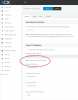
Network Settings > External IP Configuration > Dynamic Public IP

This solution addresses your problem.
 
@JohnS_3CX, Thank you for your reply. I have not tried this yet and was hesitant to try this considering I have static IP addresses from 2 different providers and it would appear I have to open an additional port on the firewall in order to have stun work properly. I will look into this more and configure/test this option. Any best practices to keep in mind when going this direction?
 
Hi Scot,

If you have a single firewall, I imagine you only need to open the ports once.

You problem of no audio occurs because the PBX is still telling the provider to send audio on WAN1 (which failed). If only the PBX knew that you switched to WAN2, it would fix the problem by itself by modifying the static WAN IP address configured in the phone system to the backup WAN IP

The system is smart and it will check to see "what is my IP?" before making a call, or even while sitting idle. Our STUN servers will tell it what IP it has and it will then configure itself by modifying the static WAN IP address configured in the phone system to the backup WAN IP

12518
 
Thanks @JohnS_3CX, I did make this change to the system, ensuring I had opened the port for stun communications on the firewall. For testing purposes, I did change the query time to 120 seconds, however, when I unplugged the primary connection, after 5 minutes, the system still has not switched over to the backup IP. I tested from a browser and saw where I was running from the backup connection, so I must have more router changes to make for this to work properly. Thank you again!
 
Hi Scot,

You should probably allow it some more time then and see when the change will occur. An email will be sent to the defined address letting you know that the IP has changed. You can also make an outbound call to force a STUN request.

If you run a capture during that time you can analyze it in WireShark and see the attempt to reach the STUN servers
 
Thanks @JohnS_3CX - I was unaware I could force a STUN request by making an outbound call. I am only able to test these things after hours, so the next chance I have to test this, I will test making an outbound call and hopefully close this issue. :) Thank you again!
 
No problem Scot, glad to help. Let us know how it goes
 
I tested again this morning and there is good and bad news. The good news is the system seemed to work without issues when I disconnected the primary internet. I made a call and it went through, then I tried to return the call and it failed, but tried again and it worked, so maybe just an issue with my first attempt.

The bad news is the pbx dashboard never reflected the updated IP address nor did I receive any emails indicating the IP address had changed. I receive emails daily from the system for backup/restore messages, so configuration of the email is not an issue. I can live with no notifications or not updating the IP on the dashboard as long as it works like it did.

Thank you!
 
If the calls works, don't worry about it, and yes there may be a failed attempt until the provider realizes you are reachable at a different public IP. The MC will eventually also update to reflect the change and trigger the email. Glad this works for you.
 
  • Like
Reactions: CentrexJ
I assume the failover PBX (passive one) should show as "detecting" in the IP until it becomes the active server (in the event of a failure)?
 
Status
Not open for further replies.

Forum statistics

Threads
112,363
Messages
592,117
Members
165,536
Latest member
Wecare_ITA