3cx Integrate with Microsoft teams direct routing

Sovuthy.net

Gold Partner
Advanced Certified
Joined
Mar 1, 2023
Messages
24
Reaction score
1
Hello, 3CX Teams

Regarding to 3cx I have integrated with Microsoft teams, Goal to Make and received the call between Team and 3cx via local extension. now my problem is call from 3cx to team hear the voicemail, not ring to team user, But from team to 3cx work fine. so could you have any solution to check this issue ?

- Microsoft Teams Phone Standard
- Office 365 E1 (no Teams)


Best Regards
Sovuthy
 
Make sure the voicemail is disabled on the users and that the Office Phone is properly set.
 
  • Like
Reactions: Sovuthy.net
Make sure the voicemail is disabled on the users and that the Office Phone is properly set.
Hello ConceptsWeb,

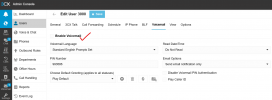
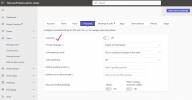
Yes from my 3cx I have disabled voicemail on that extension, then make call to Team extension, hear voicemail "Voicemail is disabled this extension" and disconnect, it's still not ring to team. have any options to check more ?

- My 3cx extension: 1001
- My team extension: 3000

1747627157411.png

1747627333250.png
 
Hello 3cx teams

Now, Integrate from 3cx with Microsoft Team working well, one more I would like to check a bit in case if we have already user extension in 3cx and don't need to configure with MS 365, just only configure with MS team, mean without 365 extension, so, this scenario are work or not ?

Best reagrd
Sovuthy
 
Hello 3cx teams

Now, Integrate from 3cx with Microsoft Team working well, one more I would like to check a bit in case if we have already user extension in 3cx and don't need to configure with MS 365, just only configure with MS team, mean without 365 extension, so, this scenario are work or not ?

Best reagrd
Sovuthy
365 sync is required for Teams, and a user cannot have Teams Direct Routing without a Teams user which requires an Office365 license.
 
  • Like
Reactions: Sovuthy.net
365 sync is required for Teams, and a user cannot have Teams Direct Routing without a Teams user which requires an Office365 license.
Ok noted with thank so much
 
Dear 3CX Teams,

Regarding to 3cx from our client, they setup 3CX on premise, use the local FQDN resolve via local dns and authorize by self sign certificate on each users computer. addition from external access to 3CX point from AWS load balancer. if we want to implement integrate between 3CX with Microsoft Team, so the process should be work as expected in 3cx or not ? May you have to advice more ?

Best Regard
Sovuthy
 
Local FQDN and self signed certificate isnt an supported way to use 3cx.
 
Last edited:
Local FQDN and self signed certificate isnt an supported way to use 3cx.
Hello bitn2,

Thank for your information, take noted.

Best Regard
Sovuthy
 
Dear 3CX Team,

I would like to inquire about a specific scenario involving our current 3CX setup.

We have two 3CX instances installed across two locations Primary (DC) and Secondary (DA) under the standard SLA Enterprise model. Both instances use the same FQDN and have distinct private IP addresses. In the event of a failure at the DC site, the 3CX instance at DA is expected to take over automatically.

In this redundancy scenario, will the integration with Microsoft Teams continue to function properly during a fail-over?
Your guidance on this matter would be greatly appreciated.

Best regards,
Sovuthy
 
Teams integration won't work unless the FQDN used is pointing to an IP that is the same for both (ex. Public IP for on-premises failover systems).

Since it's a custom FQDN for Teams, you need to handle that IP change yourself if needed.
 
  • Love
Reactions: Sovuthy.net
Teams integration won't work unless the FQDN used is pointing to an IP that is the same for both (ex. Public IP for on-premises failover systems).

Since it's a custom FQDN for Teams, you need to handle that IP change yourself if needed.
Dear ConceptsWeb,

Noted with thank so much !
 
  • Like
Reactions: N_G
Thank you @ConceptsWeb and @bitn For your excellent advice. Just want to add the teams direct routing requires 16sc minimum license....
 
Dear, 3CX Expert Teams,

Regarding to 3cx Integrate with Microsoft Team

Step 1: We need to configure Integrate with Microsoft 365
Step 2: We need to configure Integrate with Microsoft Team

So, above my question, which role that we should be use in Microsoft 365 account ?
must be set account as Global Administrator or also any roles that we can use for Integrate too?
May you help to advice ?

Best Regard
Sovuthy
 
Dear, 3CX Expert Teams,

Regarding to 3cx Integrate with Microsoft Team

Step 1: We need to configure Integrate with Microsoft 365
Step 2: We need to configure Integrate with Microsoft Team

So, above my question, which role that we should be use in Microsoft 365 account ?
must be set account as Global Administrator or also any roles that we can use for Integrate too?
May you help to advice ?

Best Regard
Sovuthy
Regarding your question, to integrate with M365 the account must be a Global Administrator.
 
You are welcome.
 
  • Love
Reactions: Sovuthy.net
Dear, 3CX Expert Teams,

Regarding to the 3CX integrate with Microsoft 365 Do we need to allow some firewall role or not? because from my network infrastructure is stick in firewall filter. If need, so may you help to advice and and list down the source or destination between 3cx and Microsoft 365 ?

Best Regard
Sovuthy
 
Dear @bitn2

Thank for you information, let me check on this guide.

Best Regard
Sovuthy