3CX logging all call records in CRM

Status
Not open for further replies.

QMaxwell

Free User
Joined
Jan 19, 2024
Messages
7
Reaction score
1
Hello!

We're encountering an issue where we have an integration set up between 3CX and Zoho CRM.

The integration is set up successfully to look up contact information and we are receiving logs in Zoho CRM, however, not all calls seem to be logged.

We have found that this specifically happens when the contact information is not in Zoho and we assume that this means an [EntityID] is not found and thus the scenario to report and create a call are skipped. This is also what we find in our verbose logs.

In essence, we would also like to receive a log in Zoho, even if the contact does not already exist in Zoho.


2024/01/19 09:58:05.465|11853|0031|Verb|CRM: Triggering Call Journaling with values - CallType='Notanswered' - PhoneNumber='[redacted]' - ContactName='' - AgentExtension='[redacted]' - AgentFirstName='[redacted]' - AgentLastName='[redacted]' - AgentEmail='[redacted]' - ContactRawData='' - StartTime='1/19/2024 8:57:58 AM' - EndTime='1/19/2024 8:58:05 AM' - EstablishedTime='1/1/0001 12:00:00 AM'
2024/01/19 09:58:05.465|11853|0031|Verb|CRM: Processing scenario 'ReportCall'.
2024/01/19 09:58:05.465|11853|0031|Verb|CRM: Creating new HttpClient for Scenario authentication.
2024/01/19 09:58:05.465|11853|0031|Verb|CRM: Header 'Authorization' = 'Zoho-oauthtoken [redacted]'
2024/01/19 09:58:05.465|11853|0031|Verb|CRM: Skipping request...
2024/01/19 09:58:05.465|11853|0031|Verb|CRM: Continue with empty matching.
2024/01/19 09:58:05.465|11853|0031|Verb|CRM: Processing scenario 'CreateCall'.
2024/01/19 09:58:05.465|11853|0031|Verb|CRM: Creating new HttpClient for Scenario authentication.
2024/01/19 09:58:05.465|11853|0031|Verb|CRM: Header 'Authorization' = 'Zoho-oauthtoken [redacted]'
2024/01/19 09:58:05.465|11853|0031|Verb|CRM: Skipping request...
2024/01/19 09:58:05.465|11853|0031|Verb|CRM: No matchings found.

The event IS subsequently created in the 3CX call log, which is great, but we would also like to receive it in Zoho.

We've tried a bunch of things by editing the integration template, such as removing the requirement for EntityID from the scenarios, but we seem to get stuck here as we don't really know what's happening with the information from the XML.

Could you tell us what to do so that we DO receive logs in Zoho as well?

Looking forward to your response!
 
When your agent receives the call, and the caller's number is not matched to a CRM contact, the Web Client will show an "Add contact" link. Your agent needs to click on it, fill the contact details, and then the call will be logged.
 
Thank you for the response!

That's nice, but I'm actually looking to see whether it's possible to still get the call logged without having to add contact details.

The way you phrase it (and we've experienced it so far) makes it seem like this is not a possibility. Do I understand this correctly? Or is there a way we CAN basically get a 1-on-1 copy of the logs in 3CX into Zoho?
 
Thank you for the response!

That's nice, but I'm actually looking to see whether it's possible to still get the call logged without having to add contact details.

The way you phrase it (and we've experienced it so far) makes it seem like this is not a possibility. Do I understand this correctly? Or is there a way we CAN basically get a 1-on-1 copy of the logs in 3CX into Zoho?
You can't log calls without a contact, as Zoho requires an entity to link the activity to.
 
Thank you for the response!

That's nice, but I'm actually looking to see whether it's possible to still get the call logged without having to add contact details.

The way you phrase it (and we've experienced it so far) makes it seem like this is not a possibility. Do I understand this correctly? Or is there a way we CAN basically get a 1-on-1 copy of the logs in 3CX into Zoho?
You need a contact to log the call. What you can do is editing the template to create the contact automatically when no contact is matched. But when you do this, you will end up with a custom integration, and you will miss any update from 3CX. If you want to go this way, you should check this:
https://www.3cx.com/docs/crm-template-xml-description/

Also, this article explains how to do it for another template:
https://www.3cx.com/community/threads/hubspot-not-showing-all-calls.122311/#post-573343
 
  • Like
Reactions: Evolute IT
Both of you, thanks for the replies. We will try out configuring a custom integration and see how far we get.

Thank you for your time. You can consider this post solved.
 
  • Like
Reactions: Evolute IT
I would like to briefly get back to this as we've now configured a custom integration. We've ran into a new problem now.

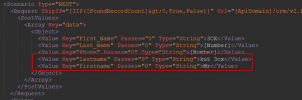
We have now chosen the route of creating a contact in Zoho CRM first and then creating a log subsequently. The code looks like this, following the example you sent:
<Scenario Type="REST">
<Request SkipIf="[IIf([FoundRecordCount]&gt;0,True,False)]" Url="[ApiDomain]/crm/v2.1/[IIf([CreateLeadOrContact]==Lead,Leads,Contacts)]" MessagePasses="0" RequestEncoding="Json" RequestType="Post" ResponseType="Json">
<PostValues>
<Array Key="data">
<Object>
<Value Key="First_Name" Passes="0" Type="String">3CX</Value>
<Value Key="Last_Name" Passes="0" Type="String">[Number]</Value>
<Value Key="Phone" Passes="0" Type="String">[Number]</Value>
</Object>
</Array>
</PostValues>
</Request>
<Rules>
<Rule Type="Any">data.details.id</Rule>
</Rules>
<Variables>
<Variable Name="Id" Path="data.details.id">
<Filter />
</Variable>
</Variables>
<Outputs AllowEmpty="false">
<Output Type="ContactUrl" Passes="0" Value="[Domain]/crm/EntityInfo.do?module=[IIf([CreateLeadOrContact]==Lead,Leads,Contacts)]&amp;id=[Id]" />
<Output Type="FirstName" Passes="2" Value="[[CreateContactFirstName]]" />
<Output Type="LastName" Passes="2" Value="[[CreateContactLastName]]" />
<Output Type="PhoneBusiness" Passes="0" Value="[Number]" />
<Output Type="EntityType" Passes="0" Value="[IIf([CreateLeadOrContact]==Lead,Leads,Contacts)]" />
<Output Type="EntityId" Passes="0" Value="[Id]" />
</Outputs>
</Scenario>

When we test the code, it sents a request accordingly and it creates the user in Zoho CRM as expected. However, when we save the integration and then do a "live" test through calling an unregistered number it does not work and the verbose logs show that the POST to the API endpoint is formatted as follows:
{"data":[{"firstname":"3CX","lastname":"[redacted]","Phone":"[redacted]"}]}
This errors since Zoho expects the fields to be First_Name and Last_Name. We've configured the keys to be written like this, but somehow it seems to be interpreted incorrectly. How do we fix this? We suspect there is something going wrong in the layer above our XML template.

Hopefully you can still help us out!
 
Do you see the text firstname or lastname in the XML template anywhere?
 
It is not written elsewhere in the template without capitalization. There are a few scenarios in which the key seems to be FirstName, LastName, but these API calls don't fail. Only this specific API call seems to fail due to sending the wrong keys
 
It is not written elsewhere in the template without capitalization. There are a few scenarios in which the key seems to be FirstName, LastName, but these API calls don't fail. Only this specific API call seems to fail due to sending the wrong keys
Can I see the full XML template? You can send it in a private message if you don't want to share it publicly.
 
I've uploaded the template here. Please let me know if you find anything interesting that can help us out!
 

Attachments

This is your scenario, and you're sending those properties:
1706188586072.png
 
  • Like
Reactions: Evolute IT
I have now removed the lines and uploaded the new template.

Unfortunately the POST message still only contains:
{"data":[{"firstname":"3CX","lastname":"[redacted]","Phone":"[redacted]"}]}

Besides that, the message initially did not seem to contain the keys First_Name and Last_Name, even though those are present as well.

Am I supposed to add something else instead?
 

Attachments

I have now removed the lines and uploaded the new template.

Unfortunately the POST message still only contains:


Besides that, the message initially did not seem to contain the keys First_Name and Last_Name, even though those are present as well.

Am I supposed to add something else instead?
Try restarting the services. We've seen some occurrences where the old template seems to be in sort of a cache.
 
Ensure that you remove the template first, and then upload it again. This way you are sure that it's overridden.
 
  • Like
Reactions: Evolute IT
You need a contact to log the call. What you can do is editing the template to create the contact automatically when no contact is matched. But when you do this, you will end up with a custom integration, and you will miss any update from 3CX. If you want to go this way, you should check this:
https://www.3cx.com/docs/crm-template-xml-description/

Also, this article explains how to do it for another template:
https://www.3cx.com/community/threads/hubspot-not-showing-all-calls.122311/#post-573343
Hi,

Does this integration creates leads on zoho crm if its a missed/received call that is not matched with any lead on the CRM?
I just need a clarification before proceeding with the PBX setup.

Thank you
 
Hi,

Does this integration creates leads on zoho crm if its a missed/received call that is not matched with any lead on the CRM?
I just need a clarification before proceeding with the PBX setup.

Thank you
When you receive a call, 3CX will search the caller's number in Zoho CRM (Contacts, Leads and Accounts). You can specify the loopup order, so if you're interested in Leads, you can search on Leads first. If there is no match, the Web Client will let you create a new contact or lead (you configure in which entity you want to create new callers). But this process is not automatic, the agent needs to click "Add contact", and then fill the details (first name, last name, etc), and then the contact will be created in Zoho CRM.
 
  • Like
Reactions: Evolute IT
Status
Not open for further replies.

Latest Posts

Members Online Now

Forum statistics

Threads
111,852
Messages
589,386
Members
164,691
Latest member
Daz1964