3CX Multi-Tenant: Making Your SMB Customers Profitable Again

You need to define the numbers that the department is allocated to in the department options. Then when they say add a new user, it picks from this range.
 
Hi All,
I am sure there are still developments going on in the Alpha version but I wanted to point out the following.
When logged in as a department owner/administrator of a tenant and creating a user, the first extension number offered by the system is starting at 100 and plus.
The expectation is that the first extension number offered is one of the extension number range of the corresponding tenant.
It would be nice if the tenant owner/administrator could get a dropdown list of all available numbers in the corresponding number range.

Thanks for taking this in consideration :)

What version are you using? Do you have a screenshot of this? Once Departments are set-up and ranges defined, adding a user for that tennant when Logged-In as an owner/admin of the tennant will offer the next extension number available in that tennants range. If you are using impersonate, then it does not.
 
One other way is to use the new impersonate user feature and login an as a user in that department, then create the user from within the department.
 
What version are you using? Do you have a screenshot of this? Once Departments are set-up and ranges defined, adding a user for that tennant when Logged-In as an owner/admin of the tennant will offer the next extension number available in that tennants range. If you are using impersonate, then it does not.
I am testing in U8 Alpha build 680

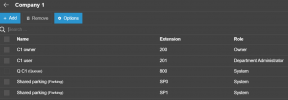
Created Company 1 and owner for this department

1762945231330.png 1762945314155.png

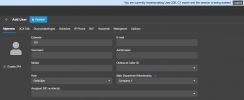
First extension offered is 101 instead of 202 here.

1762945496291.png

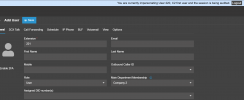
NOTE: strangely enough, I created a second company and then the offered extension is correct!?

1762945717677.png
 
I am testing in U8 Alpha build 680

Created Company 1 and owner for this department


First extension offered is 101 instead of 202 here.


NOTE: strangely enough, I created a second company and then the offered extension is correct!?
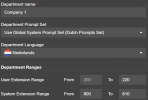
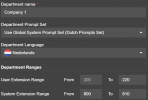
For the first company:
1762948375428.png

The From value is the soft grey. That's not an already filled in box. It's just an indication of the type of data to fill in. So in this screenshot the department is set to extension range 0-220.

I believe that perhaps I was seeing something similar when I tested earlier, as now that I went and added/confirmed ranges for all departments, they all pick up the proper info in impersonate.
 
  • Like
Reactions: accentlogic

Forum statistics

Threads
111,991
Messages
590,166
Members
164,929
Latest member
Cloudstar