3CX Phone System\Data\DB\Base\16451 Folder growing continuously

Status
Not open for further replies.

Stevo0601

Forum User
Basic Certified
Joined
Aug 25, 2021
Messages
6
Reaction score
0
Hi,

We have a 3CX V18 install installed on a Windows Server 2016 1607 VM, 4 cores, 8GB RAM, NVMe disk, a while back i noticed the server was running out of space, we hadn’t given the VM a huge amount of storage to start with but increased from 80GB to 100GB, however it carried on growing so added another 30GB to bring the disk up to 130GB.

I’ve checked on it today and noticed that its filled that space up too, currently have approx. 6GB free on the disk again.

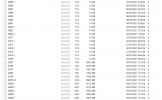
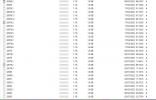
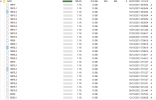
Using Windirstat we have found that the 3CX Phone System\Data\DB\Base\16451 folder is 92GB, its full of 1.0GB files up until todays date, then a large amount of variable file sizes with random dates, from 16/10/21 when v18 was installed as a fresh install.

Logging is set to low; backup log files are set to be kept for 1 day, the logs were last cleared 7.2.22.

Backups are kept on site storage device.

We don’t use call recording or any integrations with 3CX.

Is there a way to clear this data without causing an issue with the system?

Thanks!
 

Attachments

  • 3cx4.PNG
    3cx4.PNG
    75.8 KB · Views: 33
  • 3cx3.PNG
    3cx3.PNG
    46.4 KB · Views: 32
  • 3cx2.PNG
    3cx2.PNG
    56.1 KB · Views: 26
  • 3cx1.PNG
    3cx1.PNG
    48.2 KB · Views: 28
We have started receiving half-hourly emails now about low or no free disk space. We have tried building a new VM and installing 3cx from fresh but this also results in the disk getting filled to the brim.
 
I've never seen this, but 2 things I would try....

Is your logging set to verbose?

I don't have any more Windows PBXs deployed - any chance you can move it to Debian? It's typically lighter on resources, gets updated first, and doesn't seem to have weird issues like this.
 
Logging is set to off, it was originally set to low but switched to off when we noticed the disk space steadily increasing.

We have tried deleting these files a while ago, however, we noticed some corruption on the console afterward and restored back.

I can certainly try a Linux machine but would prefer to stick to a windows host as our environment is mostly windows, my only thought is if we install 3CX on a Linux machine, and restore the system, is it going to have all this data stuck there again.
 
hmm... if you have a Windows install the solution is move to Debian. I am trying to find a forum post where a 3CX issue on Debian results in the suggest solution of moving to Windows.. nothing so far.

Stevo, I checked a few of my Windows deployments and that directory is typically less than 250MB and most of the files are 8KB in size. Have you opened a case with 3CX support?
 
@Chris-MBN Not opened a case just yet, I wanted to see if there was a solution to the issue we are facing that someone else may have had and their fix.

We are running Server 2016, even the new VM I threw up today, 160GB SSD, 20GB used by windows, and 130GB used by 3CX install after restoring from backup.
 
@Chris-MBN Not opened a case just yet, I wanted to see if there was a solution to the issue we are facing that someone else may have had and their fix.

We are running Server 2016, even the new VM I threw up today, 160GB SSD, 20GB used by windows, and 130GB used by 3CX install after restoring from backup.
I have had (2) Debian instances on AWS performing the exact same way. It started after the last update.
 
I have had (2) Debian instances on AWS performing the exact same way. It started after the last update.
Last update meaning 4 or 5?
 
18.0 Update 4 (Build 965) for me also
 
This is normal because you have records for at least 42 million calls, inflating the size of the database folder.

You can either increase the size of the disk to accommodate for the large number of records, or when you upgrade to Update 5 we will introduce a new feature that allows you to purge call records by range:

Depending on how long you've had the system, you could for example purge everything older than a year (or specify a range) and the size should reduce considerably.
 
  • Like
Reactions: Chris-MBN
This is normal because you have records for at least 42 million calls, inflating the size of the database folder.

You can either increase the size of the disk to accommodate for the large number of records, or when you upgrade to Update 5 we will introduce a new feature that allows you to purge call records by range:

Depending on how long you've had the system, you could for example purge everything older than a year (or specify a range) and the size should reduce considerably.
I have increased it multiple times and have purged recordings, call detail and the like. No matter what I do it still fills up the drive space.

The only way that i could correct the issue was to relocate the instance to lightsail from AWS.
 
Did you click on Purge Call History at any point to delete all the call records? (after taking a backup first of course)
 
Did you click on Purge Call History at any point to delete all the call records? (after taking a backup first of course)
of course...couldnt perform a backup, due to HD and 3CX PhoneSystem Database Server stopping.
 
This is normal because you have records for at least 42 million calls, inflating the size of the database folder.

You can either increase the size of the disk to accommodate for the large number of records, or when you upgrade to Update 5 we will introduce a new feature that allows you to purge call records by range:

Depending on how long you've had the system, you could for example purge everything older than a year (or specify a range) and the size should reduce considerably.
Hi, thanks for your update, do we know when v18.5 is due?
 
Not exactly, it's getting very close though. Keep an eye on our blog posts
 
Status
Not open for further replies.

Forum statistics

Threads
111,974
Messages
590,081
Members
164,899
Latest member
mazet