3cx Recordings not working

Status
Not open for further replies.

deepee

Bronze Partner
Basic Certified
Joined
May 31, 2019
Messages
18
Reaction score
0
I have 3cx configured to record all extensions but for some reason, it has stopped working on most extensions, it is as if it is gradually failing on all extensions?

There is plenty of storage space. The occasional recording that does work, plays fine.

I am on the latest build, everything is up to date, the server has been rebooted.

I am not sure what else to try, can anyone help?
 
Hello,

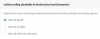
Please confirm your license first (you can refresh license to double check)

Also tell us if you selected All calls or External calls

1591264906072.png
 
Is it possible that deepee has exceeded his quota?
 
  • Like
Reactions: JohnS_3CX
@voiptoys They would get a message front page and center, you cant miss it.
Also an email would be sent if the option was enabled from the recording settings
1591271096090.png
 
  • Like
Reactions: TBWD
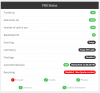
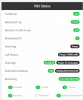
The license is an enterprise license and I have refreshed it. The storage space is fine, I have 40Gb assigned and only used about 13Gb.Screenshot - 04_06_2020 - 001 P.png
Hello,

Please confirm your license first (you can refresh license to double check)

Also tell us if you selected All calls or External calls

View attachment 16372

My license is Enterprise and it is set to record all calls.
 
Ok you can look at some additional logging in this case.

Go to Activity Log, then click on settings and set the system to Verbose (just for troubleshooting purposes).

Then make sure a few calls go through, and confirm they were not recorded.

Once this is done, then click Support on your management console and Generate Support Info file.

You will shortly get a link with a support package which will include some logs you can look at.

3cxSystemService.log = search with keyword recording

You can also use a more advanced log analysis tool here and again search for the word recording which may reveal more useful information (read guide first) https://www.3cx.com/docs/3cx-log-viewer/
 
Ok you can look at some additional logging in this case.

Go to Activity Log, then click on settings and set the system to Verbose (just for troubleshooting purposes).

Then make sure a few calls go through, and confirm they were not recorded.

Once this is done, then click Support on your management console and Generate Support Info file.

You will shortly get a link with a support package which will include some logs you can look at.

3cxSystemService.log = search with keyword recording

You can also use a more advanced log analysis tool here and again search for the word recording which may reveal more useful information (read guide first) https://www.3cx.com/docs/3cx-log-viewer/


Great, I have found the fault but wonder if it is a system glitch?

The recordings fail for some of our newer extensions we have added in the last couple of weeks.

Basically, the log files show that the call was recorded, but the folder in the recording location /mnt//sdb/recordings/ had not been created and therefore the recording must have failed to save.

The logs show that recordings made to extensions that have a folder in the /mnt//sdb/recordings location will save fine but extensions that do not have their folder in this path fail which seems obvious.

I would assume the folders should create automatically on extension creation but this seems to have not happened and I guess this is the fault I need to look into.

I can create other folders manually to work around this but could do with fixing the issue.

Is there any way to debug how/why the folders are not creating?
 
Have you moved your default recordings location?

If so, check permission or trying setting it back to default location and trying again.
 
Exactly, the user phonesystem on Debian will need to have access to write to that folder with the same rights as it has for the PBX folders.

In addition, the folder needs to be on a physical drive or a drive with block level access like a SAN / iSCSI drive. Not an NFS or SMB file system (otherwise the writes integrity may fail you).
 
Thanks for the info, the folder was moved from the default at installation time as the primary disk was too small. It has been like this since day one but as you suggest, I suspect that permissions may be the cause here.

I manually created one of the folders and the recording save fine so there appears to be write permissions to the folder I created manually, but not folder creation rights?
 
Take a deeper look at Linux rights, and ownership (chown command, and chmod command).

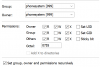
Ensure the owner of the recordings folder and its contents is phonesystem

Ensure that phonesystem has the same rights as it had in the original recordings folder

This might help guide you:
1591352451799.png
 
What GUI is that for permissions?
 
It's not a system GUI, I was just using a remote file manager app to take a helpful screenshot (WinSCP).
 
Can I uses WinSCP to correct the permissions?
 
Probably could do, if you login with sufficient rights.

I would recommend running a backup first of course and taking it off of the machine just in case.
 
Status
Not open for further replies.

Forum statistics

Threads
111,952
Messages
589,895
Members
164,845
Latest member
tdzski5