3CX SBC / Yealink No Service

Status
Not open for further replies.

ipt_dude

Premier Customer
Joined
Feb 28, 2022
Messages
96
Reaction score
23
Hello Internets,

We are deploying some 20-30 CanaKit SBCs. Everything went great with home users that had Xfinity cable modems. I then had two users who are CenturyLink DSL customers and they have Zyxel C3000Z DSL modems.

My assumption is that it is some magical sequence of configuration options in the DSL modem. The GUI of that device is FAR more complicated than a home based solution should be. I did the basics by disabling the firewall and toggling the SIP ALG on / off - and had ZERO luck. The Yealink consistently went into No Service.

There is no problem with IP connectivity on the LAN segment of this DSL modem. Unfortunately, the staff that provisioned the SBC did not leave SSH enabled on the LAN interface so I can't pull logs.

Questions:
1. Anyone dealt with this DSL modem before?
2. Where are the SBC logs stored?
3. Any other basic troubleshooting I can do?

3CX 16.0.8.9
SBC 18.1.36

Amir
 
Check and see if you can turn off IPv6 on the DSL modem. I have seen that cause issues with SBC. Also I would highly recommend upgrading your 3CX to v18.
 
Thanks Jonathan. After spending hours messing with this GUI - I was hopeful with your suggestion to disable IPv6 - but it was already disabled.
 
So with the SBC you shouldn't have to touch the firewall at all. Is the SBC showing registered in 3CX?
 
  • Like
Reactions: ipt_dude
Within 3cx management console under sip trunks is the sbc registered

If yes, remove the settings of the phone from the extension.

Factory default the phone and it should appear under extension where you can assign it

As above, I would upgrade your 3cx to v18

Under extension - options make sure ‘sbc *****’ option is unticked
 
Last edited:
  • Like
Reactions: ipt_dude
So with the SBC you shouldn't have to touch the firewall at all. Is the SBC showing registered in 3CX?
Hi Barry,

The SBC is showing registered. I deployed 8 SBC / Yealinks and the ONLY 2 phones which came up No Service where behind the Zyxel C3000Z DSL modem. It is WAY to complicated of a GUI for a SOHO application. I tried SO many different combination of settings and literally rebooted her DSL modem, SBC and phone MANY times to no avail!

Thank you so much,

Amir
 
The thing is, with a SBC, you shouldn't need to change anything on the modem/firewall/etc. As long as the SBC can connect to the PBX and the phones can talk to the SBC, they should be able to connect.

Are you sure the phones have the correct IP of the SBC?
 
  • Like
Reactions: ipt_dude
Within 3cx management console under sip trunks is the sbc registered

If yes, remove the settings of the phone from the extension.

Factory default the phone and it should appear under extension where you can assign it

As above, I would upgrade your 3cx to v18

Under extension - options make sure ‘sbc *****’ option is unticked
Hi Saqqara,

Yes, within the 3CX management console, the SBC is registered. Perhaps I need to drink another dirty chai because I'm not following your suggestion to "remove the settings of the phone from the extension". Since I couldn't get her Yealink desktop phone working behind her SBC ( which is green and registered in the 3CX management console) - I had to provision the 3CX app on her iPhone. So in the 3CX management console under extensions, in the Phone Provisioning tab, I only have "3CX App" listed.

I will await your response and I can certainly get her to factory default the phone - but it seems like you want me to do a step before I factory default the phone.

As to your last comment, I looked at my personal extension in the 3CX management console because I'm happily operating with an SBC and my Yealink at home for months. I looked in Extension >> Options >> Restrictions and this box is, in fact, UNCHECKED:

Block Remote Tunnel Connections (3CX App connections with Tunnel enabled & SBC will be blocked)

Thank you so much,

Amir
 
The thing is, with a SBC, you shouldn't need to change anything on the modem/firewall/etc. As long as the SBC can connect to the PBX and the phones can talk to the SBC, they should be able to connect.

Are you sure the phones have the correct IP of the SBC?
Hi Sweetaction,

The first thing I did was make sure I have IP connectivity by taking remote access to the staff members PC and PINGING the IP address of the SBC and phone. I then made the ASSumption that the phone would broadcast and find the SBC address. We didn't pre-provision it with the address of the SBC.

This same process worked for 6 remote workers who were behind Xfinity cable modems. The 2 staff members which had issues where behind CenturyLink DSL modems and I made the assumption that it was the crazy configuration of the DSL modem that was causing a problem.

But now hearing feedback from CobaltIT, Saqqara and you - I'm starting to wrap my head around the fact that if the SBC is registered AND the phone can talk to the SBC - then we should be good.

Is there a place in the Yealink GUI where I can configure it with the SBC IP address?

Thank you so much,

Amir
 
Has the sbc server internal IP address range changed ?

Are you sure the phone in the management console has been setup as 3CX SBC (remote)

1. the IP match the 'SCX Session Border Controller 'settings with the management console.
2. The mac address of the phone is correct

On the phone gui, does the provisioning url match the one in the 3CX management console - Settings - Auto Provision - Server URL. If you click on 'Auto Provision Now' does the settings get updated and the phone register,

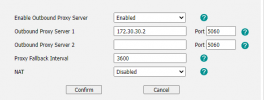
To set the SBC server - under account, change these settings to match your installation

1646669151766.png
 
  • Like
Reactions: ipt_dude
Has the sbc server internal IP address range changed ?

Are you sure the phone in the management console has been setup as 3CX SBC (remote)

1. the IP match the 'SCX Session Border Controller 'settings with the management console.
2. The mac address of the phone is correct

On the phone gui, does the provisioning url match the one in the 3CX management console - Settings - Auto Provision - Server URL. If you click on 'Auto Provision Now' does the settings get updated and the phone register,

To set the SBC server - under account, change these settings to match your installation

View attachment 28474
Hi,

I factory defaulted the phone and it came back up as "NO SERVICE". I was able to access the phone gui and PING the SBC IP address (192.168.0.50) from the phone ( 192.168.0.49) .

The SBC address shown in the 3CX GUI (see breadcrumbs below) matches that of the SBC.
3CX Management Console >> SIP Trunks >> Problem SBC >> General TAB >> Connection Information >> Local IP is 192.168.0.50

Please note that I've never seen the Yealink deskphone in the 3CX MC. I've just seen the SBC Green / registered.

Thank you!

Amir
 
If you want to do this "manually"..

1. Under the extension, add phone, make sure to set SBC and it's IP.
2. Visit the config URL and download the config (example for yealink phones: http://fqdn.example.com:5000/provisioning/<randomstring>/<phonemac.cfg> )
3. Connect to the phones webui and upload the config

Phone should be connected and working. This bypasses the auto-discover/pnp process since it doesn't seem to be working for some reason.
 
Hi,

I factory defaulted the phone and it came back up as "NO SERVICE". I was able to access the phone gui and PING the SBC IP address (192.168.0.50) from the phone ( 192.168.0.49) .

The SBC address shown in the 3CX GUI (see breadcrumbs below) matches that of the SBC.
3CX Management Console >> SIP Trunks >> Problem SBC >> General TAB >> Connection Information >> Local IP is 192.168.0.50

Please note that I've never seen the Yealink deskphone in the 3CX MC. I've just seen the SBC Green / registered.

Thank you!

Amir
Saqqara,

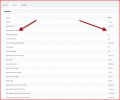
I'm confused by the fact that I see "agents behind sbc" listed in the SBC in the 3CX MC:
 

Attachments

  • stacie_sbc.jpg
    stacie_sbc.jpg
    130.8 KB · Views: 13
If you want to do this "manually"..

1. Under the extension, add phone, make sure to set SBC and it's IP.
2. Visit the config URL and download the config (example for yealink phones: http://fqdn.example.com:5000/provisioning/<randomstring>/<phonemac.cfg> )
3. Connect to the phones webui and upload the config

Phone should be connected and working. This bypasses the auto-discover/pnp process since it doesn't seem to be working for some reason.
Let me try that! I'll update shortly. Thank you!
 
Great news ! The Yealink appeared in the 3CX console after I configured the " Enable Outbound Proxy Server" in the Yealink GUI.

Before we close out this thread - I would like to make sure that was the sequence of events because I've had a quite a few plates in the air.

I hope that this will help someone in the future. After having been a Cisco engineer for nearly 20 years, I'm amazed at the 3CX community and the platform itself. What a great solution for so many SMBs and eventually - if 3CX has an active / active clustering topology like CUCM - this would be a perfectly fine platform for smaller "enterprise" class clients.

Our org has 400 staff across 6 locations and I cannot begin to tell your HOW MUCH EASIER IT IS TO MANAGE 3CX vs 2 @ CUCM VMs, 2 @ UCCX VMs, 2 @ CER VMs, 2 @ CIMP VMs , 2 @ CUC VMs, 2 @ C Series Servers / the vsphere layer and last but not least 4 damn ISR 4100 Series IOS routers acting as CUBEs. All of that ridiculously oversold solution will be replaced by a single 3CX VM!
 
  • Like
  • Love
Reactions: NickD_3CX and ivank
Thanks again CobaltIT, Saqqara and SweetAction - the resolution for me was to follow the steps provided by SweetAction (followed steps below to manually build the phone in 3CX MC) and Saqqara ( added manual pointer to SBC address in Yealink GUI).

If you want to do this "manually"..

1. Under the extension, add phone, make sure to set SBC and it's IP.
2. Visit the config URL and download the config (example for yealink phones: http://fqdn.example.com:5000/provisioning/<randomstring>/<phonemac.cfg> )
3. Connect to the phones webui and upload the config

Phone should be connected and working. This bypasses the auto-discover/pnp process since it doesn't seem to be working for some reason.
 
  • Like
Reactions: VasilisV_3CX
  • Like
Reactions: ipt_dude
Question - how did setup the phone in the first instance

This is how the system should work - install the sbc and make sure it is registered.

Factory default the phone and it should appear under phones where you can assign it - https://www.3cx.com/docs/manual/configuring-ip-phones/
 
  • Like
Reactions: ipt_dude
Question - how did setup the phone in the first instance

This is how the system should work - install the sbc and make sure it is registered.

Factory default the phone and it should appear under phones where you can assign it - https://www.3cx.com/docs/manual/configuring-ip-phI

I first took remote control of the staff members work PC at home and did a discovery to determine what address on their local segment could we hard code to the SBC. We then provisioned the SBC with the address and shipped it with a new phone to remote staff members home office. We provided instructions on how to remove their existing Cisco phone and replace it with 1. SBC and 2. Yealink phone.

After that, the SBC became green / registered in our 3CX MC. But the phone would NEVER appear in the 3CX MC. I did noticed that when these two events occurred, when I sent into the 3CX MC >> SIP Trunks >> Staff Members SBC >>Statistics tab - I would see a "1" entry here. It's interesting that now it shows three - yet she only has a single Yealink on that LAN segment at her house.

Agents Behind SBC3
 
If you want to troubleshoot the PnP issue further, start here: https://www.3cx.com/docs/plug-and-play-ip-phone/

If I had to guess, I would say it's an issue with the switch/wherever things are plugged into blocking multicast somehow.
That makes a lot of sense and would explain why the ONLY two remote site staff members that I had problems with - were on this Zyxel C3000Z DSL modem. All of the other remote site staff members had Xfinity and worked exactly how we all would expect them to work!
 
Status
Not open for further replies.

Forum statistics

Threads
111,974
Messages
590,083
Members
164,901
Latest member
Silent_Guru