3CX server RAM and CPU Spike to 100%

Status
Not open for further replies.

renfotech

Free User
Joined
Aug 26, 2019
Messages
16
Reaction score
0
We are having issues with our 3cx server, we noticed that the server RAM and CPU spike up to 100% and all services stop working, when this happened all agents are not able to do inbound and outbound calls. This has been happening for the past 2-3 months. Any suggestion on how to resolve this issue as soon as possible will be highly appreciated.
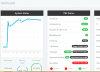
 

Attachments

  • 3cx Status.PNG
    3cx Status.PNG
    97.2 KB · Views: 24
Hi @renfotech

I would start by monitoring the system processes and see what process is using up all the resources during such events.

Windows: Run Task manager and check
Debian: You can do this if you SSH into the machine and a process viewer/system monitor like top
 
Last edited:
Hi @renfotech

I would start by monitoring the system processes and see what process is using up all the resources during such events. You can do this if you SSH into the machine and a process viewer/system monitor like top
I noticed that the management console is taking upto 14GB of the RAM.
 
  • ow many phones and/or clients are connected simultaneously
  • how many BLFs
  • how many extensions in total
  • do you use chats
  • How many phones and/or clients are connected simultaneously----50 to 70
  • how many BLFs ---- don't understand
  • how many extensions in total ----- 128
  • do you use chats----- No
 
Hi, Could it be related to Recordings as in your screen copy datas info are in Red, near full quota 200Gb
 
  • 3CX Version: 16.0.2.910
  • Server OS:Linux debian 4.9.0-8-amd64 #1 SMP Debian 4.9.130-2 (2018-10-27) x86_64
  • Is the 3CX Server Hosted and where? Premise
  • IP Phone Make/Model/Firmware: Deskphone 3cx App
  • Provisioning Method: Local
  • Trunk Provider or Gateway Make/Model: E1 (21st Century) and IPNX
  • Has the Firewall Checker passed: Not Sure
  • Are custom Phone Templates being used: Not Sure
 
Ok, lets start from a clean slate: reboot the system when you can, and then install the pending update you have now to go to version 16.0.3.676, and also make sure your users are running the latest 3CX deskphone (should be 16.0.1.81 on Windows). Lets monitor this and see if the cpu/memory usage starts to grow again
 
Ok, lets start from a clean slate: reboot the system when you can, and then install the pending update you have now to go to version 16.0.3.676, and also make sure your users are running the latest 3CX deskphone (should be 16.0.1.81 on Windows). Lets monitor this and see if the cpu/memory usage starts to grow again
I just want to know if PD and call flow designer will work perfectly on the new version?
 
If you know how, Next the time CPU is spiking, SSH to the system and run the command, ps aux, and then paste the results here, it helps make this easier if you maximize putty to fullscreen first, this should tell us what is spiking the system, and at least some details that may help. This output shouldn't contain anything sensitive to your systems security, so please censor lightly or not at all.
 
If you know how, Next the time CPU is spiking, SSH to the system and run the command, ps aux, and then paste the results here, it helps make this easier if you maximize putty to fullscreen first, this should tell us what is spiking the system, and at least some details that may help. This output shouldn't contain anything sensitive to your systems security, so please censor lightly or not at all.

Find the attached file for the results
 

Attachments

Can you please let me know if you have installed anything else on the machine like monitoring tools, antivirus, software firewalls, remote management software etc. or if the machine is purely dedicated to 3CX with no other software packages installed?
 
Status
Not open for further replies.

Forum statistics

Threads
112,363
Messages
592,121
Members
165,536
Latest member
Wecare_ITA