3CX SMS Version 18.0 U6

Status
Not open for further replies.

KonnectCraft

Silver Partner
Basic Certified
Joined
Apr 29, 2021
Messages
19
Reaction score
7
Putting together a quick note for everyone having issues with 3CX SMS Update with V18 update 6 since notes are all over the place and you missed the 3CX updates on blog and emails. Hope this helps someone.

  1. Messaging Section no longer available on the Management Console. Rebooting Server, restarting services isn't going to restore this. Its by design and not a glitch.
  2. SMS for Telnyx, Twilio, Flowroute & Bandwidth SMS is broken and reconfiguration is definitely required to restore SMS functionality.
  3. SMS Configuration (For Supported Providers) is now inside the SMS tab (Next to Outbound Parameters inside SIP Trunk Config). Configuration is going to be different as per different Service Providers. For any service providers not supported by 3CX, the SMS tab is simply missing.
  4. SMS is now enabled by default for all users. You no longer have to enable it per user in the General Tab.
  5. SMS Routing to an individual user/extension Interface is no longer available. SMS routing is handled directly by Inbound Rules.
I hope this helps someone as documentation is not yet updated with most of the SMS providers and can create a lot of confusion trying to follow different support documentations.
 
  • Like
Reactions: Phoenixfw
Hi
Can you please expand on "SMS routing is handled by inbound rules"?
I used to have SMS go to a queue (using Flowroute).
Queue never had a DID because we route to a digital receptionist first.
How would you fix that?
 
Hello,
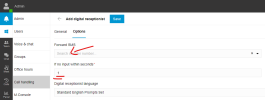
For something like this you'd most likely have to use the workaround Digital Receptionist function (In Web Client not the old Management Console) to forward SMS. The can silence the IVR and set the input time for 1 second :)

1675735640786.png
 
No Option for on-premise, unless someone can tell me something different.

separate the voice and SMS. that option not Available.
 
I just discovered this craziness after my client told me their SMS wasn't working.
I am using Twilio and the web hook is all set up.
I only have routing set up in the SIP trunk itself to go to an extension.
Should there also be an inbound rule?
What is even stranger, I was trying to self test this to my own extension, and it never worked. As soon as I changed the extension to another user, the SMS seemed to start working.
Twilio shows the messages accepted and no errors, and I see no errors in 3cx.
I simply never see the SMS come into the iOS app

Any thoughts on rule need or how to troubleshoot the extension that is not getting the

What do you mean by that? Have voice on a separate trunk than SMS or a differing rule?
Can you expand?
I had everything working till this update, unless you can tell me how to get Main Number\SMS to DR and SMS to Call Queue.
 
If I bind DID to Call queue then can send and receive sms. Client has 1 number and thats there main. I have 3 clients that way. Lawyer, Roofing Company and Research Dental Company.
 
yes, I am also stumped. That is how I had it set up as well, I think this deprecated functionality we had before unless I am missing something
Bandwidth Trunks and SMS
 
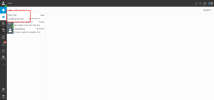
1675673776558-png.34011


This option is not there
 
Can you explain how this new digital receptionist work?
If I have my main number already assign in the Web control panel (Inbound routing) how is this going to interact with my stuff for SMS ?
 
Can you explain how this new digital receptionist work?
If I have my main number already assign in the Web control panel (Inbound routing) how is this going to interact with my stuff for SMS ?
you on startup or Hosted/on-premise
 
one more question for this crew
I have two 3CX systems set up identically, each with their own Twilio SIP trunk
Voice calling working fine
I can see "send an SMS" in the chat portal in one, but not the other
I see trunk registered correctly and no errors.
Any ideas?
I have re-entered the account SID and secret and also reconfirmed webhooks
I Would Del the trunk and reprogram and test again. Make a backup first
 
I Would Del the trunk and reprogram and test again. Make a backup first
backups don't import after reconfig. They are incompatible as the templates are different. There are hacks available if you look in other threads.
 
I just discovered this craziness after my client told me their SMS wasn't working.
I am using Twilio and the web hook is all set up.
I only have routing set up in the SIP trunk itself to go to an extension.
Should there also be an inbound rule?
What is even stranger, I was trying to self test this to my own extension, and it never worked. As soon as I changed the extension to another user, the SMS seemed to start working.
Twilio shows the messages accepted and no errors, and I see no errors in 3cx.
I simply never see the SMS come into the iOS app

Any thoughts on rule need or how to troubleshoot the extension that is not getting the messages?
I am on the same spot as you, using Twilio, and now the SMS is disabled, and not able to reactivate, is this a bug that is going to be fixed at some point?? What are we supposed to do?
 
Hi, just upgraded to version 18 U6 and was using Telnyx. Definitely cannot see any SMS tab anywhere.
 
  • Like
Reactions: UCPATH
Well, I hope you did a full backup before upgrading. If you did, then you can simply terminate the current PABX and create a new one (using the backup to restore). Hope this make sense.
 
  • Like
Reactions: ekuypers
How do you send a sms from the web client? I have twilio sms enabled in the truck and Can send sms from the android and ios app.

1675874356141.png
 
I have restored three backups from before the update that ran last night, all three load the new version?
 
I've found Telnyx in the old Admin UI and have added it back, but it wants to register it as a full SIP trunk and doesn't seem to register for SMS. In the new Admin UI Telnyx isn't even an option in the dropdown but shows up if you add it in the old UI, however there's still the same problem - it won't register the SMS connection. The trunk shows as unregistered (because there's no SIP connection), but SMS messages are going through again. Still, we've had to rebuild the configuration from scratch all over again - the update wiped it all out. This is unacceptable in a business environment.
 
  • Like
Reactions: UCPATH
How do you send a sms from the web client? I have twilio sms enabled in the truck and Can send sms from the android and ios app.
You need to have a DID pointing to your extension somehow. Either directly, or via a Ring Group or Queue that you are a member off.
 
I have restored three backups from before the update that ran last night, all three load the new version?
Backups might be of a specific version but it depends in what version you are restoring the backups to. If your installer is of Update 6 then Update 6 will be restored with the settings included in the backup of the previous version.

Hope this makes sense.
 
Status
Not open for further replies.

Latest Posts

Forum statistics

Threads
111,973
Messages
590,075
Members
164,895
Latest member
jasonkkrause