3CX Softphone V5.2 Beta - View Calls & Set Up Voicemail Greetings

ThomB_3CX

Staff member
Joined
Apr 28, 2022
Messages
833
Reaction score
1,268

Easily monitor all call activity and manage voicemail greetings directly from the softphone.​

A new Beta update is available for the 3CX Softphone for Windows. Version 5.2 introduces new call visibility options and the ability to manage voicemail greetings from the app. Here’s what’s included.

View All Calls in One Place

...
Continue reading the Original Blog Post.
 
Another great update. Having extra features in the softphone which do not require users to go to the webclient is always amazing.
Makes the product much more userfriendly not having to switch in between.
 
I am very pleased that the app is being further developed.

But I am stil missing six things:
  1. Add/Edit/Delete BLF in 3CX Windows App (without webclient)

  2. Restore headset integration (like in webclient)
    -> see https://www.3cx.com/community/threa...tegration-when-headset-is-reconnected.133509/

  3. Correct wrong german translation in 3CX Windows App ("Teilnehmen" is wrong)
    -> see https://www.3cx.com/community/threads/wrong-translation-in-windows-app-german.131103/

  4. Provisioning 3CX Windows App
    -> see https://www.3cx.com/community/threads/3cx-windows-app-v20-provision-url-by-dhcp-dns-gpo.133254/
    -> see https://www.3cx.com/community/threads/mass-deployment-of-3cx-softphone-on-windows.134352/
    -> see https://www.3cx.com/community/threads/v20-windows-app-provisioning.131062/#post-629867

  5. Active call always visible
    -> see https://www.3cx.com/community/threads/windows-softphone-app-active-call-always-visible.130956/

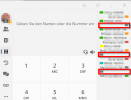
  6. No gray BLF icon, when no BLF entry
    -> To structure the BLF section it would be useful to have empty lines. At the moment there is for empty lines always a gray button shown. Could that be removed?
    1752750759342.png
 
Last edited:
Maybe it would be more user friendly to move "configuration" from profile picture to settings area. Then all setting/configuration options would be on one single place
 
Very nice. Can I install Beta alongside the standard release, but just not run both at same time?
 
Very nice. Can I install Beta alongside the standard release, but just not run both at same time?
You can actually run both at the same time, they are totally different apps.
 
Very nice. Can I install Beta alongside the standard release, but just not run both at same time?
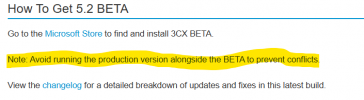
As per the blog, we advise that you avoid that:

1752815854308.png
 
@UCMUserAZ strictly speaking you can run both at the same time. But windows notification for incoming calls/chats may randomly misbehave (even when 1 app is running and the other is terminated.)
 
I am very excited for this update and keep up the good work!
 
This looks great guys, have been testing it for a few days now.

Please look at adding back the option to show Department headers in the Receptionist view as there was in the older V18 versions. You would make a lot of our clients very happy to bring that back.
 

Forum statistics

Threads
111,990
Messages
590,165
Members
164,929
Latest member
Cloudstar