3CX - Twilio SMS Not Working

Status
Not open for further replies.

eholloway

Customer
Joined
Aug 19, 2022
Messages
8
Reaction score
0
Hello all,
I have configured Twilio and 3CX hosted instances to support SMS. If I test on either side it gives the success message that a test message was successfully sent. However, if I set a message to be received on any number that has SMS capabilities it is not received.

The 3CX configure page has my:
Twilio Account ID from the main console page (I also tried with the SMS sid id just to see if that was the issue, same thing)
Twilio Auth Token
I pasted the URL it gives on the "A MESSAGE COMES IN" section and it is set to "HTTP POST" on the numbers in Twilio (I also changed to HTTP GET to see if that was maybe the issue.. still didn't work)
My numbers are formatted without spaces or dashes with the "+1" in front of the area code.
Inbound messages are set to route to my user account. My user account is also toggled to allow SMS message sending.

I used Twilio's support to see if maybe they could find the issue and they could not.
I also checked all the logs for 3CX and Twilio and there is nothing that would indicate an issue with messaging itself. Both sides show delivery of messages and Twilio shows successful receipt of messages but 3CX does not at all.

I have completely deleted SMS configs and reconfigured, and restarted 3CX a few times and nothing is getting messages to receive.
I am new to setting up anything phone related from scratch and I'm hoping there is just something I missed/am overlooking.

Account details:
Hosted account
3CX Pro 4 SC
18.0 Update 4 (Built 965)
 

Attachments

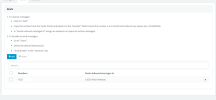
  • 3cx phone number.png
    3cx phone number.png
    29.3 KB · Views: 60
  • auth id page.png
    auth id page.png
    45.2 KB · Views: 60
  • weburl.png
    weburl.png
    65.2 KB · Views: 57
We just did the upgrade to 18.0 Update 5 and are having SMS issues with Twilio. I have walked through the new guide and configured everything. I am getting an error on twill and no SMS ever gets to 3CX


Errors and Warnings​

NOTIFICATION SIDNOaf3040e1576b6670a77effe3aff750d2WARNING 12300 Twilio is unable to process the Content-Type of the provided URL. Please see Twilio's <a href="https://www.twilio.com/docs/sms/accepted-mime-types"> documentation on accepted content types </a> for more information on valid Content-Types.

DESCRIPTION
Twilio is unable to process the Content-Type of the provided URL. Please see Twilio's <a href="https://www.twilio.com/docs/sms/accepted-mime-types"> documentation on accepted content types </a> for more information on valid Content-Types.

Not sure if that's the same issue you guys are seeing or not.
 
Hello all,
I have configured Twilio and 3CX hosted instances to support SMS. If I test on either side it gives the success message that a test message was successfully sent. However, if I set a message to be received on any number that has SMS capabilities it is not received.

The 3CX configure page has my:
Twilio Account ID from the main console page (I also tried with the SMS sid id just to see if that was the issue, same thing)
Twilio Auth Token
I pasted the URL it gives on the "A MESSAGE COMES IN" section and it is set to "HTTP POST" on the numbers in Twilio (I also changed to HTTP GET to see if that was maybe the issue.. still didn't work)
My numbers are formatted without spaces or dashes with the "+1" in front of the area code.
Inbound messages are set to route to my user account. My user account is also toggled to allow SMS message sending.

I used Twilio's support to see if maybe they could find the issue and they could not.
I also checked all the logs for 3CX and Twilio and there is nothing that would indicate an issue with messaging itself. Both sides show delivery of messages and Twilio shows successful receipt of messages but 3CX does not at all.

I have completely deleted SMS configs and reconfigured, and restarted 3CX a few times and nothing is getting messages to receive.
I am new to setting up anything phone related from scratch and I'm hoping there is just something I missed/am overlooking.

Account details:
Hosted account
3CX Pro 4 SC
18.0 Update 4 (Built 965)
I can suggest updating to sp5 Hotfix 1 and deleting the current SMS configuration under messaging, and reconfiguring the SMS via a Twilio sip trunk as per the guide:https://www.3cx.com/docs/manual/sms-text/
 
We just did the upgrade to 18.0 Update 5 and are having SMS issues with Twilio. I have walked through the new guide and configured everything. I am getting an error on twill and no SMS ever gets to 3CX


Errors and Warnings​

NOTIFICATION SIDNOaf3040e1576b6670a77effe3aff750d2WARNING 12300 Twilio is unable to process the Content-Type of the provided URL. Please see Twilio's <a href="https://www.twilio.com/docs/sms/accepted-mime-types"> documentation on accepted content types </a> for more information on valid Content-Types.

DESCRIPTION
Twilio is unable to process the Content-Type of the provided URL. Please see Twilio's <a href="https://www.twilio.com/docs/sms/accepted-mime-types"> documentation on accepted content types </a> for more information on valid Content-Types.

Not sure if that's the same issue you guys are seeing or not.
See your post and answer here: https://www.3cx.com/community/threads/issue-with-twilio-and-sms-on-18-0-update-5.116755/
 
Update to this: It was the numbers purchased through Twilio. I found that out yesterday. Twilio had them marked as being able to perform texting but they were not at all.
Twilio insisted it was fine but it was not.
I just released the numbers and bought new ones to fix.
 
I can suggest updating to sp5 Hotfix 1 and deleting the current SMS configuration under messaging, and reconfiguring the SMS via a Twilio sip trunk as per the guide:https://www.3cx.com/docs/manual/sms-text/
I have the pro version and honestly from what I can tell nothing has changed really? SMS is still working for my users now that I have actual numbers that can perform texting.
SMS is functioning as intended, do I still need to go through and set the SIP up on 3CX if it's functioning? I don't want users to get phone calls at all.
Our hosted version also is set to update daily :)
 
I have the pro version and honestly from what I can tell nothing has changed really? SMS is still working for my users now that I have actual numbers that can perform texting.
SMS is functioning as intended, do I still need to go through and set the SIP up on 3CX if it's functioning? I don't want users to get phone calls at all.
Our hosted version also is set to update daily :)
It will still work with the old configuration of sms until SP6 when the 3cx messaging server will be deprecated at which time you will need to reconfigure sms using the trunk.
 
  • Like
Reactions: eholloway
Status
Not open for further replies.

Latest Posts

Forum statistics

Threads
111,973
Messages
590,074
Members
164,895
Latest member
jasonkkrause