3cx upgrade v15.5 SP6 to v16 upgrade 5

Status
Not open for further replies.

Yellow_Flash

Customer
Advanced Certified
Joined
Mar 11, 2019
Messages
288
Reaction score
37
Hi,

We are planning an upgrade to the latest version.
I had gone through a few posts and I saw that there is some changes that has to be done in the recordings.
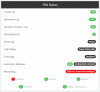
Someone told that once update is done, a red button will be shown on the console.

I'm still at dark about this.
Can someone from 3cx/Community let me know what this conversion is about?
Can we skip it and do it at a later stage?


Kind Regards,
Thank you
 
It is a straight upgrade, no changes to recordings are required.

More info here - https://www.3cx.com/docs/upgrading-pbx-v16/

If using windows make sure you are using a supported OS
Thank you, but this what was told to be before regarding call recording convertion.

"You should not worry about this step at all, it is automated. V16 knows you are coming from V15.5 and will automatically trigger the conversion notice on your dashboard. It's a big red button, you can't miss it. Just press the button to start the conversion.

The reason it exists is because recordings are indexed differently now in V16, and the conversion is basically a one-off re-indexing so V16 can detect your existing recordings."
 
@Saqqara Are you saying that this step isnt required anymore?
 
My mistake, going from 15.5 to 16 the system needs to do some conversion of the recordings.

After the upgrade, you click on the button within the dashboard

How much storage is your recordings taking
 
  • Like
Reactions: Yellow_Flash
Due to the fact you are using Windows, you will need to uninstall 3cx, and reinstall
Windows-based installs cannot be upgraded inline from V15.5 SP6 to V16. You will need to make a backup of your V15.5 installation and restore it during the installation of V16. Windows compatibility for 3CX V16 Update 5 and later is restricted to Windows 10 or Server 2016/2019 due to the new Apple Push Notification service (APNs) requirements.
With that said, best thing you could do is backup recordings to a different hard drive, run a backup of 3cx without the recordings, perform the upgrade, after everything is working put the recordings back, you will be prompted to convert them, done
 
My mistake, going from 15.5 to 16 the system needs to do some conversion of the recordings.

After the upgrade, you click on the button within the dashboard

How much storage is your recordings taking

In the system, there is no recording stored.
Its in an ISCSI device, that is mounted.
Recordings might be around 400 GB.
How long will this conversion take?
 
Due to the fact you are using Windows, you will need to uninstall 3cx, and reinstall
With that said, best thing you could do is backup recordings to a different hard drive, run a backup of 3cx without the recordings, perform the upgrade, after everything is working put the recordings back, you will be prompted to convert them, done
Yes, I understand.
That is the plan.
I never include recordings while taking backup.
Recordings are in ISCSI , which is mounted to the server.

How long do you think it will take to convert 400 GB of recordings?
 
Hard to say, but impact should be minimal and you will be able to use the PBX while the recordings are being converted.
 
Hi @TechieGuy

When you restore your V15.5SP6 backup while reinstalling V16, it will know what version you are coming from and will give you the option to convert your recordings.

If you have any trouble whatsoever, just let us know and we can assist. It's very important that you do not change the names of the files though, as this will break the conversion process.

It should not take too long to convert, the files remain the same (content-wise) but V16 basically indexes them differently from V15 and that index will need to be rebuilt to convert them into a readable table.

And finally, ensure you are on a supported version of windows before your upgrade otherwise you may face unforeseen problems
https://www.3cx.com/docs/manual/
 
  • Like
Reactions: Yellow_Flash
Hi @TechieGuy

When you restore your V15.5SP6 backup while reinstalling V16, it will know what version you are coming from and will give you the option to convert your recordings.

If you have any trouble whatsoever, just let us know and we can assist. It's very important that you do not change the names of the files though, as this will break the conversion process.

It should not take too long to convert, the files remain the same (content-wise) but V16 basically indexes them differently from V15 and that index will need to be rebuilt to convert them into a readable table.

And finally, ensure you are on a supported version of windows before your upgrade otherwise you may face unforeseen problems
https://www.3cx.com/docs/manual/
Thank you
I will get in contact with you, if there are any issues.
But is there any estimated time that you can say for the convertion process of 400 GB?
Like, will it take hours? i just need an estimate so that I can plan things accordingly.
 
I cannot make any estimation on this I'm afraid, it will mainly depend on the disk access speed and the the CPU. Since it is an indexing operation, it should not be too heavy (it does not convert the actual audio files)

Don't worry about it too much, because it runs in the background after the PBX is already up and running, and will allow you to use the PBX normally while this is being done. The only thing you will miss is the ability to access all the recordings during the operation.

An email will be sent to the administrator in case there is an issue so the system informs you of the outcome so you can take further actions if needed.
 
I cannot make any estimation on this I'm afraid, it will mainly depend on the disk access speed and the the CPU. Since it is an indexing operation, it should not be too heavy (it does not convert the actual audio files)

Don't worry about it too much, because it runs in the background after the PBX is already up and running, and will allow you to use the PBX normally while this is being done. The only thing you will miss is the ability to access all the recordings during the operation.

An email will be sent to the administrator in case there is an issue so the system informs you of the outcome so you can take further actions if needed.
okay. Will the admin get a mail once this conversion is over?
 
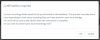
Yes, and this is what you will see when you press the button

1592560678597.png

1592560656920.png
 
Also, can this be done at a later time? Is it necessary to do this conversion right after upgrade?
 
If that is the location that 3cx uses to store recordings, then yes
 
  • Like
Reactions: Yellow_Flash
it can be done anytime, you just wont have access to any recordings from the management console until complete
 
  • Like
Reactions: Yellow_Flash
As soon as your system comes online, check the location of the recordings first, and ensure the same path matches as before (to avoid ending up with 2 recording storage locations and splitting them up)

I would recommend to convert them right away as soon as the PBX comes online, to be able to catch any issues early.

Don't leave this for later, I cannot say what will end up happening if you try to merge them later after your system starts taking calls or if you end up with two split storage locations.

In fact, is there any particular reason you are thinking of avoiding this? What are you anticipating?
 
As soon as your system comes online, check the location of the recordings first, and ensure the same path matches as before (to avoid ending up with 2 recording storage locations and splitting them up)

I would recommend to convert them right away as soon as the PBX comes online, to be able to catch any issues early.

Don't leave this for later, I cannot say what will end up happening if you try to merge them later after your system starts taking calls or if you end up with two split storage locations.

In fact, is there any particular reason you are thinking of avoiding this? What are you anticipating?

Okay.
One reason i'm asking it is because, there are 2 ISCSI devices mounted to the server.
One of which store the live call recordings, and the other one is used to store recordings that are more than 6 months old.
So even if I do this conversion, from what I've understood so far, it is only those recordings that are there in the location mentioned in 3cx that will be converted. This means, the one that is in the second ISCSI, the recordings that are more than 6 months old won't be affected.
So I'm not sure what will happen if there are 2 types of recording, one that is converted and other isn't converted.
 
Status
Not open for further replies.

Latest Posts

Forum statistics

Threads
111,953
Messages
589,915
Members
164,850
Latest member
masvty