3CX V18: Connecting Teams & Customers - Faster, Better, More Efficiently

@PhoneOnline

There's no fixed date yet but it should be close.

We are all waiting when Windows installer are come ( I every day checking change log :) )
Hope this day are come soon.

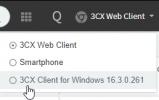
By the way, could i ask you regarding v18 Windows Client , it worked with 18 version only or can be connected to v16 ?

Wish you all strong health
 
Hi!

I understand what you are using it for, however, most other users don't use it the same way and end up breaking their SIP Trunk when they enter a number with spaces, hyphens, etc, as these characters are translated to ASCII when put in the User Part of a SIP message.

If you really need to hard-code the CNAME, it seems you already know what you need to do in the Outbound Parameters, and quite frankly this is the way you should have done it in the first place.
You were misusing the field by using it for the CNAM while it was intended for the CID.


Hi,
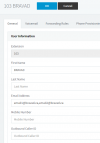
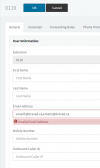
Is this for the same reason that you made it invalid to add multiple email addresses in the same extension. ?

V16 : 1629894523415.png
1629894552513.png


V18 :
1629894609374.png


If it's not a programming error ...

You realize that (at least for our customers) we have a huge number of customers who use multiple emails to receive voicemail messages ?
We can't start creating distribution lists for each of the scenarios all because 3CX decided to make this invalid.
Or worse, start creating Ring Groups just to send voice messages to group members.
It is the equivalent of punishing those who knew how to use it well to "protect" a minority of people who did not know how to use it.

#IdiotProof
 
Try removing the space between Bravad ti and use Bravadti

Bravad ti is an example ... :p
Thank you anyway for your humor :D

Just for Laughs, Here is another example.
If I listen to your suggestion; RESUNIDET Résidence univers détente : RES. UNI. DET.

I'll wait for your next idea! LOL
 
Hi,
Is this for the same reason that you made it invalid to add multiple email addresses in the same extension. ?

V16 : View attachment 23971
View attachment 23972


V18 :
View attachment 23973


If it's not a programming error ...

You realize that (at least for our customers) we have a huge number of customers who use multiple emails to receive voicemail messages ?
We can't start creating distribution lists for each of the scenarios all because 3CX decided to make this invalid.
Or worse, start creating Ring Groups just to send voice messages to group members.
It is the equivalent of punishing those who knew how to use it well to "protect" a minority of people who did not know how to use it.

#IdiotProof
No, it's not the same reason....
 
  • Like
Reactions: FridayIT
We are all waiting when Windows installer are come ( I every day checking change log :) )
Hope this day are come soon.

By the way, could i ask you regarding v18 Windows Client , it worked with 18 version only or can be connected to v16 ?

Wish you all strong health
Hi @Knight!

If with "Windows App" you are referring to the new Desktop App, then no, this is exclusive for V18.

With V16 installations, you can of course still install the now legacy Windows App by following the instructions in the Welcome Email.
 
  • Like
Reactions: Knight!
No, it's not the same reason....

Ouf !!
So much the better !
Is it already planned to re-give access to put several emails in the field please?
 
  • Like
Reactions: pmterp
Hi to all...

I have been waiting to the release of V18 to put the PBX in production...

Now, I have a test instance in Azure but I want to deploy a new one from scratch with V18.

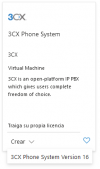
The Azure Marketplace stills show the V16:

2021-08-26 11_43_08-Window.png

2021-08-26 11_42_54-Window.png

Can you please tell me when the V18 is available in Azure Merketplace?

Thanks in advance.

Best regards.
 
Deploy from the customer portal to azure to get v18 now... Its also the best way to deploy unless you have some complicated scenario that can not be supported by the customer portal deploy wizard....
 
Last edited:
Deploy from the customer portal to azure to get v18 now...

Hi Nick,

Thanks for your quick answer.

OK, I will try that method for deploy.

Best regards.
 
  • Like
Reactions: N_G
Will there be a possibility to provision the new Windows desktop app without a webclient?
Will there be something like a CTI integration for remote control the new Windows desktop app from a 3CX Webclient, as it is atm possible for the now legacy desktop app?

Explanation to the questions:
We use some Lenovo ThinClient with Win10 IoT or the older ones with Win7 embedded. ATM on the ThinClient is the 3CX legacy desktop app running. The user works remote from the ThinClient on a Windows Terminalserver. There is a 3CX Webclient running that controls the 3cxphone for windows (legacy client) remote. When this "old" desktop phone is now legacy client, then it will probably not be developed any further sooner or later. So it would be great if all its functionalities would be given to the new Win Desktop App. Therefore we also need a provisioning without the webclient. Because the Webclient on Terminalserver can not provision the Desktop App on the local machine, when the user has no access to any browser.

Edit: Photo attached from remote control 3CX v16 Webclient to 3CX legacy desktop app
1629980804763.png
 
Last edited:
Will there be a possibility to provision the new Windows desktop app without a webclient?
There was a similar discussion about this here:
https://www.3cx.com/community/threads/v18-desktop-app-mass-deployment-option.83541/post-389805


[EDIT]
This is the post I was referring to:
Technically you can simulate what the browser does, which is invoke the EXE and pass as argument the HTTP/S link that the QR code resolves to.

You could load a config like this:
Code:
3CXDesktopApp.exe tcx+app:<HTTP/S link of QR code>
DesktopApp_prov.gif

You could get the QR codes of the users from the Management Console, then via GPO, have a CMD script run on startup doing this.

I haven't tried it and this was not the intended way of provisioning the Desktop App, but you could give it a shot.
 
Last edited:
  • Like
Reactions: PhilK
  • Like
Reactions: Evolute IT
There was a similar discussion about this here:
https://www.3cx.com/community/threads/v18-desktop-app-mass-deployment-option.83541/post-389805


[EDIT]
This is the post I was referring to:
Technically you can simulate what the browser does, which is invoke the EXE and pass as argument the HTTP/S link that the QR code resolves to.

You could load a config like this:
Code:
3CXDesktopApp.exe tcx+app:<HTTP/S link of QR code>
View attachment 24016

You could get the QR codes of the users from the Management Console, then via GPO, have a CMD script run on startup doing this.

I haven't tried it and this was not the intended way of provisioning the Desktop App, but you could give it a shot.

Thanks for that, that seems to be a well way to provision these devices!
What about the remote control feature?
 
Right now, it is not on the roadmap as far as I'm aware.
Were there maybe also some other customers asking for this feature? Should I create an ideas post? Could you maybe ask for it at the responsible team?
 
Were there maybe also some other customers asking for this feature? Should I create an ideas post? Could you maybe ask for it at the responsible team?
You can create a thread in the "Ideas" section, yes. The responsible team(s) monitor this section of the forum constantly as well, so they are aware of what is said.
 

Latest Posts

Forum statistics

Threads
111,977
Messages
590,098
Members
164,906
Latest member
Nari