


- Joined
- Jul 31, 2017
- Messages
- 18
- Reaction score
- 2
Hi Everyone,
Hopefully someone can assist.
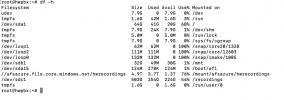
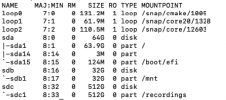
We restored 3cx on a fresh install on an azure VM (Debian 10 3cx V18). The issue that we have is that 3cx shows the incorrect drive space on the dashboard. Please see screenshots attached. Look at the space showed within linux. On 3cx the total drive space is shown as the available space on the vm.


The recordings folder is a secondary disk attached to the vm. We also checked and made sure the folder has the correct permissions.
We tried unmounting the folder to a new location and changing the folder location again within 3cx without success. Did a couple of reboots aswell. The only way we can get recordings going is to set the quota to 0.
Anyone experiencing this? Your help will be much appreciated.
Thanks
Hopefully someone can assist.
We restored 3cx on a fresh install on an azure VM (Debian 10 3cx V18). The issue that we have is that 3cx shows the incorrect drive space on the dashboard. Please see screenshots attached. Look at the space showed within linux. On 3cx the total drive space is shown as the available space on the vm.
The recordings folder is a secondary disk attached to the vm. We also checked and made sure the folder has the correct permissions.
phonesystem:phonesystemWe tried unmounting the folder to a new location and changing the folder location again within 3cx without success. Did a couple of reboots aswell. The only way we can get recordings going is to set the quota to 0.
Anyone experiencing this? Your help will be much appreciated.
Thanks


 .
.


