Well, here it is,
I've been busy with clients, but I finally got around to doing it.
So here's an example of a script (Dialer) to achieve this.
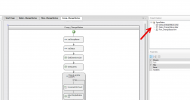
To the right, if you double-click on Comp_ChangeStatus.comp,
you can modify the first two variables (string).
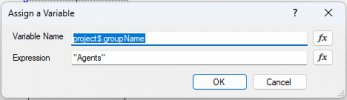
The first is the department name.
We will ignore any extensions that are not at least part of the department configured in this variable.
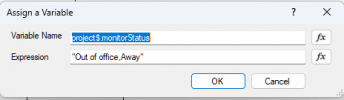
The second is the name of the statuses that are forbidden to use. If any of the extensions has one of the statuses written in this variable (separated by a comma), it will be considered in the wrong status and will be added to the list of extensions where an intervention will be made.
If the extension has a status that is not on the list, which you can customize in the variable, we ignore it; no intervention will be made (In my example, Available, Custom 1 and Custom 2 are statuses that we ignore; an extension having one of these statuses will be ignored).
You need to use the
status names as seen by the system, not those displayed in the graphical interface.
Available
Away
Out of office
Custom 1
Custom 2
If there are several, please separate them with commas.
GetExtensionsList aims to retrieve all extensions based on the conditions described;
The extensions that are part of the "Agents" group name and have one of the statuses written in the varStatus variable.
It returns one extension per line.
The first line (Line 0) contains
the number of extensions, and then the following line (second line) contains the first extension that meets the conditions, the next line contains the second extension that meets the conditions, and so on.
The loop is designed to process each extension in the list (one at a time) until all have been handled, as we cannot request the CallFlow component to change the status of a list of extensions. Therefore, the loop will send one extension at a time.
So, the variable named VarCount will increment each time the process goes through the loop. Initially, it is set to 0.
Therefore, it will increment before even modifying the status of the first extension.
The 'returnSingleExtension' script aims to return the extension number written at the requested line number (The line number is equal to the incremented value (VarCount)).
Thus, we provide it with the list of extensions, and also the desired line number.
The first line is actually line 0, which contains the number of extensions in the list. It is not part of the extension list.
Therefore, the extensions start on the second line (which is line #1).
And when the incremented value exceeds the total number of extensions, we exit the loop.
Next, double-click on Dialer_ChangeStatus.dialer. On the right, you will see the settings of the Dialer.
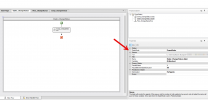
ParallelDialers = 1, we do not want the script to run multiple times in parallel with the same list.
PauseBetweenDialerExecution = 30, is the number of seconds to pause between two executions. Adjust this according to frequency. Be careful not to set the value too low; you need to give it time to process the list before starting a new instance. The new instance overrides the previous one. Therefore, do not reduce it below 15 seconds, ideally. Optimization: For Agents, this is not used in our context.
In the Dialer, you could implement a date and time condition logic, into which you insert the 'comp_ChangeStatus'.
Note, if you are using 'Date and Time conditions' based on a department schedule, you should read the following:
https://www.3cx.com/community/threa...ay-from-call-flow-designer.126381/post-606796
You need to call it once to trigger it. After that, it will run in an infinite loop ( Until you restart the CallFlow service. )


 , as the saying goes: "Pay it forward"
 LOL
LOL


