long story short. here's what we sent to support. their response is to upgrade to version 12 to further troubleshoot the issue.
Problem Description:
Audio is coming into the 3CX server without issue on both the SIP provider Leg of the Call and the local extension leg of the call. However as can be seen in a packet capture the audio is Choppy leaving the 3CX server, this can happen on either leg of the call. Note this issue is intermittent however it happens on a large number of calls each day.
Example- The audio is good coming from the SIP provider to the 3CX server, however the audio leaving the server destined to the handset is choppy (as captured from the 3CX server)
Packet Capture findings:
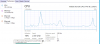
They audio leaving the 3CX server with the while the issue is occurring does not report any missing or out of sequence RTP packets. Wireshark reports the expected number of RTP packets for the call and shows no issues with its RTP analysis. This is because there are no missing RTP packets, the problem is that RTP packets are empty (containing no audio data) when they should be. You can see the evidence of this on the RTP player with chunks missing from the audio stream graph.
Media server Trace Log findings:
While looking at the media server trace log specific line seems to continually come up on all calls that experience this issue, calls that do not experience this issue do not show this line or do not show it the number of times that problem calls do.
10:11:15.804|MSEndPoint.cpp(3682)|Debug2||??:
[email protected]:5482(shift toMix) avgJitter=7965 current=8016
Findings confirmation
If you open the media server Trace log and find any line with the “(shift toMix) avgJitter=7965 current=8016” error then pull the endpoint ID “
[email protected]:5482” you will then be able to find the call ID number by searching for the following line “
[email protected]:5482 joined to call
[email protected]” With the Call ID of 59 you will be able to go into the 3CX server activity log and filter by Call ID number 59. With this you can pull the packet capture and verify the issue on the call. You will find any call with the “shift to Mix error will have audio issues” I verified calls without audio issues do not have this error.


 Like I said I have seen this issue a number of times on the older servers, yours being a G5 it is getting up there in age.