Solved 3CX video conferencing on android

Status
Not open for further replies.

FragFranz

Premier Customer
Joined
Jan 26, 2023
Messages
22
Reaction score
4
hy,
some users have android phones and they want to join a scheduled 3cx webmeeting.
this worked for year but now there is an error "TLS error pbx" on the 3cx android app.

Our System is on V18 U9, i did not apply the A update.
is this necessary? Or is there another error?

the certificate is OK

BR
 
The problem is likely due to the certificates on your phone. If your device is running Android ~8.0 or older, the internal certificates might be outdated or expired. This isn't about our current 3CX version or missing updates.

Here’s what you can do:
  1. Update Your Android OS: If you could update your phone to a newer Android version, it could fix the certificate issue.
  2. Install a New Root Certificate: You can manually install an updated root certificate. This usually involves downloading the certificate and installing it via your phone's security settings.
  3. Use a Different Device: If updating or installing a new certificate isn't an option, you might want to try using a newer device that has up-to-date certificates.
Please keep in mind that updating your Android O/S or Installing a new root cert can/could cause other issues. You or your users would be performing the above at your own risk.
 
i tested with my android phone - i have a samsung galaxy s22
android 14, security patches to July 1st
same problem

when i open the webclient url on the phone, the certificate is trusted
 
Hi,

We're looking into this.
 
thank you!
if you need information or want me to test, please let me know
 
  • As expected we're getting the error when using an Android 8.0 and below device.
  • Works fine when using a 14.0 device.
Could you PM me your PBX domain so we can check?
 
Hi there,

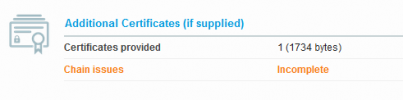
It sees your certificate chain is a bit wrong. While it'll work for most things, some applications require a correct certificate chain to work. You can scan your domain using this URL: https://ssllabs.com/ssltest/analyze.html

unnamed.png
As you see above, the cert chain seems to be a bit problematic. You may need to re-create the cert chain accordingly. We cannot assist you with this part unfortunately as it's beyond the scope of help we can provide here.
 
  • Like
Reactions: MarcelloV
You are right.
delivering the intermediate CA solved the issue

Thank You!
 
Status
Not open for further replies.

Forum statistics

Threads
111,916
Messages
589,723
Members
164,787
Latest member
IWalter