Solved 3CX + W60B + W56H problem

Status
Not open for further replies.

garrett78

Forum User
Joined
Apr 28, 2020
Messages
6
Reaction score
1
Good morning,
situation:

- 3CX on local server (ver.18.0 update 1)
- cell dect yealink W60B (firmware ver. 77.85.0.25)
- 3 Cordless Yealink (W56H) [extensions 00-01-02] (firmware ver. 61.85.0.35)
- 3 fixed Grandstream voip phones [extensions 03-04-05]

Problem:
The phone call arrives, ring group that makes all the phones ring. Extension 00 answers and passes it to 01
Subsequent call extension 00 does not ring as it is still "busy" for 3CX.
As soon as 01 closes the call, 00 is free.
The problem persists only between telephones connected to the dect cell, if from 00 pass a call to extension 03 (fixed voip telephone) the problem does not occur.
Already tried to reset dect and phones and provisioned again, but the problem remains.
Does anyone get the same thing?

Thank you
Andrew
 
Hi Andrew,

1. Have you tried to factory reset the W60B based and reprovision it as per the guide here? Please do so at least once, and without modifying any of the options on the base after provisioning is completed.

2. Please explain, in a strictly step by step manner how 00 transfers the call to 01 (don't miss any steps - important because I would like to replicate this if I can!)

3. V18 Update 2 is out, I would recommend to upgrade your PBX as soon as you can and check again as it could potentially contain a fix.
 
Hi John,

1. yes, I have already tried to reset with the help procedure

2. The call arrives, 00 answers, presses the TRAN key on the W56H keypad, selects extension 01 on the W56H screen with the directional arrows, click ok and talks to the extension while the call is on hold. Then click again on the TRAN key of the W56H and pass the call to extension 01. At this point, instead of being free, extension 00 remains busy and the W56H associated with the arrival of another call does not ring.

3. I tried to update 3CX to version 18 update 2, but without solving the problem
 
Could it be the 3CX installation?
We are using an old installation that started from version 16 ...
 
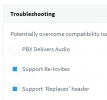
Please edit all your extensions and see if these two options are active. If not, enable them :

1639391705031.png
 
I suspect that what you are currently doing is transferring the call from one handset to the other (ie. you are not transferring to extension 01, but rather you are transferring to the physical handset that also happens to be assigned to 01 - effectively a DECT to DECT transfer if you you understand what I mean).

Ok let's try something to disprove this:

1. Transfer the call from 00 to 01 just like you normally do.

2. While 01 is in the call now, call 01 from another extension (ie. from a Grandstream) and let me know what happens. (Does it ring?)
 
Last edited:
  • Like
Reactions: CentrexJ
Yes it is as you say. The call is transferred to the phone and not to the extension. In fact, if I call 01 while he is speaking from another phone, he is free.
So it's a problem with my configuration. How can I solve?
 
It's not a config problem at all :)

You just have to change the way your perform the transfers. Do not use the directional arrows, just try to dial 01 instead of selecting from the list.
 
OOOOHHHH John, thank you so much for your help !!! :D:D:D
After pressing TRAN, by dialing the extension number via the telephone keypad followed by # we finally have a call transfer that frees the calling extension.
Thanks again for your help,
Andrea
 
  • Like
Reactions: JohnS_3CX
Glad to help!
 
Status
Not open for further replies.

Members Online Now

Forum statistics

Threads
111,831
Messages
589,277
Members
164,660
Latest member
RJenkinsROCK