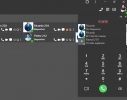
3CX Windows Softphone V20, 20.0.746.0, March 2025 - BROKE SEARCH BY NAME

rickyhorne

Customer
Joined
Sep 28, 2020
Messages
11
Reaction score
5
Hi, all.

It seems the 3CX Windows Softphone V20, 20.0.746.0, March 2025 update has broken the ability to search by name when transfering calls.

We can now only search by extension number. I would be interested to know if anyone else has this issue, if not is there a setting to re-enable it?

This is causing us a bit of an issue for all our users as we've historically always searched by name.

Thanks,
James
 
  • Like
Reactions: Mora
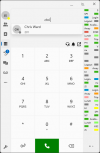
1743412253338.png

This is still available. You will need to type in at least 3 characters to begin getting results though.
 
Hi Nicholas.

It would appear this is broken for us.

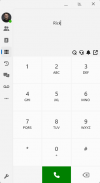
1743412935047.png

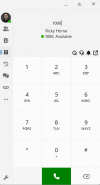
Cannot search anyone using their name, but its fine when searching by extension.

1743413039638.png
 
Update pushed to MS Store that fixes this issue.
 
  • Like
Reactions: Ronaldvdv
Hi!

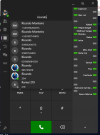
In the version 20.0.751.0, when I search a extension by the name don't show in priority. In PWA, works well.

3CX Windows App

1744220895615.png

PWA

1744220937215.png
 
The issue is still (or again) persistent for us with the Windows Softphone App (5.1 Build 895, 20.0.895.0).
 
We also have this problem - extremely annoying (5.1 Build 895). When can we expect a fix?
 
Works just fine for me with build 895
 
  • Like
Reactions: Saky
@Mora we checked from our end and this works find on 5.1 Build 895
Could you kindly send me a private message with verbose logs whilst replicating the issue?

Enable Verbose Logs
Click on More button > About
Click 12 times on the version. This will take you to Settings
Click on troubleshooting > Enable verbose logs

Replicate the issue and send us logs

Logs can be found here: C:\Users\{YOURUSER}\AppData\Local\Packages\3CXDMCC.3CX_bhm4yemhnd70e\LocalCache\Local\3CXSoftphone
 
@Mora we checked from our end and this works find on 5.1 Build 895
Could you kindly send me a private message with verbose logs whilst replicating the issue?

Enable Verbose Logs
Click on More button > About
Click 12 times on the version. This will take you to Settings
Click on troubleshooting > Enable verbose logs

Replicate the issue and send us logs

Logs can be found here: C:\Users\{YOURUSER}\AppData\Local\Packages\3CXDMCC.3CX_bhm4yemhnd70e\LocalCache\Local\3CXSoftphone
Thanks - I've sent you the files.
 

Forum statistics

Threads
111,974
Messages
590,081
Members
164,899
Latest member
mazet