3CX with Bitrix

Status
Not open for further replies.
Did you check the logs as I suggested? There you will see the interactions between 3CX and Bitrix.
 
  • Like
Reactions: Evolute IT
what excatly should i look for in service logs?
Search for "CRM:" and you'll see all lines related to requests/reponses.
 
what excatly should i look for in service logs?
As @ConceptsWeb has mentioned, in the lines starting with "CRM:" you have all the interactions between 3CX and the CRM. You should check how 3CX is invoking the HTTP request for the contact lookup (if the full number is sent, or just a part), and then you will see the JSON response from Bitrix, so you can see if Bitrix is returning data or not. This is a first step so you understand what's wrong, if its Bitrix not returning data, or if it's 3CX not properly matching the returned data to variables and outputs.
 
  • Like
Reactions: Evolute IT
As @ConceptsWeb has mentioned, in the lines starting with "CRM:" you have all the interactions between 3CX and the CRM. You should check how 3CX is invoking the HTTP request for the contact lookup (if the full number is sent, or just a part), and then you will see the JSON response from Bitrix, so you can see if Bitrix is returning data or not. This is a first step so you understand what's wrong, if its Bitrix not returning data, or if it's 3CX not properly matching the returned data to variables and outputs.
this is what is see in logs

CRM: Processing scenario 'ReportCall'.
|0029|Debg| CRM: Creating new HttpClient with no authentication
|0029|Debg| CRM: Performing GET request 'https://b24-xxxxxx.bitrix24.com/rest/1/l0v0g2ge0c97afan/user.get.json?filter[email protected]'.
|0029|Info| [System.Net.Http.HttpClient.Default.LogicalHandler] Start processing HTTP request GET https://b24-xxxxxx.bitrix24.com/rest/1/l0v0g2ge0c97afan/user.get.json?filter[EMAIL][email protected]
|0029|Debg| CRM: Triggering Call Journaling with values - CallType='Notanswered' - PhoneNumber='xxxxxxxxx' - ContactName='Smith, John' - AgentExtension='10000' - AgentFirstName='xxxx' - AgentLastName='K' - AgentEmail='[email protected]' - ContactRawData='13|3' - StartTime='8/14/2024 3:47:57 PM' - EndTime='8/14/2024 3:47:57 PM' - EstablishedTime='1/1/0001 12:00:00 AM'
 
This log belongs to the call journaling, and not the contact lookup. You mentioned that the problem is that the contact name is not shown. However, what I can see is that the ContactRawData has the value 13|3, which means that the contact lookup found a matching contact, and this matching contact should be shown in the web client.

When you say that the contact name is not shown, are you referring to the web client? Please note that your desk phone will not show it, this information should be visible in the web client.
 
  • Like
Reactions: Evolute IT
This log belongs to the call journaling, and not the contact lookup. You mentioned that the problem is that the contact name is not shown. However, what I can see is that the ContactRawData has the value 13|3, which means that the contact lookup found a matching contact, and this matching contact should be shown in the web client.

When you say that the contact name is not shown, are you referring to the web client? Please note that your desk phone will not show it, this information should be visible in the web client.
yes I am refering to the webclient, contact name is not displayed on webclient when i call.
 
yes I am refering to the webclient, contact name is not displayed on webclient when i call.
That's weird, the log shows a matched contact named "John Smith".
 
  • Like
Reactions: Evolute IT
Also, if i call a contact from Bitrix end, should the call go from 3cx webclient? if yes then it is not happening with my setup. When i call a "lead" there it asks me which app do you want to use and I can select 3cx from there.
 
That's weird, the log shows a matched contact named "John Smith".
yes I have tried with another contact as well but same thing, and if i go in 3cx->contacts-> search and type the name then contact apperas otherwise it doesn't show in 3cx contacts.
 
Also, if i call a contact from Bitrix end, should the call go from 3cx webclient? if yes then it is not happening with my setup. When i call a "lead" there it asks me which app do you want to use and I can select 3cx from there.
So you're not using the Web Client to make this call. You're using a different client. Which client is it? Can you paste a screenshot?
 
  • Like
Reactions: Evolute IT
So you're not using the Web Client to make this call. You're using a different client. Which client is it? Can you paste a screenshot?
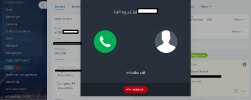
When I press call from 3cx, this windows opens and there is prerecorded message that to make your real outbound call please add your telephony credits and provide national ID.
 

Attachments

  • crm.png
    crm.png
    93 KB · Views: 4
That's the Bitrix phone system that is enabled by default. You need to ask them to disable it. Then you will be able to use click-to-call with 3CX.
 
  • Like
Reactions: Evolute IT
Status
Not open for further replies.

Members Online Now

Forum statistics

Threads
111,843
Messages
589,326
Members
164,679
Latest member
SamadMYK