3CX with Google Voice via Obi200

Status
Not open for further replies.
There must have been something else changed in the Obi that was affecting that.

From the log, it appears you are sending it to port 5060, on the Obi. It should be 5061 if that is what was set in the Obi (and as I recall, 5061 was the default). Check your 3CX trunk settings.
 
There must have been something else changed in the Obi that was affecting that.

From the log, it appears you are sending it to port 5060, on the Obi. It should be 5061 if that is what was set in the Obi (and as I recall, 5061 was the default). Check your 3CX trunk settings.

Thank you! So I have corrected X_UserAgentPort to 5061, my mistake - I must have missed that after the reset.

Now when I dial out I get "The number you are trying to reach is busy - please try later".

Attached is 3CX error.

Thanks for your help!
 

Attachments

  • busy.png
    busy.png
    75.1 KB · Views: 60
Have you only tested using one number, or do all dialled numbers do the same?
Verify that you can dial the same number using an analogue set plugged into the Obi. Look at the Obi call logs, compare a working call (from the analogue set,if it does work), to that of a call from 3CX. Be certain that the correct digits are being send by 3CX.
 
Have you only tested using one number, or do all dialled numbers do the same?
Verify that you can dial the same number using an analogue set plugged into the Obi. Look at the Obi call logs, compare a working call (from the analogue set,if it does work), to that of a call from 3CX. Be certain that the correct digits are being send by 3CX.

I have tried two different North American numbers. The analogue phone is able to place outgoing calls successfully, but the PBX still can't.

Is there a setting on the OBI that directs outbound calls on SP2 to SP1?
 

Attachments

  • 3CX_Log.png
    3CX_Log.png
    30.8 KB · Views: 50
  • OBI_CallLog.png
    OBI_CallLog.png
    25.8 KB · Views: 51
Yes, that is the job of X_InboundCallRoute, under SP2 Service, which in your case should be {10000>(xx.):SP}

Note the "curly-cue" brackets , at the start and end
 
Yes, that is the job of X_InboundCallRoute, under SP2 Service, which in your case should be {10000>(xx.):SP}

Note the "curly-cue" brackets , at the start and end

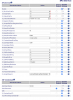
Hmm, I have those brackets in the SP2 Inbound Route Field, unfortunately still not able to place outbound calls. :(

I really appreciate your help, and understand if there is nothing else to try. That being said, let me know if you have and further insight. I have attached a screenshot of my SP2 settings.

Cheers.
 

Attachments

  • sp2-voiceservice.png
    sp2-voiceservice.png
    163.2 KB · Views: 87
I will have to go over my Obi settings when i get home tonight.

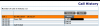
Was there any sign of a call attempt (via 3CX), in the Obi call log?
 
I will have to go over my Obi settings when i get home tonight.

Was there any sign of a call attempt (via 3CX), in the Obi call log?

Thank you! No, no sign of the PBX outbound calls in the Obi Call history, however the phone connected to Obi is able to dial out and shows in the history, additionally, inbound calls show up in Obi and are being forwarded to SP2 as intended.

If it helps, I can post a screenshot of my settings pages.

Cheers.
 
What does the 3CX Activity Log look like when a call is sent to the Obi, now that you've changed the trunk to use port 5061?
 
What does the 3CX Activity Log look like when a call is sent to the Obi, now that you've changed the trunk to use port 5061?

It says:
01/09/2019 12:49:28 PM - Call to T:Line:10000>>##########@[Dev:sip:[email protected]:5061] from L:15.1[Extn:201] failed, cause: Cause: 486 Busy Here/INVITE from 172.16.0.7:5061

Phone immediately says destination busy
 
at least it's not the "no responce" message now.
Let me check this evening to see if there was anything in another menu, that needed to be be changed. It's been a while since I did anything with them.
 
at least it's not the "no responce" message now.
Let me check this evening to see if there was anything in another menu, that needed to be be changed. It's been a while since I did anything with them.
Yeah, this is looking promising. Thanks again!
 
Looking again...every setting down, after SP2 Service, is at the default.

Can you post the Setup Wizard page. You can X out anything you consider sensitive, I think the only thing might be the SP1 AuthUserName
 
Looking again...every setting down, after SP2 Service, is at the default.

Can you post the Setup Wizard page. You can X out anything you consider sensitive, I think the only thing might be the SP1 AuthUserName


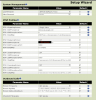
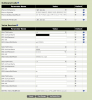
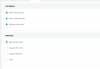
Is this the screen you mean? I notice some are not default but I don't believe I made those changes. You'll notice that my PBX IP has been switched to a hostname, however I have confirmed this still works as inbound calls work and both sides say 'registered'.

Let me know if there are any other screenshots that may help. Thanks again.
 

Attachments

  • setup1.png
    setup1.png
    110.4 KB · Views: 93
  • setup2.png
    setup2.png
    98.6 KB · Views: 89
The only difference I can see, is that under ITSP B SIPProxyServer, you have a URL (it appears), I have the local IP of the 3CX server PC. If the Obi and the server are on the same network (which I assume they are), then it should be the local IP there.
 
The only difference I can see, is that under ITSP B SIPProxyServer, you have a URL (it appears), I have the local IP of the 3CX server PC. If the Obi and the server are on the same network (which I assume they are), then it should be the local IP there.

Yes, this is a local DNS hostname for the PBX, unfortunately I ran into the same error when it was the local IP.

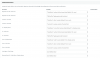
Do you think the problem resides in the OBI or PBX? I reset and reset-up the PBX yesterday with still no luck with outbound calls. I have attached PBX SIP config.

Thanks again.
 

Attachments

  • PBX_SIP.png
    PBX_SIP.png
    58.3 KB · Views: 63
  • PBX_SiP2.png
    PBX_SiP2.png
    27.2 KB · Views: 65
  • PBX_SIP3.png
    PBX_SIP3.png
    106 KB · Views: 63
The outbound caller ID has no effect here as it can't be changed. The outbound trunk settings should not have been changed, they should be at the defaults. The settings in your Obi look to be correct, seem to be the same as what I have. It seems to have a problem passing an incoming call fro SP2 to SP1 if it is getting the call.The 3CX log seems to indicate that it is. From the log, the Obi is not even seeing a call being presented. Not knowing how your network is set-up, I have no idea if there is something else that is causing this. You may want to consider using Wireshark, at the Obi end, to see if an Invite is even reaching it. there really should be something in the Obi call logs.
If I have time I will look over your settings again and do a side by side comparison, I may have over looked something.
 
  • Like
Reactions: nick96761
The outbound caller ID has no effect here as it can't be changed. The outbound trunk settings should not have been changed, they should be at the defaults. The settings in your Obi look to be correct, seem to be the same as what I have. It seems to have a problem passing an incoming call fro SP2 to SP1 if it is getting the call.The 3CX log seems to indicate that it is. From the log, the Obi is not even seeing a call being presented. Not knowing how your network is set-up, I have no idea if there is something else that is causing this. You may want to consider using Wireshark, at the Obi end, to see if an Invite is even reaching it. there really should be something in the Obi call logs.
If I have time I will look over your settings again and do a side by side comparison, I may have over looked something.

Ok, I'll check out wireshark and look to see if the obi has any network activity when a call is placed, thank you again for your incredible help.
 
Status
Not open for further replies.

Forum statistics

Threads
111,909
Messages
589,687
Members
164,775
Latest member
Chester McTester