5001 port is not works, 443 is mandatory for IOS app working

Status
Not open for further replies.

Nik_si

Bronze Partner
Basic Certified
Joined
Jun 7, 2024
Messages
61
Reaction score
4
Hello,

I have some issues and can't understood how to fix.

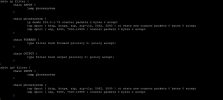
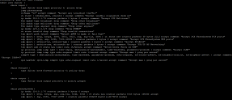
1) when I try to work with 5001 to 5001 is not works (it's seems like 3cx is not listens on 5001 port)
2) when I trying to disable nat 443 to 443 3cx iOS app won't register any more.

I remembered that 2-3 years ago, 443 is not needed for registering and etc. as I remember everything was worked via 5001 port.

I am using V 18.

p.s can I use same public IP for different kind of 3cx systems? to separate it with port only.

thank you.
 

Attachments

  • nf_Tables.png
    nf_Tables.png
    2.4 MB · Views: 3
  • nf_tables2.png
    nf_tables2.png
    604.2 KB · Views: 3
  • Router Ports .png
    Router Ports .png
    395.8 KB · Views: 3
The port is set during installation…which was chosen? When you log in to the web client what is used?
 
The port is set during installation…which was chosen? When you log in to the web client what is used?
I am directly connecting on web client, without any port. I am not sure if I set port during installation. :/
 
The default web browsing port is 443 and that’s been the 3CX default for a year or two now, as I recall.
 
The default web browsing port is 443 and that’s been the 3CX default for a year or two now, as I recall.
and is it changeable? also can I use same public IP for different kind of 3cx systems? to separate it with port only.
 
You can reinstall and specify the port in the uploaded config file.

One can’t effectively put multiple 3CX servers on the same computer since all the audio ports will conflict.

Closest is https://www.3cx.com/blog/releases/multi-tenant-pbx/, basically your own SMB.
 
  • Like
Reactions: Evolute IT
You can reinstall and specify the port in the uploaded config file.

One can’t effectively put multiple 3CX servers on the same computer since all the audio ports will conflict.

Closest is https://www.3cx.com/blog/releases/multi-tenant-pbx/, basically your own SMB.
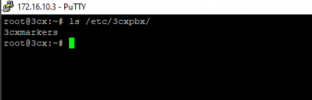
can you tell me where can I find existing configuration file? i tried to google but on this location nothing is.

"/etc/3cxpbx/setupconfig.xml"

1720969089335.png
 
  • Like
Reactions: Evolute IT
  • Like
Reactions: Evolute IT
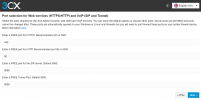
Let me confirm that to change any port numbers in 3CX you will need to reinstall the system.

When you use the backup to restore DURING the installation process it will ask you for the port numbers you wish to use.

1721027708061.png
 
  • Like
Reactions: Evolute IT
Let me confirm that to change any port numbers in 3CX you will need to reinstall the system.

When you use the backup to restore DURING the installation process it will ask you for the port numbers you wish to use.

View attachment 42590
I think, in my case this list is not visible. I will take a look next installation time and notice you.
 
This will only be visible during the installation when you are using a backup to restore a configuration
 
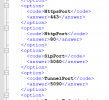
Change it in the setupconfig.xml file before uploading it to the PBX

1721035137552.png
 
  • Like
Reactions: Nik_si
Status
Not open for further replies.

Members Online Now

Forum statistics

Threads
111,832
Messages
589,282
Members
164,662
Latest member
DejanMDS