Action Required! Prepare Now for SMS Changes in U6

  • Thread starter Thread starter HannaY_3CX
  • Start date Start date
Status
Not open for further replies.
Create an extension, set system owner/admin rights, send a welcome email or reset it's password, visit /webclient in a browser, then click the admin link.
I am already logged into the main Admin GUI as an owner.
I can no longer access the webclient since I sat myself as the owner (required on U6).
Seems like one should be able to set such forwarding in the main Admin GUI.
 
Last edited:
I am already logged into the main Admin GUI as an owner.
I can no longer access the webclient since I sat myself as the owner (required on U6).
Seems like one should be able to set such forwarding in the main Admin GUI.
The management console login is the "root" credentials (that's how 3CX labels it, not to be confused with linux root user credentials)
The webclient login is a user credentials.

These 2 creds are not synced. the usernames don't match and the passwords don't match. Make sure you have them both documented and are using the correct credentials for each location.
 
@SweetAction Good answer thanks.

To add to that: Root credentials are going to go away over time. This is why one *must* assign a System Owner. And this extension can not be hidden from other admins. It may be possible to not show it in the phonebook or in presence, as indeed you can hide each extension, but for security reasons the System owner extension must be visible to other admins of the system.

The management console will be integrated into the Web client and over time there will no longer be a separate login.
 
Got surprised that we have not been receiving SMS from our customers since the latest automatic 3CX update over 1-2 weeks ago. It completely broke SMS functionality and I just spent several hours trying to fix this... It seems that we had auto updates enabled on our cloud 3cx by default, it's seems pretty crazy that those kind of disruptive updates can be installed automatically. Lesson learned, I since disabled auto-updates.

After a few hours, I managed to configure the Twilio SIP trunk SMS ok.

The problem:


However, I still can't figure out the proper way of how to route incoming SMS to our "Queue".

Here is how our 3CX was setup and working fine for years :

Inbound Rule for calls : Main phone number (DID) > Call Flow App > the call flow app manages the call and redirects it to appropriate Queues or Extension

Inbound SMS : Main phone number (DID) > SMS is routed to our Queue

We always use the main phone number as the outgoing SMS as well.


Now, since the update, can someone please explain to me how do I route the inbound SMS when it comes to the Main Phone number ?

I found a "solution" that consists of creating a digital receptionist and with the management console I managed to set it to redirect the call to Call Flow app extension after 1 second. I had to do it with the management console because it was impossible to select call flow app via the Desktop Client.
This solution adds an unnecessary 1-second delay when the call starts, how to avoid this ?

Thanks,
 
I found a "solution" that consists of creating a digital receptionist and with the management console I managed to set it to redirect the call to Call Flow app extension after 1 second. I had to do it with the management console because it was impossible to select call flow app via the Desktop Client.
This solution adds an unnecessary 1-second delay when the call starts, how to avoid this ?
Since you are using Call Flow designer you need to Digital receptionist for now to send calls there and SMS to a different destination. You will need the Web Client to route your SMS to a different destination.
More details on that here: https://www.3cx.com/blog/docs/sms-configuration/
 
I since disabled auto-updates
Short note on this comment... manually updating 3CX does not upgrade any packages/OS updates. So when you next want to upgrade I'd suggest temporary enabling automatic updates again.
 
Since you are using Call Flow designer you need to Digital receptionist for now to send calls there and SMS to a different destination. You will need the Web Client to route your SMS to a different destination.
More details on that here: https://www.3cx.com/blog/docs/sms-configuration/
Ok, so there is no way to avoid the useless 1 sec delay between when the call starts and the digital receptionist transfers the call to the Call Flow ?
 
Ok, so there is no way to avoid the useless 1 sec delay between when the call starts and the digital receptionist transfers the call to the Call Flow ?
Currently I am afraid not.
 
  • Sad
Reactions: pmterp
Nick Galea stated:
"The management console will be integrated into the Web client and over time there will no longer be a separate login."


I found that this transition has already happened with the Management Console to Webclient, even though not really communicated to us.

After 1 month of losing SMS connectivity (and revenue) to our own company Customer Service department,
because our DIDs are delivered to a Digital Receptionist - and we did not know to do this:

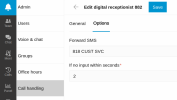
The setting, which I have not seen explained in anything 3CX has presented for preparing us for the U6 release, was added to the Webclient "Admin" GUI as pictured below.

We used to be able to set this SMS destination in the Management Console.
And I would really like to know what to do if we have multiple DIDs and Departments sharing a single Digital Receptionist ???

I like the Management Console, and really don't understand why 3CX would want to MOVE Management into the Webadmin.

I am saddened that changes such as this are not communicated to us, and am now scared of what else is going to get moved around - and become disruptive (to our company and our clients) in the upcoming changes.

Furthermore - when stuff like this happens - we get hit with a $75 Technical Support charge, and I have to argue with our accounting controller about having to pay the fee.

Though we have this SMS situation somewhat under control, we noticed that ALL previous SMS Chats with our Customer Service department are now GONE.


Screenshot_20230308_174543.png
 
Last edited:
Nick Galea stated:
"The management console will be integrated into the Web client and over time there will no longer be a separate login."


I found that this transition has already happened with the Management Console to Webclient, even though not really communicated to us.
Yes, parts have been moved over (but not all of it yet) as early as update 5. Each update will have more and more moved over.
We can argue all day about communication, but 3CX has docs and webinars where they went over new features.

After 1 month of losing SMS connectivity (and revenue) to our own company Customer Service department,
because our DIDs are delivered to a Digital Receptionist - and we did not know to do this:

The setting, which I have not seen explained in anything 3CX has presented for preparing us for the U6 release, was added to the Webclient "Admin" GUI as pictured below.

We used to be able to set this SMS destination in the Management Console.
A month to make changes that were warned about in multiple blog posts, emails, and forum posts? I'm amazed - most of my clients would realize in about an hour.

https://www.3cx.com/blog/docs/sms-configuration/
https://www.3cx.com/blog/news/messaging-configuration-u6/

And I would really like to know what to do if we have multiple DIDs and Departments sharing a single Digital Receptionist ???
Not ideal, but you make a "dummy" DR with an auto-forward after 1 second to the real DR for each DID and set the routing for each dummy DR where it needs to go.

I like the Management Console, and really don't understand why 3CX would want to MOVE Management into the Webadmin.
Probably because they are pushing their new StartUP product and want to unify the code base. But some things will remain in the management console - mostly system settings.

Furthermore - when stuff like this happens - we get hit with a $75 Technical Support charge, and I have to argue with our accounting controller about having to pay the fee.
So use the forums, your 3CX partner, and other sources for help instead of 3CX technical support. Or factor in a couple support tickets into your yearly budget - does accounting complain about paying the electric bill?

Though we have this SMS situation somewhat under control, we noticed that ALL previous SMS Chats with our Customer Service department are now GONE.
Change the filter in the upper right to archived and you will see them.
 
Yes, parts have been moved over (but not all of it yet) as early as update 5. Each update will have more and more moved over.
We can argue all day about communication, but 3CX has docs and webinars where they went over new features.


A month to make changes that were warned about in multiple blog posts, emails, and forum posts? I'm amazed - most of my clients would realize in about an hour.

https://www.3cx.com/blog/docs/sms-configuration/
https://www.3cx.com/blog/news/messaging-configuration-u6/


Not ideal, but you make a "dummy" DR with an auto-forward after 1 second to the real DR for each DID and set the routing for each dummy DR where it needs to go.


Probably because they are pushing their new StartUP product and want to unify the code base. But some things will remain in the management console - mostly system settings.


So use the forums, your 3CX partner, and other sources for help instead of 3CX technical support. Or factor in a couple support tickets into your yearly budget - does accounting complain about paying the electric bill?


Change the filter in the upper right to archived and you will see them.

We are the 3CX Partner.

No, I don't attend the webinars - as I am NOT a sales person, and refuse to be subjected to sales stuff.
If 3CX had Technical Webinars, I would/will be right there..
.
And no, there is no clear documentation that stated that 3CX StartUP Pro's VM email notifications will no longer have WAV file attachments like the 3CX Standard Edition (that we can no longer get) had, and was available for less cost.

I will have our Customer Service try changing the filter you mentioned.

@SweetAction Thank You for the very professional reply.
Are those webinars archived and avail to watch?

I remember signing up for one, and the time was at something like 12:am (midnight) Eastern TIme
Screenshot_20230309_235201.png
Though it was probably a mistake, It made me upset and I disregarded it...

I am not allowed a budget for anything, because that is the way this company works
and YES - our Accounting does complain about paying the electric bill xD
 
Last edited:
  • Like
Reactions: Evolute IT
@Intech Speed - to be clear you are not a partner, you are an affiliate with a few free edition licenses and a free nfr. The affiliate level is going away and your account will become a regular customer account.

As a partner you could attend free tech webinars. That said we have plenty of blog posts that explain the process clearly without requiring any partner level.

My advice to you is to look for another solution better suited to your company and "customers".
 
Last edited:
  • Like
Reactions: Evolute IT
We are the 3CX Partner.
Sorry, I was going off the forum tags.
Partners of a high enough level get free support, so this issue will go away (the cost per ticket) as you sell more licenses.

No, I don't attend the webinars - as I am NOT a sales person, and refuse to be subjected to sales stuff.
If 3CX had Technical Webinars, I would/will be right there..
3CX has webinars that go over the changes / what's new - not sure if you consider that sales, I personally think it's a product briefing type webinar and worth attending.

And no, there is no clear documentation that stated that 3CX StartUP Pro's VM email notifications will no longer have WAV file attachments like the 3CX Standard Edition (that we can no longer get) had, and was available for less cost.
You were discussing SMS originally, which is what my response was addressed to. I'm not super familiar with StartUP (we just sold system #1 on StartUP and client hasn't even gone live with it yet), so I can't speak much to the documentation but considering it's a new product and not a change to existing products I'm not surprised to find lacking / missing documentation as 3CX builds it out. I will certainly agree that this limit should be on the full feature list here: https://www.3cx.com/ordering/pricing/ but it is not today.

@SweetAction Thank You for the very professional reply.
Are those webinars archived and avail to watch?

I remember signing up for one, and the time was at something like 12:am (midnight) Eastern TIme
View attachment 34585
Though it was probably a mistake, It made me upset and I disregarded it...
I'm not aware of an archive or watch later with 3CX webinars. I do know they have webinars during normal hours (I attended one at 11am EST), so not sure how you got one for 12am, but I suspect 3CX thinks you are in AU based on your screenshot)

I am not allowed a budget for anything, because that is the way this company works
and YES - our Accounting does complain about paying the electric bill xD
Imagine if your customers complained and refused to spend money with you how much you would do for them. Then put yourself in 3CX's shoes and ask why they should do stuff for you for free.

Just as your business cannot operate without money, 3CX requires money to operate. Only difference is that your electric company will turn off the lights and 3CX is nice enough to turn off only some lights but leave the rest running.
 
Status
Not open for further replies.

Forum statistics

Threads
111,973
Messages
590,077
Members
164,896
Latest member
sameage