Hi, dear forum users.
Could you please help me to resolve some configuration issue?
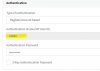
When I`m trying to add the new Gateway, "Authentication ID (aka SIP User ID)" field seems to be disabled for any changes. How can I put my own ID?
I think you'll find 3CX allocates the first available 'virtual' extension number for a gateway to register against. Is there any particular reason you need to change this?
I think you'll find 3CX allocates the first available 'virtual' extension number for a gateway to register against. Is there any particular reason you need to change this?
This should be an easier process than with the Pattons (see string I sent) as Pattons are more intelligent devices (and thus have a more complex GUI) but the Grandstream process is not as widely documented on the 3CX forums as they have only recently appeared back on the supported lists.
I would follow the Patton forum posts (of which there are many) for the 3CX side and possibly either await a Grandstream user to comment on here or contact Grandstream support and ask - I have used them before and they are very helpful.