After last update on Android, tons of unneeded contacts added to 3CX contacts

Status
Not open for further replies.

dcook1313

Free User
Joined
Jan 30, 2018
Messages
21
Reaction score
0
Good morning all, I'm just hoping someone may be familiar with this and be able to point me in the right direction.
A coworker who uses the 3CX android application on their phone is having an issue. The application just updated to 16.0.4.0, I think, I wasn't able to look at for more than a second. Anyway, his application on his phone just updated this morning and when it did it pulled in all of his other phone contacts into the 3CX contact section. There are a ton of duplicate contacts and contacts that are email only etc. Will they need to remove all of these added contacts manually?

thank you, :)
 
  • Like
Reactions: dcook1313
Hi,
If you do not want the native android contacts to be listed in 3cx contacts just remove permission to access contacts for 3cx App.
You can do this from the phone's settings - Applications - select 3cx app - permissions.
Just keep in mind each time the contact page is opened 3cx client will ask permission to access native contacts.
 
Thank you very much but he want contacts in there, just the original ones, not every contact he has.
They actually came to me again this morning with a couple of other issues that I wanted to list in case anyone else is seeing them.
The option to exit the application seems to be gone now and you can still shut down the app manually but if anyone calls it wakes the app up. Evidently this happened to them while they were sleeping last night. How does he exit 3CX and shut down the application when its not being used?

thank you.
 
Last edited:
Hi @dcook1313

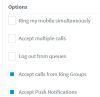
With the new V16U3 and the new mobile app, the profiles allow you to select to not have push. They just need to change their profile instead of exiting.

Each Status profile will have this option now so adjust accordingly
12604
 
Hi John, thank you for the amazingly fast response. :)
I'm sorry I actually do not personally use this app on my phone so I'm not completely familiar with it.
Are these settings something that the user can change on their phones by themselves or is it something handed by admin in the main setup on the server?

P.S. just curious if there is documentation I can just read instead of bugging you guys?
 
Hi Also tried using the Silent setting to "turn it off" it does not work and calls still come through and ring.
 
Hi John, thank you for the amazingly fast response. :)
I'm sorry I actually do not personally use this app on my phone so I'm not completely familiar with it.
Are these settings something that the user can change on their phones by themselves or is it something handed by admin in the main setup on the server?

P.S. just curious if there is documentation I can just read instead of bugging you guys?
Hi Also tried using the Silent setting to "turn it off" it does not work and calls still come through and ring.

The admin can configure this setting from MC - extension - Forwarding Rules.
The user can access the forwarding rules from his mobile device by just taping on the status indicator (top right corner). After configuring each status he can then easily switch between a status that has Push notifications ON (Available) and another that has it OFF (DND). After the first time configuration enabling and disabling PUSH by switching accounts will be a matter of 2 clicks.

Regarding the Silent mode not working, could you please specify the model and Android version of the device so we can investigate further.
 
The admin can configure this setting from MC - extension - Forwarding Rules.
The user can access the forwarding rules from his mobile device by just taping on the status indicator (top right corner). After configuring each status he can then easily switch between a status that has Push notifications ON (Available) and another that has it OFF (DND). After the first time configuration enabling and disabling PUSH by switching accounts will be a matter of 2 clicks.

Regarding the Silent mode not working, could you please specify the model and Android version of the device so we can investigate further.
awesome thank you. I will get with them when they get in and find out the make/model of the phone.
 
Hi the Phone that is having the problem with Silent is a Samsung SM J 27A. He can turn it on, but if any calls come through it wakes up and rings.
 
Status
Not open for further replies.

Members Online Now

No members online now.

Forum statistics

Threads
111,832
Messages
589,286
Members
164,662
Latest member
DejanMDS