App Group Query

Status
Not open for further replies.

Lusk

Forum User
Joined
Apr 8, 2018
Messages
68
Reaction score
1
When using the extensions web browser, I can show and hide other groups by turning them off in the management console.

When I go to the 3CX app and then go to contacts, all of the extensions show there. How can I stop these from showing, please?
 
In the top left where it says "All" in blue, you can select that and choose the group you want it to display.
 
In the top left where it says "All" in blue, you can select that and choose the group you want it to display.
Thanks and yes, I can see what you are referring to.

However, I am trying to make sure that people who are not in that group do not show up; the same way that it does when using the browser for the client.
 
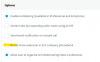
You will need to uncheck this option for your groups if you do not wish them to be visible to people outside of the group.

1594028953381.png
 
  • Like
Reactions: AWS2P
You will need to uncheck this option for your groups if you do not wish them to be visible to people outside of the group.

View attachment 16844
Thanks again and I can confirm that I do not have this box ticked in any of the groups. When I go to the app and go to contacts and then choose the all option, all extensions appear here.
 
Are they in default group and not in particular one ? or are they also in default even you created a particular group?

if so then remove extensions from default group
 
Are they in default group and not in particular one ? or are they also in default even you created a particular group?

if so then remove extensions from default group
On this install, there are currently four extensions and four individual groups - each extension is in it's own group. There are no extensions in the default group.
 
That is your company address book.

If you do not want extensions to appear in the public address book you will need to tick the box from the options setting of the extension settings.

1594032835641.png
 
Please note you cannot entirely isolate extensions from each other.

They may be prevented from seeing each other but they can still call each other.

The groups are more for things like presence (status) and controlling your trunk rules.

This module should make it a bit more clear
https://www.3cx.com/3cxacademy/videos/intermediate/extension-groups/
 
Please note you cannot entirely isolate extensions from each other.

They may be prevented from seeing each other but they can still call each other.

The groups are more for things like presence (status) and controlling your trunk rules.

This module should make it a bit more clear
https://www.3cx.com/3cxacademy/videos/intermediate/extension-groups/
That would work fine with me - it would only be the case of a "fat finger" dialling a number which although may not be visible, would be still be able to be dialled.
 
Status
Not open for further replies.

Forum statistics

Threads
111,954
Messages
589,919
Members
164,851
Latest member
DrunkeMeister