Auto Provisioning Yealink w52p

Status
Not open for further replies.

smokie

Forum User
Joined
Jun 22, 2019
Messages
54
Reaction score
2
Hello

I please need help with this continuous struggle with the above handset,
Running v16
I was running Win Pro but after a while i received the blue screen of death, have switched to linux,
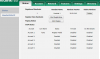
I am trying to auto provision the handset but it fails, and were do i get the password, thanks if you need more info let me know11328
1132711329
 
Thanks, no support for commercial user, thanks i appreciate it, thanks
 
Not sure if you're seeing a different site there, that link contains all the free guides to setting up the phones we currently support

11347
 
Cool cool bananas, i will go through and resolve the issue, thanks for the info you provided I really appreciate it :)
 
@smokie The simplest thing to do is to factory reset the W52P, make sure the base is running the required firmware specified here

Copy the provisioning URL from the FXS/DECT Page in the 3CX MGMT console in to the provisioning tab on the Yealink W52P Base and press Autoprovision. It will pull the EXT info you have specified under the extensions tab in the FXS/DECT page. Theres no other requirement really the guide is pretty informative. Also check the IP of the Yealink base is not blacklisted in the MGMT console.
 
It seems and hope he has already done something since the two last days no ?

Perhaps he needs something else than restarting from scratch each time someone read this thread. all the process is known now and in his hands, let him do some experience.
 
Hi French,

cool cool bananas and I fully agree to what you are saying - so far it has been a great experience and I am learning a new thing everyday about the pbx, ;)
 
Status
Not open for further replies.

Latest Posts

Forum statistics

Threads
112,359
Messages
592,096
Members
165,533
Latest member
[email protected].