- Joined
- Jun 22, 2019
- Messages
- 54
- Reaction score
- 2
Hello
I please need help with this continuous struggle with the above handset,
Running v16
I was running Win Pro but after a while i received the blue screen of death, have switched to linux,
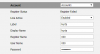
I am trying to auto provision the handset but it fails, and were do i get the password, thanks if you need more info let me know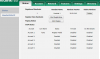

I please need help with this continuous struggle with the above handset,
Running v16
I was running Win Pro but after a while i received the blue screen of death, have switched to linux,
I am trying to auto provision the handset but it fails, and were do i get the password, thanks if you need more info let me know