Automatic outbound call

Status
Not open for further replies.

Mina Hanna

Platinum Partner
Basic Certified
Joined
Jul 27, 2020
Messages
28
Reaction score
0
Dears,
Kindly i have a customer asking about Execute CFD for automatic outbound call and actually i read the documentation of 3cx for Automatic dialer but i have some note cant understand for example the below steps
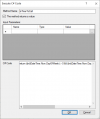
  1. Use this
    1. C# code
  2. return ((int)DateTime.Now.DayOfWeek) > 0 && ((int)DateTime.Now.DayOfWeek) < 6 && DateTime.Now.Hour >= 9 && DateTime.Now.Hour < 17;
    1. Next, drag the “Create a Condition” component from the toolbox, drop it into the designer and set its name to “checkTimeToCall”.
    2. Configure the “Create a Condition” component’s branches as:
    3. “timeToCall”: executed when it is time to make a call,
    4. “nothingToDo”: when it is out of that time frame.
  1. For the “timeToCall” branch, set its “Condition” property to this expression, using the result of the “Execute C# Code” component we added previously:
1618823785728.png
they ask about to use C# Code and i use it like the above diagram and folow the steps but in the step number 5 i didn't understand it and cant do it so any one can help me to do that or i will be appreciate any help, documentation with simple steps and i will continue,Kindly advice.
 
Dears I need to know how can i found file containing the numbers to call to a path on your 3CX server
 
Hello @Mina Hanna,

Please note that what's in this guide is just an example. You might not even need to use C# code at all...

What do you want to do exactly? Please provide as much details as possible, so we can point you in the right direction.
 
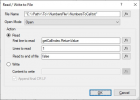
Actually i made most steps but now i need to know where can i found file containing the numbers to call to a path on my 3CX server.
1618837652239.png
 
You can copy the file anywhere you like in your 3CX server, and then just set the File Name property to the appropriate path.

The file will not be automatically uploaded for you. You need to upload the file.
 
  • Like
Reactions: amir_
Dears,
This file should be CSV or txt or what , could you please share with me a template of this file .
 
If you decide building a production-ready dialer using the Call Flow Designer (CFD) is just too much work, you may want to consider looking at our 3CX Power Dialer.

With our dialer you can perform appointment reminders, delivery notifications, collection activities, phone surveys and much more.

You can use text-to-speech to ensure each contact gets a personalized message and give contacts options to choose from. For example, "to confirm your appointment, press 1 or to reschedule your appointment, press 2".

We can transfer callers to a queue and pause dialing when the number of people waiting in the queue exceeds the specified threshold. We can also monitor the total number of calls active on the 3CX system and pause dialing when that number exceeds a threshold so the dialer doesn't consume all available resources.

We can monitor the status of agents and control the number of calls placed based on agent availability.

We can set up recurring campaigns and schedule the start and stop times. There is a ton of work that goes into building a feature-rich dialer. As wonderful as the CFD is, I can't imagine trying to build all the above features using a CFD application.
 
Dears,
This file should be CSV or txt or what , could you please share with me a template of this file .
The demo app uses a text file, with a different number in each line.
 
The demo app uses a text file, with a different number in each line.
Could you please tell me where can i find this file in demo app or discuss me how can i add customer phone for allowing the pbx to auto dial them
 
If you decide building a production-ready dialer using the Call Flow Designer (CFD) is just too much work, you may want to consider looking at our 3CX Power Dialer.

With our dialer you can perform appointment reminders, delivery notifications, collection activities, phone surveys and much more.

You can use text-to-speech to ensure each contact gets a personalized message and give contacts options to choose from. For example, "to confirm your appointment, press 1 or to reschedule your appointment, press 2".

We can transfer callers to a queue and pause dialing when the number of people waiting in the queue exceeds the specified threshold. We can also monitor the total number of calls active on the 3CX system and pause dialing when that number exceeds a threshold so the dialer doesn't consume all available resources.

We can monitor the status of agents and control the number of calls placed based on agent availability.

We can set up recurring campaigns and schedule the start and stop times. There is a ton of work that goes into building a feature-rich dialer. As wonderful as the CFD is, I can't imagine trying to build all the above features using a CFD application.
This tool for free or with fees ???
 
Could you please tell me where can i find this file in demo app or discuss me how can i add customer phone for allowing the pbx to auto dial them
The demo app includes a sample NumbersToCall.txt file. You can see it in folder "C:\Users\USERNAME\Documents\3CX Call Flow Designer Demos\OutboundDialerDemo".
 
Status
Not open for further replies.

Members Online Now

No members online now.

Forum statistics

Threads
111,831
Messages
589,277
Members
164,660
Latest member
RJenkinsROCK