- Joined
- Jul 27, 2020
- Messages
- 28
- Reaction score
- 0
Dears,
Kindly i have a customer asking about Execute CFD for automatic outbound call and actually i read the documentation of 3cx for Automatic dialer but i have some note cant understand for example the below steps
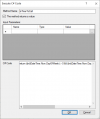
they ask about to use C# Code and i use it like the above diagram and folow the steps but in the step number 5 i didn't understand it and cant do it so any one can help me to do that or i will be appreciate any help, documentation with simple steps and i will continue,Kindly advice.
Kindly i have a customer asking about Execute CFD for automatic outbound call and actually i read the documentation of 3cx for Automatic dialer but i have some note cant understand for example the below steps
- Use this
- C# code
- return ((int)DateTime.Now.DayOfWeek) > 0 && ((int)DateTime.Now.DayOfWeek) < 6 && DateTime.Now.Hour >= 9 && DateTime.Now.Hour < 17;
- Next, drag the “Create a Condition” component from the toolbox, drop it into the designer and set its name to “checkTimeToCall”.
- Configure the “Create a Condition” component’s branches as:
- “timeToCall”: executed when it is time to make a call,
- “nothingToDo”: when it is out of that time frame.
- For the “timeToCall” branch, set its “Condition” property to this expression, using the result of the “Execute C# Code” component we added previously:
they ask about to use C# Code and i use it like the above diagram and folow the steps but in the step number 5 i didn't understand it and cant do it so any one can help me to do that or i will be appreciate any help, documentation with simple steps and i will continue,Kindly advice.