Solved Backups to SFTP or SMB not working.

Status
Not open for further replies.

johandezwaan

Free User
Joined
Nov 13, 2013
Messages
22
Reaction score
2
We recently updated to 3CX version 16.0.493 on Linux using the default ISO.
With the newest version in place we want to set up the backups to write to an network location.

Unfortunately we cannot set up the network locations. When adding an SMB location we are receiving the error: Cannot connect to SMB and when adding an SFTP location the error is: Cannot connect to SFTP - SSH File Transfer

We are using an Synology NAS and we can successfully connect through fileZilla to the FTP location.
The location we've put in is: sftp://IpOfNas:9022/3cxBackup

We also tried FTP as an test, but that gives nearly the same error.
is there anything else we need to set up or is there something wrong?

Regards,
Johan de Zwaan
 
Have you tried using IP address instead of server name ?
 
yes i did, but it doesn't make any difference.
 
I've just tested to connect directly from the linux console to the NAS using the command sftp -P 9022 user@IpOfNas and this is working so it looks like something in the 3cx configuration.
 
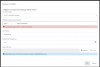
thanks, but i am not even getting that far. the 3cx window gives me this error.

1583219389562.png

It looks like it cannot connect to an local service or something.
 
What about your OpenSSH key? I see you have not provided one to the 3CX server
 
The openSSH key wasn't necessary I thought?
Eitherway unfortunately even with an key generated the error stays the same.
 
We've changed to a NAS location in the same subnet en then it is working correctly.
Although there isn't anything showing up in the firewall logs, it seems to have something to do with that.
strange thing is that it is working from the linux machine itself.

For us it's fixed now.
 
Curious - is your SMB a domain controller?
 
Hi Johan,

I'm glad to hear this was resolved. Perhaps there are restrictions on the SFTP server that make the connection fail. The 3cxManagementConsole.log might show you some more information as to why it was failing originally. The error you see can be due to these reasons as a minimum:

  • Wrong ip
  • Wrong password
  • Folder specified does not exist
 
No we tested SMB on an Windows server (no DC) and an Synology NAS, both failed.
unfortunately the 3cxManagementConsole.log didn't show me anything about this..
 
I cant remember which version of SMB 3CX uses. But, could be that your SMB version wasnt enabled on your server.
 
If it is an old version I guess it would be blocked yes, but I should assume that 3cx supports Version 3?
 
Not sure, probably not yet so it might just be the ol' SMB 2.
 
ok, i also noticed that there where changes in this for V16 update 5 regarding SMB communication.
We've changed to SFTP so our problem seems to be solved.
 
Status
Not open for further replies.

Latest Posts

Forum statistics

Threads
111,939
Messages
589,843
Members
164,824
Latest member
Xeniosg