Best way to create Out of Office dialoge for queue?

Peti

Premier Customer
Joined
Jan 20, 2026
Messages
39
Reaction score
6
We have a queue for our IT department and we want to set an "out of office mode" - if someone calls after business hours, it should play a pre-recorded message.

What´s the best way to set this up? My current setup is a big workaround, it works, but it´s not really nice lol.
 
Hi @Peti

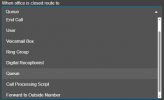
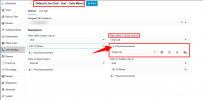
You can assign the DID to the department the queue is a member of, set office hours for that department, and under the option "When office is closed, route to" enable the "Play Announcement" option and record a custom prompt.

This way, when a call reaches the department, before routing the call to the Out of Office destination, it will also play the custom announcement.

You can also refer to the guide below.
https://www.3cx.com/docs/manual/office-hours/
 
Hi @Peti

You can assign the DID to the department the queue is a member of, set office hours for that department, and under the option "When office is closed, route to" enable the "Play Announcement" option and record a custom prompt.

This way, when a call reaches the department, before routing the call to the Out of Office destination, it will also play the custom announcement.

You can also refer to the guide below.
https://www.3cx.com/docs/manual/office-hours/

1771255252404.png

I don´t see a "Play Announcement" option
 
  • Like
Reactions: NikolasA_3CX
Route it to an IVR that plays the prompt
 
Just tried it, it plays the announcement AND the on hold music at the same time :P
This means you have assigned the DID directly to the queue. Instead, go to call handling >> click on the department >> assign the DID to the department, and then route the call to the appropriate destination when in office and out of office.

On the out of office, choose where the call will route and select to enable the play announcement.
 
  • Like
Reactions: KyriacosS_3CX

Latest Posts

Forum statistics

Threads
111,962
Messages
589,996
Members
164,867
Latest member
swegner