bitrix24 and 3cx v20 update 5 integration

Thiago Felipe

Bronze Partner
Advanced Certified
Joined
Nov 24, 2023
Messages
8
Reaction score
0
Hello, I'm integrating Bitrix24 with 3cx V20 update 5. The entire Bitrix weebhook part has been done. 3cx can now find the numbers registered in the CRM. In Bitrix, I changed the CallTo format to forward it to 3cx. When I click on the number in Bitrix to call, it wants to go to a device outside the browser and only shows me 2: the 3CX Desktop App (old) and Skype. The 3cx app from the Microsoft store cannot be found. Does anyone know what could be done?
Note: I tested it on another machine that didn't have the old 3cx app, and it only called Skype and not 3cx from the Microsoft store.
Below is the path to the Bitrix24 Format
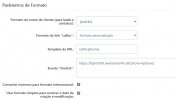
evento 3cx.png
 
template url should be "tel:[phone]"

Onclick should be empty.

This will trigger the softphone. Use the Click2Call browser extension if you need to use the Webclient/PWA.
 
There would be no way to call the 3cx application from the Microsoft store, the company's staff do not use 3cx in the browser.?
 
There would be no way to call the 3cx application from the Microsoft store, the company's staff do not use 3cx in the browser.?
Yes, as I said, use the "tel:[phone]" format. Chrome/Edge/Firefox will trigger the OS response and ask to trigger 3CX Softphone. The app registers the "tel" url to itself.
 
I left the format you provided with nothing in the "Onclick" field and in the Template URL only "tel:[phone], however if I turn on click2call it opens in the browser and if I disable the extension nothing happens, it does not call the application.
 
It actually worked, restart everything here and called the application with the extension turned off. Another question, I did a call test but after closing it did not register any interaction on the client, wasn't it supposed to show that there was a call?
 
It actually worked, restart everything here and called the application with the extension turned off. Another question, I did a call test but after closing it did not register any interaction on the client, wasn't it supposed to show that there was a call?
First, make sure you're calling to/from a number that isn't a 3CX user's mobile number, as those will be ignored.

Next, make sure your email in Bitrix matches the one in 3CX for your user. That's how activities are matched.

When doing a test call, if you don't see a "CRM" link appear in the app/Webclient (easier to test there sometimes), then no activity will be created as there were no matches for the number. This can be caused also by a misconfigured max length of matching (System > Phonebook > Options). If set to Match Exactly, and the number doesn't exactly match in the CRM, it will be ignored.
 
I left both with the same email, this part is ok. I did a test but when I clicked on the number in the Bitrix24 web panel, it pulled up the 3cx application without any problems, but nothing about the CRM appeared, I decided to delete the number and type it in, the CRM appeared but when I turned it on the CRM disappeared. One question, the operator we use has some rules for the call, for the same location it would be DDD + number, but for calls outside the location you need to enter a 043 in front of the DDD, could this affect the integration?
 
Last edited:
I did a test by calling the company from my number, and the CRM part worked correctly by appearing in front of the contact's name (just like in the picture). However, when I click on CRM, it opens the Bitrix24 link, but the URL is incorrect—it includes an extra // in a part of it, causing a 404 error on the page. If I remove the extra /, it accesses the client correctly. Do you know of anything that could remove this extra /? I suspect it is preventing the customer's contact with the company from being registered.

3cx hidrogeron crm.png

Below is the link as it appears.

https://teste.bitrix24.com.br//crm/company/details/19503/
 
Check your 3CX CRM config, remove any slashes at the end of the Bitrix URL. That's why it's doing that.
 
Check your 3CX CRM config, remove any slashes at the end of the Bitrix URL. That's why it's doing that.
It worked, I found an extra /, but it still didn't register the interaction on the Bitrix panel. I believe I'll need to reformat the way numbers arrive at the system when calling the number.
 
My operator delivers the number in a continuous format, but Bitrix requires it to be separated, specifically as (area code) xxxx-xxxx. Is it possible to configure 3CX to display it this way?
 

Latest Posts

Forum statistics

Threads
111,977
Messages
590,098
Members
164,906
Latest member
Nari